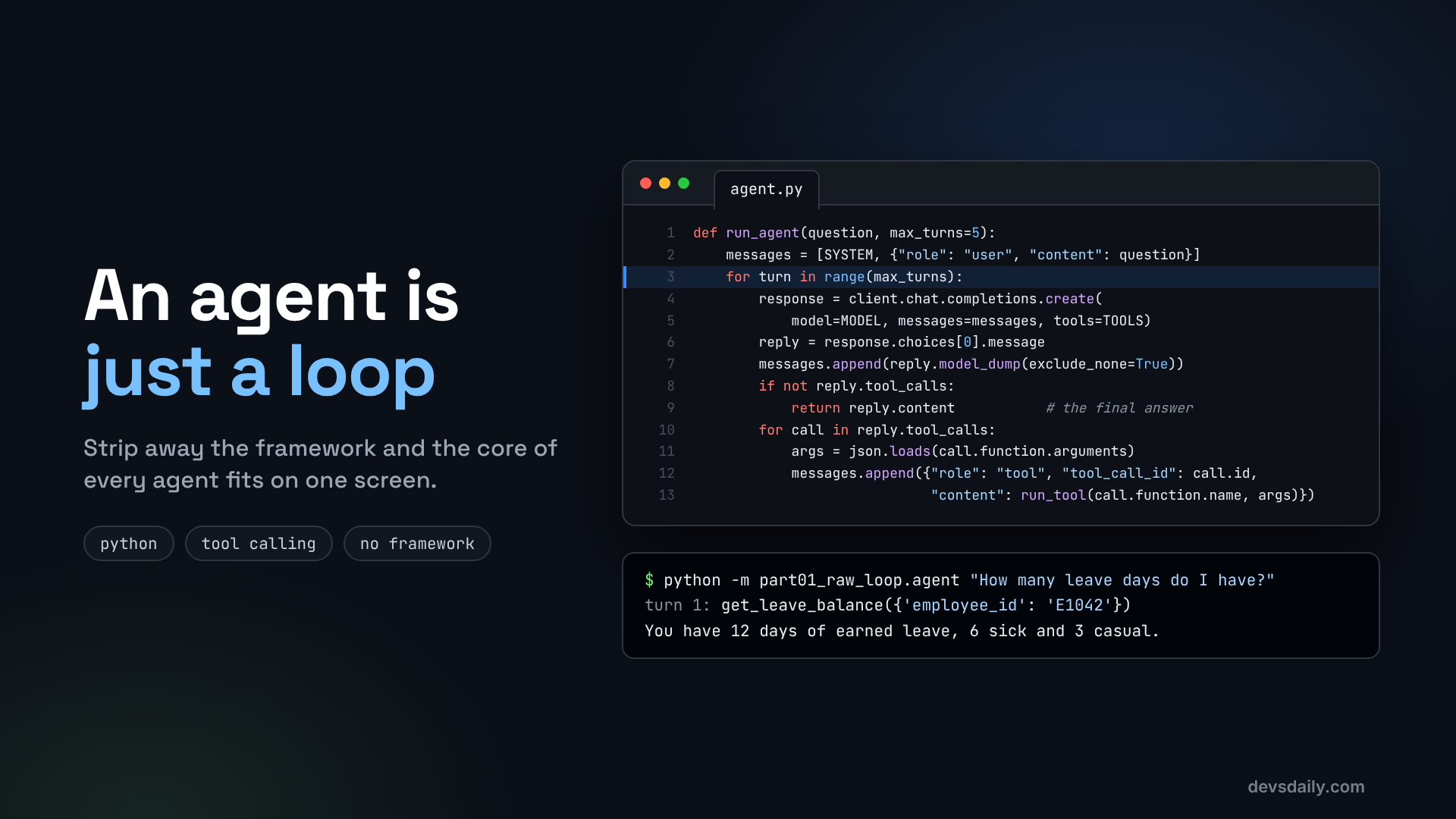

Build a working AI agent in about 60 lines of Python, with no framework, and see exactly what every agent framework does under the hood.
Building AI Agents · Part 1 of 11 · All parts ↓
In short: An agent is a language model in a loop: it asks for a tool, your code runs it, the result goes back, and the loop repeats until it can answer. You build one in about 60 lines of plain Python with the OpenAI SDK and see the exact messages that every framework produces underneath.
Where this fits: This is where the series starts. We build the HR helpdesk agent with no framework at all, so every later part, from LangChain in Part 2 to the deployed service in Part 11, has something concrete to build on.
An employee types "How many leave days do I have?" into a chat window. The model behind it has never seen your HR system, so on its own it can only guess. What it can do is tell your code which function it wants run. Your code runs it, hands the result back, and the model writes the answer.
I look at systems for a living from the security side, and I don’t trust what I can’t see. When I first tried agent frameworks, I couldn’t answer a simple question: what exactly is being sent to the model, and what is it allowed to call? So I threw the framework away and wrote the loop by hand. Everything I’ll show you in this series started from that.
Put that request, run, answer exchange in a loop and you have an agent. In this article you will write the loop yourself, in plain Python, using only the OpenAI SDK. Once you have seen it work, every agent framework becomes much easier to understand, because they all run this same loop with extra features around it.
Across the series we build one project: an HR helpdesk agent that answers employee questions, checks leave balances, explains payslips and files leave requests. Today it learns to check leave balances and holidays.
What you will build
A command-line agent that answers questions like:
- "How many leave days do I have?"
- "Which holidays are there in October?"
- "How many casual days do I have, and are there holidays in October?"
To answer, the agent calls two tools against a fake HR system: get_leave_balance and get_holidays.
What you need
- Python 3.12 or newer
- An OpenAI API key (any OpenAI-compatible endpoint also works, more on that at the end)
- About 15 minutes
Chatbot or agent?
A chatbot sends your message to a model and shows you the reply. One trip.
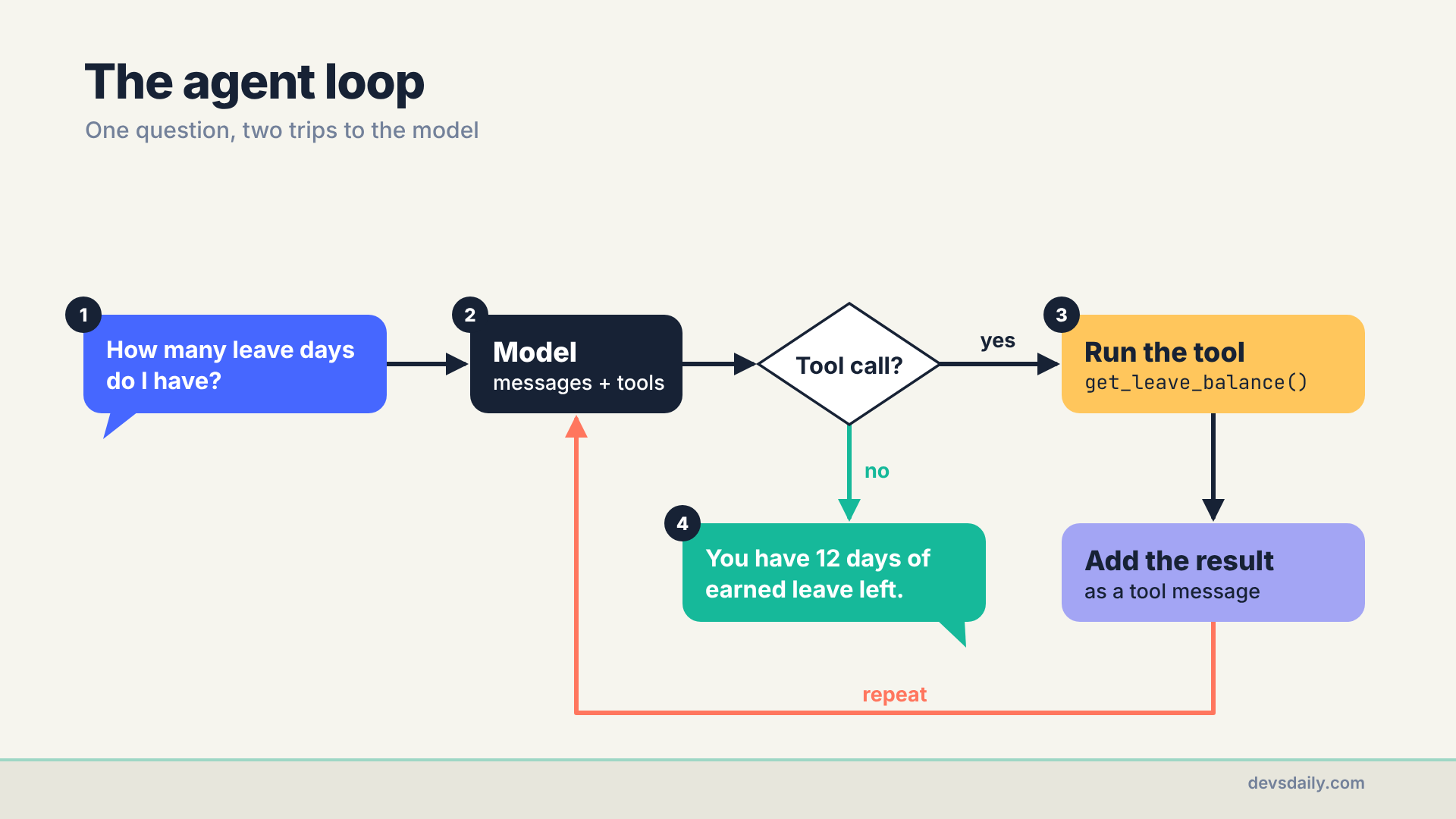
An agent can take several trips. On each trip the model can either answer, or say "before I answer, please run this function with these arguments". Your code runs the function, adds the result to the conversation, and calls the model again. Here is one question going through it:
Step 1: Set up the project
Create a folder and a virtual environment, then install two packages.
On macOS or Linux:
mkdir hr-helpdesk-agent && cd hr-helpdesk-agent
python -m venv .venv
source .venv/bin/activate
pip install openai python-dotenv
On Windows, in PowerShell:
mkdir hr-helpdesk-agent; cd hr-helpdesk-agent
python -m venv .venv
.venv\Scripts\Activate.ps1
pip install openai python-dotenv
Create a file called .env with your key:
OPENAI_API_KEY=sk-...
OPENAI_MODEL=gpt-5.4-mini
Any chat model that supports tool calling works here. A small, cheap model is plenty for this example.
Step 2: Create a fake HR system
The agent needs something to talk to. Make a folder helpdesk with an empty __init__.py, then add helpdesk/hrms.py. Here is the part we need today (the companion repo has the full version used later in the series):
# helpdesk/hrms.py
class HRMSError(Exception):
    pass

LEAVE = {"E1042": {"earned": 12, "sick": 6, "casual": 3}}
HOLIDAYS = [
    {"date": "2026-10-02", "name": "Gandhi Jayanti"},
    {"date": "2026-10-20", "name": "Dussehra"},
    {"date": "2026-11-09", "name": "Diwali"},
    {"date": "2026-11-24", "name": "Guru Nanak Jayanti"},
    {"date": "2026-12-25", "name": "Christmas"},
]

def get_leave_balance(employee_id: str) -> dict:
    if employee_id not in LEAVE:
        raise HRMSError(f"No employee with id {employee_id!r}.")
    return {"employee_id": employee_id, "unit": "days", **LEAVE[employee_id]}

def get_holidays(month: int, year: int = 2026) -> list[dict]:
    if not 1 <= month <= 12:
        raise HRMSError("month must be between 1 and 12.")
    return [h for h in HOLIDAYS if h["date"].startswith(f"{year}-{month:02d}")]
These are ordinary Python functions with nothing AI about them. Tools are just your code.
Step 3: Describe the tools to the model
The model cannot read your Python. It only sees a description of each tool: a name, a sentence about what it does, and a JSON Schema for its arguments. Create part01_raw_loop/agent.py (plus an empty part01_raw_loop/__init__.py) and start with the setup and tool list:
# part01_raw_loop/agent.py
import json
import os
import sys

from dotenv import load_dotenv
from openai import OpenAI

from helpdesk import hrms

load_dotenv()
client = OpenAI()  # reads OPENAI_API_KEY
MODEL = os.getenv("OPENAI_MODEL", "gpt-5.4-mini")

SYSTEM = ("You are an HR helpdesk assistant. The person chatting with you is employee E1042. "
          "Use the tools for any fact about leave or holidays. Never guess numbers.")

TOOLS = [
    {"type": "function", "function": {
        "name": "get_leave_balance",
        "description": "Get the remaining leave days for one employee, split by leave type.",
        "parameters": {"type": "object",
                       "properties": {"employee_id": {"type": "string", "description": "For example E1042"}},
                       "required": ["employee_id"]}}},
    {"type": "function", "function": {
        "name": "get_holidays",
        "description": "List company holidays in a month of 2026.",
        "parameters": {"type": "object",
                       "properties": {"month": {"type": "integer", "description": "1 to 12"}},
                       "required": ["month"]}}},
]
Treat the description fields as part of your prompt. The model picks tools by reading them, so "Get the remaining leave days for one employee" works far better than "leave API".
One shortcut to notice: get_leave_balance takes an employee_id, and the model fills it in from the system prompt. That is fine for a demo and dangerous in production, because a persuasive user could get the model to ask for someone else’s ID. Part 10 fixes it by taking identity from the logged-in session instead.
Step 4: Connect tool names to real functions
When the model asks for get_leave_balance, your code has to know which function that means. A dictionary does the job:
FUNCTIONS = {"get_leave_balance": hrms.get_leave_balance, "get_holidays": hrms.get_holidays}

def run_tool(name: str, args: dict) -> str:
    try:
        return json.dumps(FUNCTIONS[name](**args))
    except Exception as exc:  # send the error back so the model can recover
        return json.dumps({"error": str(exc)})
Two details matter here:
- Results must be text. We turn every result into a JSON string before it goes back to the model.
- Errors go back to the model too. If the model asks for month 13, it gets
{"error": "month must be between 1 and 12."}and can try again or ask the user, instead of the whole conversation ending in a stack trace. Catching everyExceptionis a teaching shortcut, though: it also hides your own bugs and can show the model internal error text. Real code catches only the errors it expects, such as the HR system’sHRMSError, and lets the rest fail loudly.
Step 5: Write the loop
This is the heart of the agent. Read it slowly, it is under 20 lines:
def run_agent(question: str, max_turns: int = 5) -> str:
    messages = [{"role": "system", "content": SYSTEM}, {"role": "user", "content": question}]
    for turn in range(1, max_turns + 1):
        response = client.chat.completions.create(model=MODEL, messages=messages, tools=TOOLS)
        reply = response.choices[0].message
        messages.append(reply.model_dump(exclude_none=True))
        if not reply.tool_calls:  # no tool requested: this is the final answer
            print(f"turn {turn}: final answer")
            return reply.content
        print(f"turn {turn}: model asked for {len(reply.tool_calls)} tool(s)")
        for call in reply.tool_calls:
            args = json.loads(call.function.arguments)
            print(f"  {call.function.name}({args})")
            messages.append({"role": "tool", "tool_call_id": call.id,
                             "content": run_tool(call.function.name, args)})
    return "Sorry, I could not finish within the turn limit."

if __name__ == "__main__":
    question = " ".join(sys.argv[1:]) or "How many leave days do I have?"
    print(run_agent(question))
Line by line:
messagesis the conversation so far. It starts with the system prompt and the question.- Each turn, we send the whole conversation plus
TOOLSto the model. - We always append the model’s reply to
messages, even when it is only a tool request. Skip it and the API rejects the next request, because every tool result must follow the request it answers. - No
tool_calls? Then the model is done, andreply.contentis the answer. - Otherwise, we print how many tools the model asked for, run each one (a model can ask for several at once) and append one
toolmessage per call. Thetool_call_idlinks each result to the request it answers. Copy it fromcall.id; never make one up. max_turnsis the safety net. Without it, a confused model could loop forever, and you pay for every turn.
Step 6: Run it
From the project folder:
python -m part01_raw_loop.agent "How many leave days do I have?"You should see something like this (the exact wording changes from run to run):
turn 1: model asked for 1 tool(s)
  get_leave_balance({'employee_id': 'E1042'})
turn 2: final answer
You have 12 days of earned leave, 6 days of sick leave and 3 days of casual leave.
Now try a question that needs two tools:
python -m part01_raw_loop.agent "How many casual days do I have, and are there holidays in October?"This is my run with gpt-5.4-mini:
turn 1: model asked for 2 tool(s)
  get_leave_balance({'employee_id': 'E1042'})
  get_holidays({'month': 10})
turn 2: final answer
You have **3 casual days** remaining.

Yes, there are holidays in **October 2026**:
- **2026-10-02** — Gandhi Jayanti
- **2026-10-20** — Dussehra
Two tools, but only two trips to the model. On turn 1 the model asked for both tools in a single reply, and the loop ran them one after the other before calling it again. On turn 2 it had both results and wrote the answer. Notice the ** too. Models answer in Markdown unless you tell them otherwise, which looks odd in a terminal and fine in a chat UI.
Then try a question that needs no tool at all, like "What can you help me with?". You see turn 1: final answer and the loop ends immediately.
What the model actually saw
It helps to look at messages after the first run. It holds five entries:
| # | Role | Content |
|---|---|---|
| 1 | system | "You are an HR helpdesk assistant…" |
| 2 | user | "How many leave days do I have?" |
| 3 | assistant | No text, one tool call: get_leave_balance(employee_id="E1042") |
| 4 | tool | {"employee_id": "E1042", "unit": "days", "earned": 12, "sick": 6, "casual": 3} |
| 5 | assistant | "You have 12 days of earned leave…" |
The model never touched your HR system. It wrote a request (entry 3), your code ran it and wrote down the result (entry 4), and the model turned that result into a sentence (entry 5). Every agent framework, however fancy, produces this same pattern of messages.
Why frameworks exist
You now have a real agent. So why would you ever need LangChain or LangGraph? Because a production agent needs more than the loop:
- conversations that remember earlier messages, across restarts
- streaming answers word by word to a UI
- structured answers your app can parse
- a pause for human approval before a risky action
- retries, timeouts, limits and tracing
You could write all of that yourself. Frameworks give it to you on top of this same loop, which is exactly where Part 2 goes next.
Get the code
The full code for this part is in part01_raw_loop/ of the companion repo, along with offline tests that run the loop against a fake model. If you use another provider with an OpenAI-compatible API (Azure OpenAI, Ollama, Groq and many others), pass its base_url and key to OpenAI(...) and the same loop works.
The series
This article is part of Building AI Agents, an 11-part series that builds one HR helpdesk agent from a plain loop to a production service.
- An agent is just a loop (you are here)
- Your first LangChain agent
- Tools that don’t break your agent
- Give your agent a memory
- RAG as a tool, not a pipeline
- When the loop isn’t enough: graphs
- Human in the loop
- Many agents, or one good one?
- Testing an agent you can’t predict
- Securing an agent
- Shipping your agent
Next: Part 2: Your first LangChain agent, where we rebuild this agent with create_agent without writing the loop yourself, and get structured answers your app can rely on.
