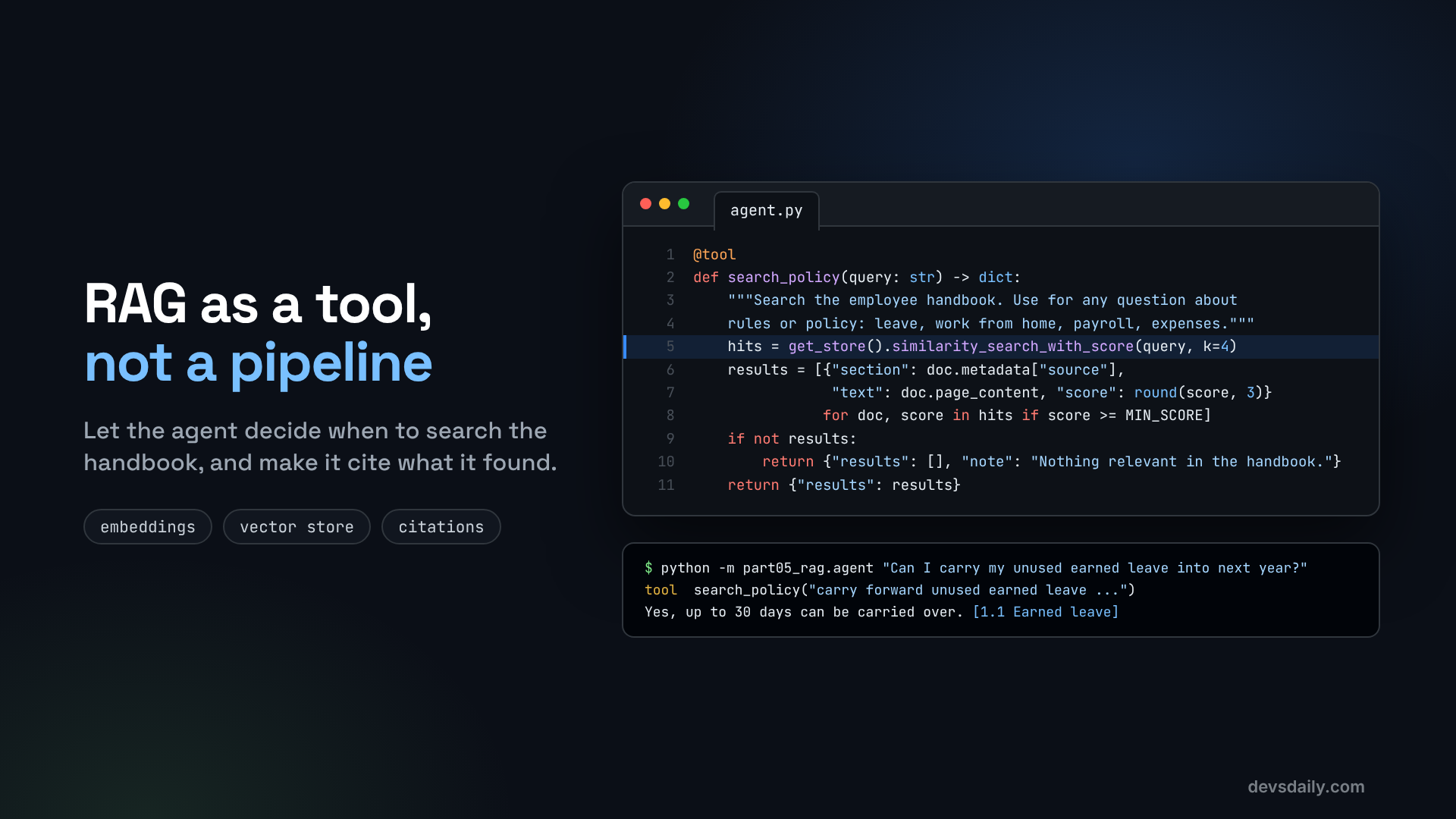

Teach the helpdesk agent to search the employee handbook, cite the section it used, and say "I don’t know" when the handbook has no answer.
Building AI Agents · Part 5 of 11 · Start from Part 1 · All parts ↓
In short: Index the employee handbook once (split by headings, embed, store), then expose search as a tool the agent calls only when a question is about policy. Results carry their section names for citations, weak matches are dropped, and the prompt makes the agent say "I don’t know" when nothing fits.
Where this fits: Up to Part 4, the agent could only answer from the HR system. Now it can read the handbook too. Part 6 moves from answering questions to running a process with rules: booking leave.
Our helpdesk agent can now look up an employee’s own numbers, remember the conversation and keep preferences. Ask it "Can I carry my unused earned leave into next year?" though, and it is stuck. That answer is not in the HR system. It is in the employee handbook, a document the model has never seen.
The standard fix is RAG (retrieval-augmented generation): find the parts of your documents that match the question, and give them to the model along with the question. In this article we build RAG the agent way: as a tool the model can choose to call, instead of a fixed step that runs on every message.
Start from your Part 4 project or the companion repo, and add two packages:
pip install langchain-text-splitters numpyThe handbook is data/handbook.md in the repo. It is fictional, about 550 words, with numbered sections for leave, work from home, holidays, payroll, expenses, notice period and conduct. Any Markdown document with headings works the same way.
How RAG works, in two halves
Indexing (once, ahead of time): split documents into chunks, convert each chunk into an embedding (a list of numbers that captures its meaning), and store them.
Retrieval (every time it is needed): embed the question the same way, find the chunks whose embeddings are closest, and give those chunks to the model.
Let’s build each half.
Step 1: Split the handbook into chunks
Chunk size matters. Too big, and a chunk mixes several topics, so it matches everything a little. Too small, and a rule gets cut in half. A good default for policy documents is to split on headings first, so each chunk belongs to one section, and then cap the size:
# part05_rag/ingest.py
import os
from pathlib import Path

from dotenv import load_dotenv
from langchain.embeddings import init_embeddings
from langchain_core.vectorstores import InMemoryVectorStore
from langchain_text_splitters import MarkdownHeaderTextSplitter, RecursiveCharacterTextSplitter

load_dotenv()
ROOT = Path(__file__).resolve().parent.parent
HANDBOOK = ROOT / "data" / "handbook.md"
INDEX = ROOT / "data" / "handbook_index.json"

def split_handbook(text: str):
    # 1. Split on headings first, so every chunk knows which section it came from.
    by_heading = MarkdownHeaderTextSplitter(
        headers_to_split_on=[("#", "doc"), ("##", "section"), ("###", "subsection")],
    ).split_text(text)
    # 2. Then cap the size, with a small overlap so sentences are not cut in half.
    chunks = RecursiveCharacterTextSplitter(chunk_size=800, chunk_overlap=100).split_documents(by_heading)
    for chunk in chunks:
        chunk.metadata["source"] = chunk.metadata.get("subsection") or chunk.metadata.get("section", "Handbook")
    return chunks
MarkdownHeaderTextSplitter stores the headings above each chunk in its metadata. We copy the most specific one into a source field. That is what lets the agent cite "1.1 Earned leave" later. On our handbook this produces 13 chunks: the short introduction, plus one for each section or subsection.
Step 2: Embed the chunks and save the index
def get_embeddings():
    model = os.getenv("EMBEDDING_MODEL", "openai:text-embedding-3-small")
    # OpenAI's client normally downloads a tokenizer file to split over-long inputs. Our chunks are
    # small, so skip it: one less download, and it avoids certificate errors behind corporate proxies.
    extra = {"check_embedding_ctx_length": False} if model.startswith("openai:") else {}
    return init_embeddings(model, **extra)

def build_index(embeddings=None) -> InMemoryVectorStore:
    chunks = split_handbook(HANDBOOK.read_text(encoding="utf-8"))
    store = InMemoryVectorStore(embeddings or get_embeddings())
    store.add_documents(chunks)
    return store

if __name__ == "__main__":
    store = build_index()
    store.dump(str(INDEX))
    print(f"Indexed {len(store.store)} chunks into {INDEX.name}")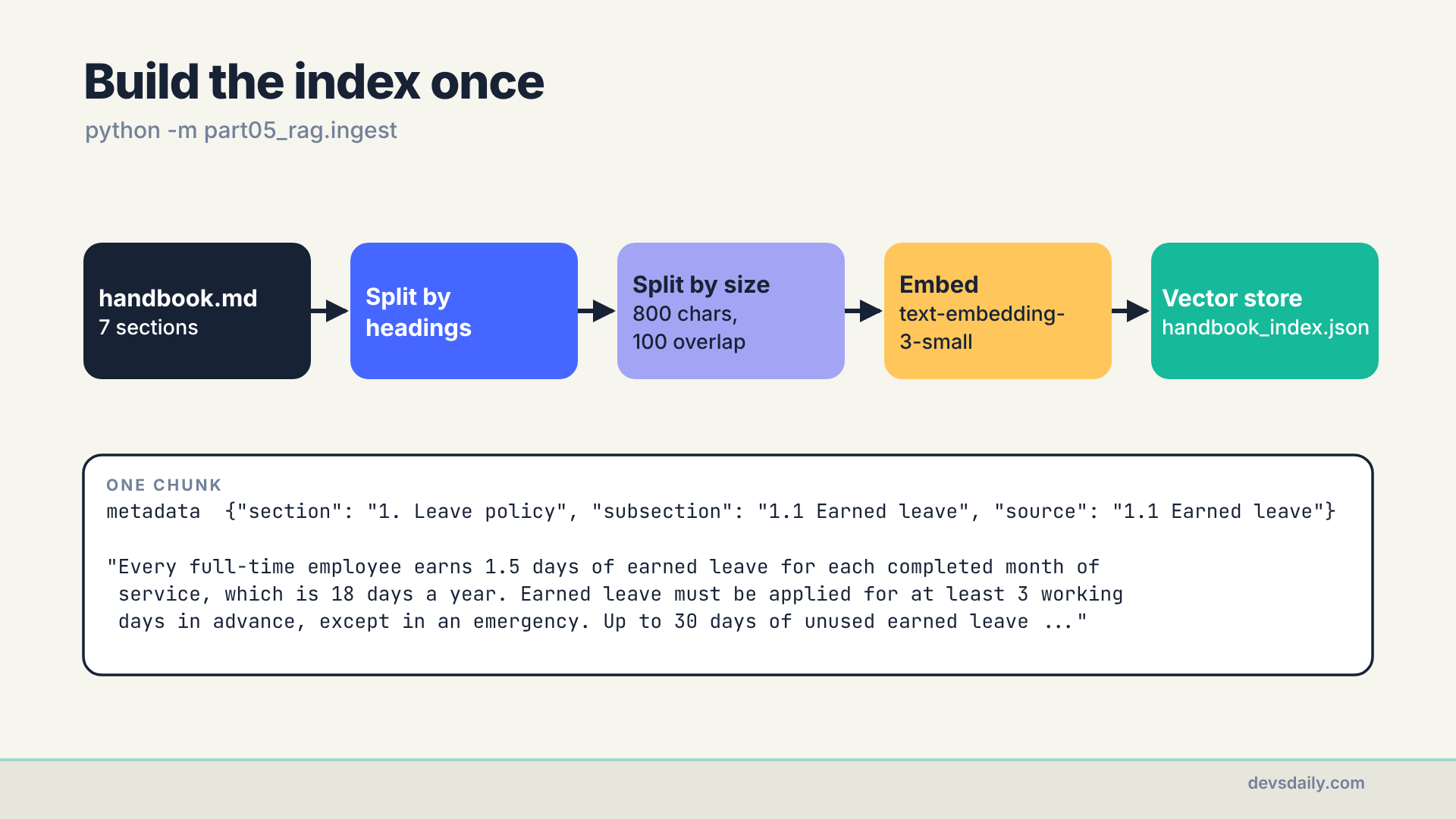
Run it once:
python -m part05_rag.ingestIndexed 13 chunks into handbook_index.jsonInMemoryVectorStore is ideal for learning and for small documents: it is a few lines, it needs no server, and dump saves it to a JSON file. For thousands of documents you would switch to a real vector database (pgvector, Azure AI Search, Qdrant and many others have LangChain integrations). The tool you write next would not change.
One rule to remember: the same embedding model must be used for indexing and for searching. If you change EMBEDDING_MODEL, rebuild the index.
About check_embedding_ctx_length=False: by default, LangChain’s OpenAI embeddings download a tokenizer file the first time they run, so they can split inputs that are too long. Our chunks are a few hundred tokens, so that check is not needed. I turned it off after the ingest failed on my office network with CERTIFICATE_VERIFY_FAILED: the company proxy inspects TLS traffic, and the download did not trust its certificate. If you hit the same error somewhere else, point Python at your company’s root certificate (REQUESTS_CA_BUNDLE and SSL_CERT_FILE) or install pip-system-certs so Python uses the Windows certificate store.
Step 3: Turn search into a tool
Now the retrieval half. Load the index once, then wrap search in a tool:
# part05_rag/agent.py
from langchain.tools import tool
from langchain_core.vectorstores import InMemoryVectorStore

from part05_rag.ingest import INDEX, get_embeddings

_store = None

def get_store():
    global _store
    if _store is None:
        _store = InMemoryVectorStore.load(str(INDEX), get_embeddings())
    return _store

MIN_SCORE = 0.30  # below this, a chunk is probably not about the question

@tool
def search_policy(query: str) -> dict:
    """Search the employee handbook. Use for any question about rules or policy:
    leave rules, work from home, holidays policy, payroll dates, expenses, notice period."""
    hits = get_store().similarity_search_with_score(query, k=4)
    results = [{"section": doc.metadata["source"], "text": doc.page_content, "score": round(score, 3)}
               for doc, score in hits if score >= MIN_SCORE]
    if not results:
        return {"results": [], "note": "Nothing relevant in the handbook."}
    return {"results": results}
Three choices here are worth explaining.
The model writes the query. The employee may say "can I roll over my holidays to next year lol". The model calls search_policy("carry over unused earned leave"), which is a much better search. That rewriting is one of the quiet advantages of RAG as a tool.
Each result carries its section. No section, no citation.
Weak matches are dropped. A vector search always returns something, even for "what is the policy on pets?". similarity_search_with_score on this store returns a cosine similarity, where higher is closer. Anything under MIN_SCORE is removed, and if nothing is left the tool says so plainly.
The right threshold depends on your embedding model and your documents, so measure it. Print the top scores for a few questions the handbook answers and a few it does not. Here is what text-embedding-3-small gave me:
'carry over unused earned leave':        1.1 Earned leave 0.626,  6. Notice period and exit 0.542
'work from home days per week':          2. Work from home 0.641, 1.2 Sick leave 0.343
'policy on bringing pets to the office': 2. Work from home 0.332, 7. Code of conduct 0.319
'parking at the office':                 2. Work from home 0.271, 1.4 Leave approval 0.225
Real matches land around 0.6. Unrelated sections land around 0.3. My 0.30 cut drops the parking question completely, but the pets question squeezes through at 0.332 and hands the model a work-from-home chunk. On this handbook, something near 0.45 would separate the two groups cleanly. I kept 0.30 in the repo on purpose, because the pets case shows the next point: the threshold is a filter with a fuzzy edge, not a guarantee. The instruction in the system prompt has to do the rest.
Step 4: Tell the agent how to use it
The tool is half the job. The other half is the instruction to answer only from what the tool returns:
from langchain.agents import create_agent

from helpdesk.llm import get_model
from part03_tools.tools import get_leave_balance, get_payslip

SYSTEM_PROMPT = (
    "You are an HR helpdesk assistant for employee E1042.\n"
    "- For policy questions, call search_policy and answer only from what it returns.\n"
    "- Cite the section in square brackets, for example [1.1 Earned leave].\n"
    "- If the search results do not answer the question, say you don't know and offer to raise a ticket.\n"
    "- For the employee's own numbers (leave balance, payslip), use those tools instead."
)

def build_agent(model=None):
    return create_agent(model or get_model(), tools=[search_policy, get_leave_balance, get_payslip],
                        system_prompt=SYSTEM_PROMPT)
Why a tool and not a pipeline?
A classic RAG pipeline searches on every message and pastes the top chunks into the prompt. That is simple, but it searches when it should not ("how many leave days do I have?" needs the HR system, not the handbook), and it cannot search twice when one question touches two policies.
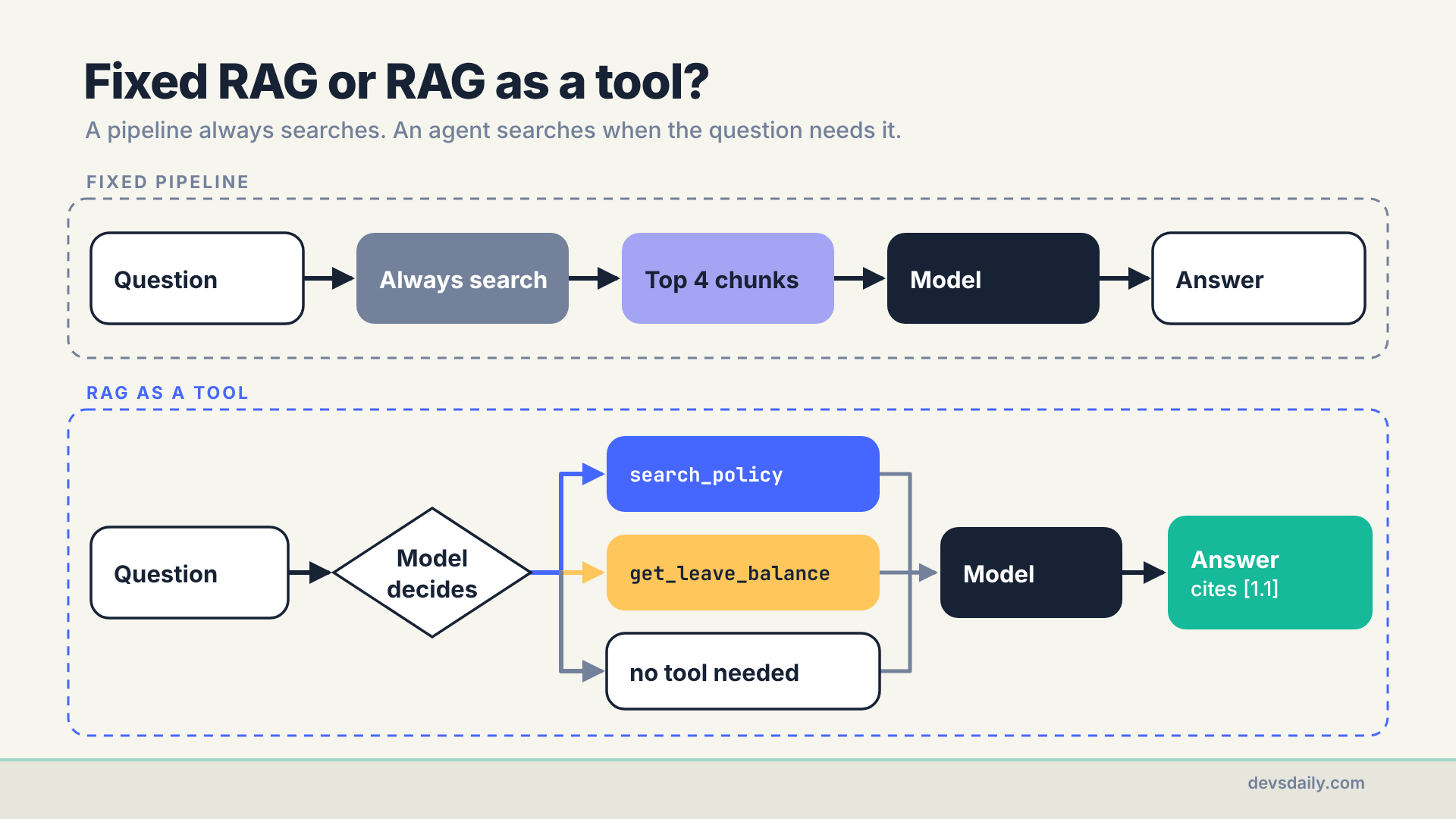
As a tool, retrieval becomes one option among several. The model searches when the question is about rules, looks up numbers when it is about the employee, does both for "how many earned days do I have and how many carry over?", and does neither for "thanks!". A fixed pipeline is still a good choice when every question needs the documents, such as a search box over a manual. For a helpdesk that mixes policy and personal data, the tool approach fits better. Fuller agentic RAG designs go further: they grade each retrieved chunk, rewrite the query and search again when the results are weak. This article keeps to the simplest useful version, retrieval as one tool the model can choose.
Step 5: Run it
python -m part05_rag.agent "Can I carry my unused earned leave into next year?"In my run, the model rewrote the question into its own search query, then answered from the result:
call: search_policy({'query': 'carry forward unused earned leave into next year earned leave policy'})
Yes — up to 30 days of unused earned leave can be carried over to the next calendar year.
Anything above 30 days lapses on 31 December. [1.1 Earned leave]
Then try a few more, and check the tool calls as well as the answer. These are from the same run:
| Question | Tools called | Answer |
|---|---|---|
| "How many days a week can I work from home?" | search_policy | 2 days after probation, cites [2. Work from home] |
| "How many earned days do I have, and how many can I carry over?" | get_leave_balance and search_policy | 12 days now, up to 30 carry over, cites [1.1 Earned leave] |
| "What is the policy on bringing pets to the office?" | search_policy | "I don’t know from the handbook results I found; they don’t mention pets in the office. If you want, I can raise a ticket to HR to confirm." |
| "thanks!" | none | "You’re welcome!" |
The pets question is the most important test, and now you know why it passed. The search returned a work-from-home chunk at 0.332, and the model read it, saw nothing about pets, and followed the prompt: say you don’t know, offer a ticket. A RAG system that confidently invents a pet policy is worse than no system at all, so test this case on every change. Part 9 turns it into an automated check.
Get the code
This part is in part05_rag/ of the companion repo, with the fictional handbook in data/handbook.md. Run python -m part05_rag.ingest once before Parts 5, 8, 9, 10 and 11.
The series
This article is part of Building AI Agents, an 11-part series that builds one HR helpdesk agent from a plain loop to a production service.
- An agent is just a loop
- Your first LangChain agent
- Tools that don’t break your agent
- Give your agent a memory
- RAG as a tool, not a pipeline (you are here)
- When the loop isn’t enough: graphs
- Human in the loop
- Many agents, or one good one?
- Testing an agent you can’t predict
- Securing an agent
- Shipping your agent
Previous: Part 4: Give your agent a memory
Next: Part 6: When the loop isn’t enough: graphs. Booking leave is a process with fixed steps and rules. We move it into a LangGraph graph, where code decides the order and the model only does the language parts.
