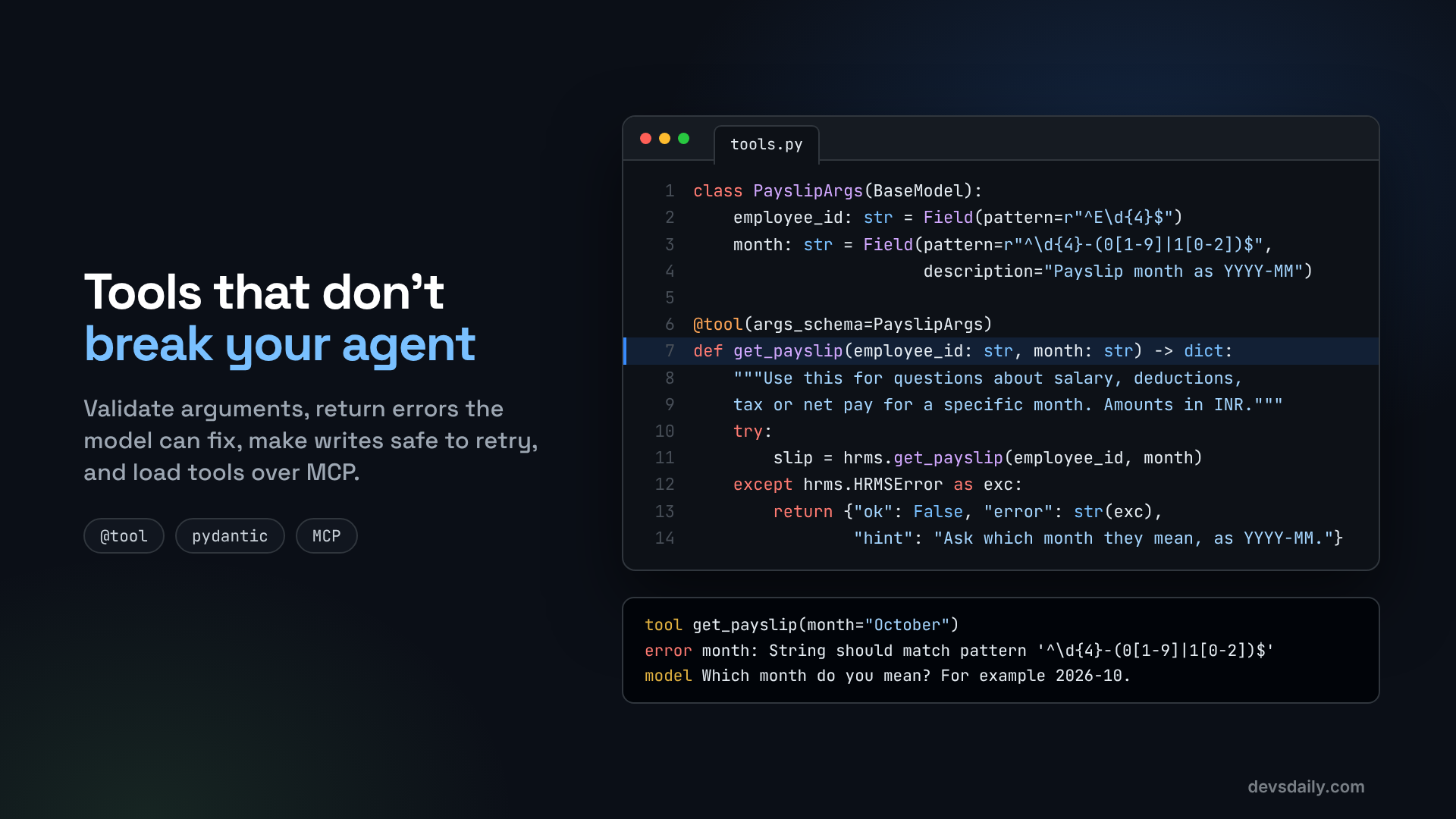

Real tools get bad arguments, fail, and get called twice. Here is how to build tools your agent can recover from, plus how to plug in tools from an MCP server.
Building AI Agents · Part 3 of 11 · Start from Part 1 · All parts ↓
In short: Most agent failures are tool failures. Write descriptions that say when to use a tool, validate arguments with Pydantic, return errors with a hint the model can act on, make writes safe to retry, and load tools another team owns from an MCP server.
Where this fits: After Part 2 the agent has real structure, but its tools still trust every input. This part makes them safe for real data. Part 4 then gives the agent memory, so it can follow a conversation.
Most agent bugs are not model bugs. They are tool bugs. The model asks for a payslip for "October" instead of "2026-10", the HR system throws an exception, the agent crashes, and the user sees an error page. Or the network blips, the call is retried, and the employee gets two identical HR tickets.
The model is the part you control least. The tools are the part you control most, so that is where this article spends its time. Then we load tools from a separate MCP server, the way you would use a tool another team owns.
By the end, the agent has four tools of its own, all working against the fake HR system from the companion repo:
| Tool | What it does |
|---|---|
get_leave_balance | Remaining leave days by type |
get_payslip | Salary breakdown for one month |
get_holidays | Company holidays in a month |
raise_ticket | Opens an HR ticket (the only tool that writes) |
Plus two tools from a small MCP server called company-calendar: list_holidays and is_working_day. Start from your Part 2 project or the companion repo, and install the MCP packages:
pip install langchain-mcp-adapters mcpThe anatomy of a good tool
A tool has six parts. The model sees five of them, everything except the body, so most of a tool is really prompt text.
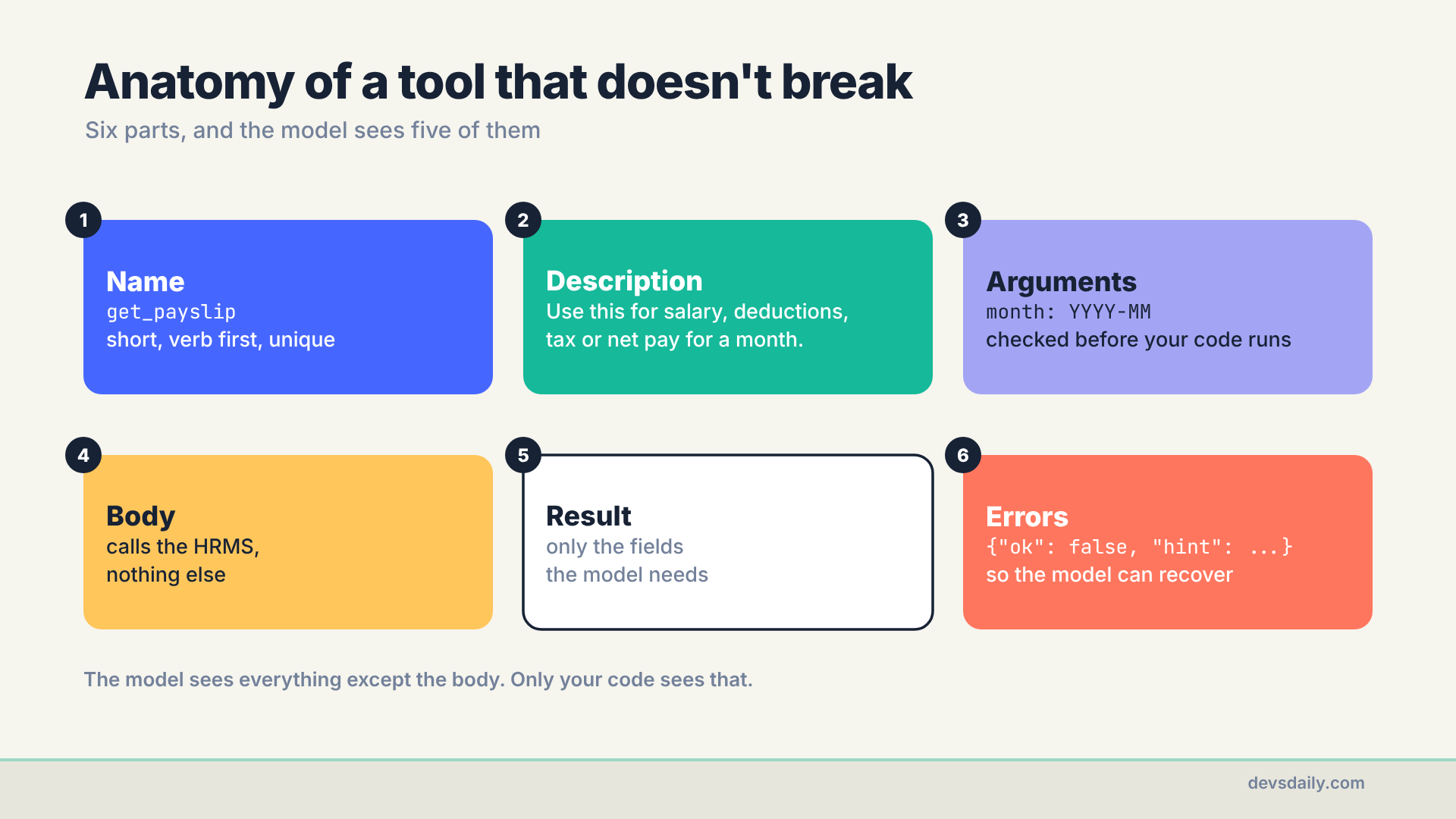
Keep this picture in mind as we go through the steps. Each step improves one part.
Step 1: Write descriptions that say when
In Part 2 our docstrings said what a tool does. Better docstrings also say when to use it. The model chooses tools by comparing the user’s question with these descriptions, so tell it which questions each tool answers:
@tool
def get_payslip(employee_id: str, month: str) -> dict:
    """Use this for questions about salary, deductions, tax or net pay for a specific month.
    Amounts are in INR."""
Compare that with "Gets a payslip." When the employee asks "why is my take-home lower this month?", the first description matches (net pay, deductions), and the second one does not.
Do the same for the one tool that writes, and say when not to use it:
"""Use this only when the employee asks for HR to follow up, or when you cannot answer
with the other tools. Opens a ticket and returns its ID. A retry with the same arguments returns the same ticket."""
Step 2: Validate arguments with a schema
Type hints catch some mistakes, but month: str happily accepts "October", "last month" or "13". Use a Pydantic model with patterns and limits, and pass it to @tool as args_schema:
# part03_tools/tools.py
from langchain.tools import tool
from pydantic import BaseModel, Field

from helpdesk import hrms

class PayslipArgs(BaseModel):
    employee_id: str = Field(pattern=r"^E\d{4}$", description="Employee ID like E1042")
    month: str = Field(pattern=r"^\d{4}-(0[1-9]|1[0-2])$", description="Payslip month as YYYY-MM, e.g. 2026-10")

@tool(args_schema=PayslipArgs)
def get_payslip(employee_id: str, month: str) -> dict:
    """Use this for questions about salary, deductions, tax or net pay for a specific month.
    Amounts are in INR."""
    ...
Now, if the model sends month="October", the arguments fail validation before your function runs. You do not have to write a crash handler for it, because LangChain catches the validation error and sends it back to the model as a tool message:
Error invoking tool 'get_payslip' with kwargs {'employee_id': 'E1042', 'month': 'October'} with error:
 month: String should match pattern '^\d{4}-(0[1-9]|1[0-2])$'
 Please fix the error and try again.
The model reads that, and usually either fixes the call (2026-10) or asks the employee which month they mean. Both are good outcomes. A crash is not.
The same idea works for numbers (Field(ge=1, le=12) for a month number) and for fixed choices (Literal["payroll", "leave", "policy", "other"] for a ticket category).
The number version closes the gap Part 2 left open. There, get_holidays(month=13) raised an error inside the function and stopped the run. With month: int = Field(ge=1, le=12), the same call never reaches the function. The model gets "Input should be less than or equal to 12" and another chance.
Step 3: Return errors the model can act on
Validation catches malformed input. It cannot catch "there is no payslip for December yet", because that is valid input with no data behind it. For those cases, do not raise. Return a small error object with a hint:
def _error(message: str, hint: str) -> dict:
    """A tool error the model can read and recover from."""
    return {"ok": False, "error": message, "hint": hint}

@tool(args_schema=PayslipArgs)
def get_payslip(employee_id: str, month: str) -> dict:
    """Use this for questions about salary, deductions, tax or net pay for a specific month.
    Amounts are in INR."""
    try:
        slip = hrms.get_payslip(employee_id, month)
    except hrms.HRMSError as exc:
        return _error(str(exc), "Ask the employee which month they mean, as YYYY-MM.")
    keep = ["month", "currency", "gross", "pf", "professional_tax", "income_tax", "net"]
    return {"ok": True, **{k: slip[k] for k in keep}}
The hint is the important part. "No payslip for E1042 in 2026-12" tells the model what went wrong. "Ask the employee which month they mean" tells it what to do next. Add a line to the system prompt so it knows the convention:
SYSTEM_PROMPT = ("You are an HR helpdesk assistant for employee E1042. Use tools for every fact. "
                 "If a tool returns ok=false, read the hint and either fix your call or ask the employee. "
                 "Raise a ticket only when the employee asks for a follow-up or you cannot answer.")
Notice the last line of get_payslip too: it returns only seven fields, not the whole HR record. Every field you send costs tokens and gives the model one more thing to misread. Return what the question needs.
Step 4: Make writes safe to retry
Reading a leave balance twice is harmless. Opening a ticket twice is not. Retries happen more than you think: the model may call the same tool again because it was not sure the first call worked, a framework may retry after a timeout, and networks drop responses.
The fix is an idempotency key: a value that is the same for the same request. If the HR system sees a key it has already handled, it returns the first result instead of doing the work again.
import hashlib
from typing import Literal

class TicketArgs(BaseModel):
    employee_id: str = Field(pattern=r"^E\d{4}$")
    category: Literal["payroll", "leave", "policy", "other"]
    summary: str = Field(min_length=10, max_length=300, description="One or two sentences in the employee's words")

@tool(args_schema=TicketArgs)
def raise_ticket(employee_id: str, category: str, summary: str) -> dict:
    """Use this only when the employee asks for HR to follow up, or when you cannot answer
    with the other tools. Opens a ticket and returns its ID. A retry with the same arguments returns the same ticket."""
    key = hashlib.sha256(f"{employee_id}|{category}|{summary.strip().lower()}".encode()).hexdigest()[:16]
    ticket = hrms.raise_ticket(employee_id, category, summary, idempotency_key=key)
    return {"ok": True, **ticket}
The key is built from the request itself, so the same employee, category and normalized summary (trimmed and lower-cased) always produce the same key. This is the simple version, chosen so the example needs no extra plumbing. The sturdier version, described below, takes a request ID from your app instead. Our fake HR system stores keys it has seen and returns the existing ticket (with "duplicate": True) on a repeat. It keeps them in memory, so it shows duplicate detection within one process, not across restarts or several workers; a real key store has to be shared and durable. Real systems often support this directly through an idempotency header or a unique request ID. If yours does not, a small table of keys you have already processed does the same job.
One job per tool
One more rule, about design rather than code. A single hr_api(action, params) tool that does everything looks tidy, but the model has to guess the right action string and its arguments, and validating arguments whose shape depends on another argument gets hard fast. Four small, well-named tools are much easier for a model to use correctly.
Step 5: Load tools from an MCP server
So far every tool lives in our code. In a real company, some tools belong to other teams: the calendar team, the payroll team, the IT team. The Model Context Protocol (MCP) is an open standard for exposing tools to AI applications. A team publishes an MCP server once, and any MCP-aware agent can use its tools without importing their code.
Here is a tiny MCP server for the company calendar, written with the official Python SDK:
# part03_tools/mcp_server.py
from datetime import date

from mcp.server.fastmcp import FastMCP

from helpdesk import hrms

mcp = FastMCP("company-calendar")

@mcp.tool()
def list_holidays(month: int, year: int = 2026) -> list[dict]:
    """List company holidays in a month. month is 1 to 12."""
    return hrms.get_holidays(month, year)

@mcp.tool()
def is_working_day(day: str) -> dict:
    """Check whether a date (YYYY-MM-DD) is a working day: not a weekend and not a company holiday."""
    d = date.fromisoformat(day)
    holiday = next((h["name"] for h in hrms.get_holidays(d.month, d.year) if h["date"] == day), None)
    return {"date": day, "working_day": d.weekday() < 5 and holiday is None,
            "reason": holiday or ("weekend" if d.weekday() >= 5 else "")}

if __name__ == "__main__":
    mcp.run(transport="stdio")
The agent connects to it with MultiServerMCPClient from langchain-mcp-adapters. With the stdio transport, the client starts the server as a child process and talks to it over standard input and output:
# part03_tools/agent.py
import asyncio
import sys

from langchain.agents import create_agent
from langchain_mcp_adapters.client import MultiServerMCPClient

from helpdesk.llm import get_model
from part03_tools.tools import ALL_TOOLS

MCP_SERVERS = {
    "calendar": {"transport": "stdio", "command": sys.executable, "args": ["-m", "part03_tools.mcp_server"]},
}

async def build_agent(model=None):
    client = MultiServerMCPClient(MCP_SERVERS)
    mcp_tools = await client.get_tools()  # list_holidays, is_working_day
    return create_agent(model or get_model(), tools=[*ALL_TOOLS, *mcp_tools], system_prompt=SYSTEM_PROMPT)

async def main(question: str):
    agent = await build_agent()
    result = await agent.ainvoke({"messages": [{"role": "user", "content": question}]})
    for message in result["messages"]:
        message.pretty_print()

if __name__ == "__main__":
    asyncio.run(main(" ".join(sys.argv[1:]) or "Is 2026-10-20 a working day?"))
MCP tools are loaded asynchronously, so this part uses ainvoke instead of invoke. To the agent, MCP tools look exactly like your own: they have names, descriptions and schemas, which come from the server’s function signatures and docstrings. So the rules above apply to MCP servers too, and if you write one, write good docstrings.
You may notice that get_holidays and the MCP server’s list_holidays now do the same job. I left that overlap in on purpose, expecting the model to flip between them. It did not: I asked about October holidays three times and gpt-5.4-mini picked get_holidays every time. Its description starts with "Use this when the employee asks about company holidays", while list_holidays only says what it does. That is Step 1 doing its job. In a real project, still keep only one.
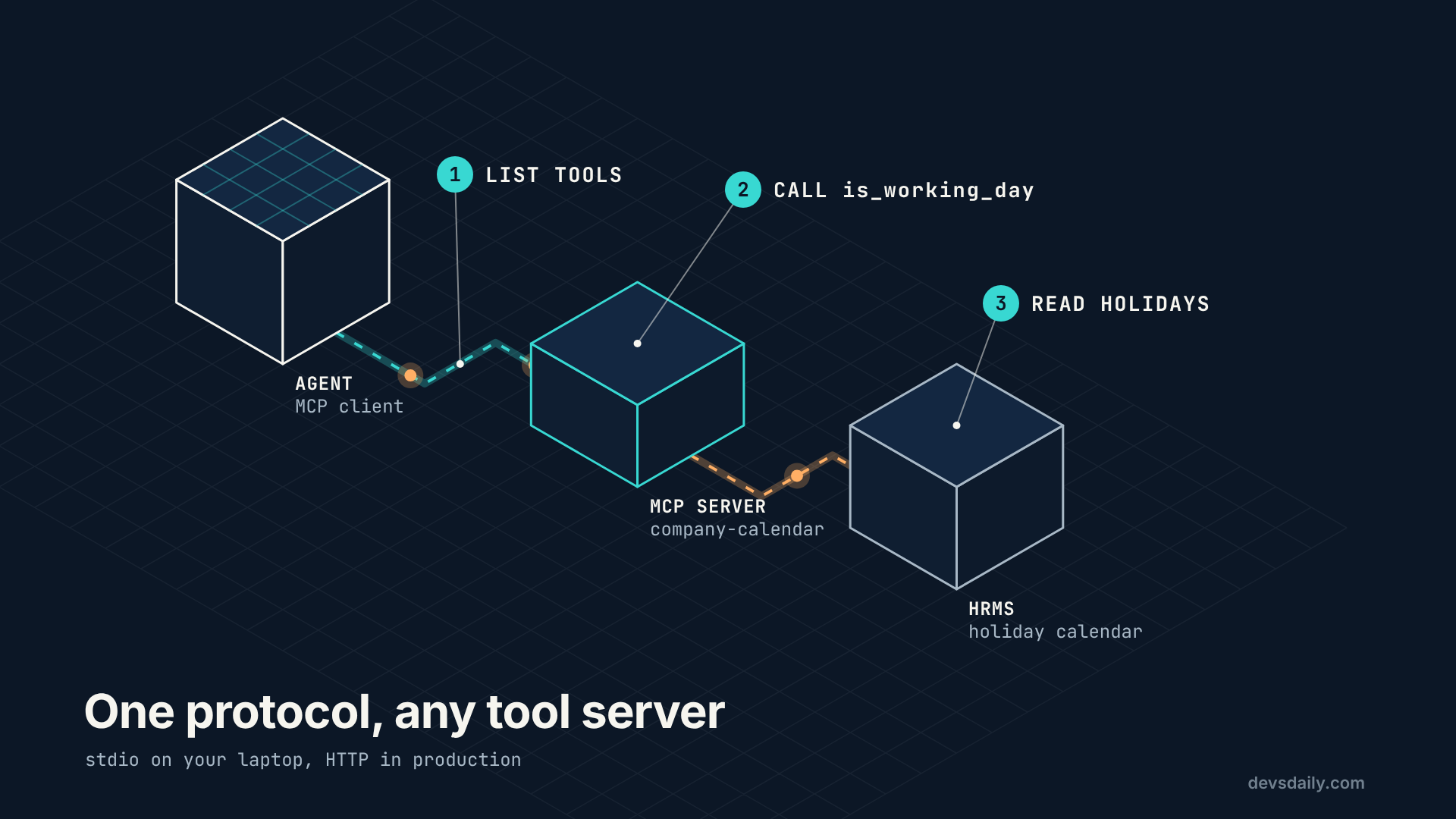
In production you would usually run the MCP server as its own service and connect over HTTP instead of stdio. The tool code stays the same, but the trust model does not: a child process on your machine needs no login, while a server on the network must authenticate its callers and be reachable only by the agents that should use it. Treat a third-party MCP server like any other dependency: read what its tools do before you hand them to your agent, because tool descriptions and results go straight into your model’s context. Part 10 covers that risk.
Step 6: Run it
python -m part03_tools.agent "Is 2026-10-20 a working day? If not, how much earned leave do I have?"This is my run with gpt-5.4-mini (calls printed from the result messages):
call: is_working_day({'day': '2026-10-20'})
call: get_leave_balance({'employee_id': 'E1042'})
No — 2026-10-20 is not a working day. It's a company holiday for Dussehra.

Your earned leave balance is 12 days.
One tool came from the MCP server, the other from your own code, and the model used them side by side without knowing the difference. Then try the failure cases on purpose:
- "Show me my payslip for October" (no year). With older or smaller models you will see the validation error go back to the model and a corrected retry. Current models often just write
2026-10themselves; when I ran it with gpt-5.4-mini, the first call was already correct. The offline test intests/forces the bad call, so you can see the error path every time. - The duplicate ticket. The fake HR system lives in memory and starts empty on every run, so running the command twice proves nothing. Call the tool twice in one Python session instead:
from part03_tools.tools import raise_ticket

args = {"employee_id": "E1042", "category": "payroll", "summary": "My October payslip shows the wrong HRA."}
print(raise_ticket.invoke(args))
print(raise_ticket.invoke(args))
{'ok': True, 'ticket_id': 'HR-0001', 'employee_id': 'E1042', 'category': 'payroll', 'summary': 'My October payslip shows the wrong HRA.', 'status': 'open'}
{'ok': True, 'ticket_id': 'HR-0001', 'employee_id': 'E1042', 'category': 'payroll', 'summary': 'My October payslip shows the wrong HRA.', 'status': 'open', 'duplicate': True}Same ticket, flagged as a duplicate. One limit to know: the key comes from the summary text, normalized only for case and surrounding spaces, so a model that rewords the summary on a retry gets a new ticket. For retries by the network or the framework, the arguments are identical and the key holds. The opposite also happens: two genuinely separate requests with the same summary are merged into one ticket, forever. The sturdier fix is a request ID created by the caller (your app, once per user action) and kept for a limited time, which is how payment APIs handle the same problem.
Get the code
All of this is in part03_tools/ of the companion repo. The offline tests check that bad arguments reach the model as errors, that tickets are not duplicated, and that the MCP tools load and answer.
The series
This article is part of Building AI Agents, an 11-part series that builds one HR helpdesk agent from a plain loop to a production service.
- An agent is just a loop
- Your first LangChain agent
- Tools that don’t break your agent (you are here)
- Give your agent a memory
- RAG as a tool, not a pipeline
- When the loop isn’t enough: graphs
- Human in the loop
- Many agents, or one good one?
- Testing an agent you can’t predict
- Securing an agent
- Shipping your agent
Previous: Part 2: Your first LangChain agent
Next: Part 4: Give your agent a memory. Right now the agent forgets everything after one question. We give it short-term memory for a conversation, long-term memory for preferences, and a summary for long threads.
