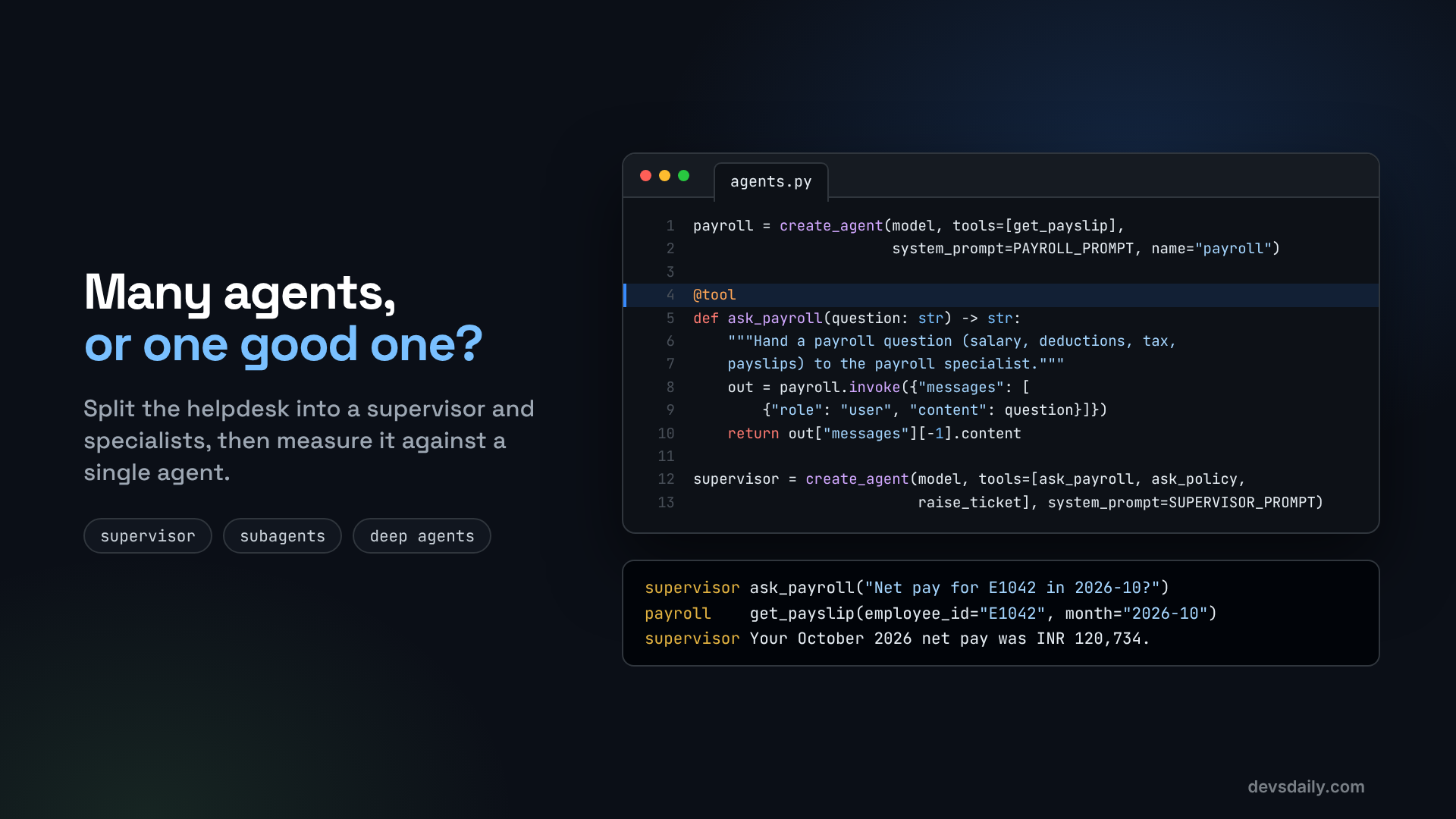

Split the helpdesk into a supervisor and two specialists, measure it honestly against a single agent, and see where a Deep Agent fits.
Building AI Agents · Part 8 of 11 · Start from Part 1 · All parts ↓
In short: Build a supervisor with payroll and policy specialists as tools, then compare it with a single agent on the same 30 questions for accuracy, latency and tokens. Split only when the numbers say so, and save Deep Agents for long, multi-step jobs that need a plan and a scratchpad.
Where this fits: By Part 7, one agent does everything. This part tests the popular multi-agent alternative honestly. Part 9 turns that kind of measurement into a test suite that runs on every change.
Multi-agent systems are everywhere in AI demos: a supervisor agent hands work to a researcher agent, a writer agent and a reviewer agent, and they all chat with each other. It looks impressive. The real question for your project is simpler: does splitting the work into several agents give better answers, and is it worth the extra cost and delay?
In this article we answer that question for our HR helpdesk, with code and a fair test instead of a diagram and a hunch. You need your Part 7 project or the companion repo, with the handbook index built (python -m part05_rag.ingest), plus one package for the Deep Agent at the end:
pip install deepagentsStep 1: The baseline, one agent
The single agent gets every tool and one prompt:
# part08_multi_agent/agents.py
from langchain.agents import create_agent

from helpdesk.llm import get_model
from part03_tools.tools import get_holidays, get_leave_balance, get_payslip, raise_ticket
from part05_rag.agent import search_policy

EMPLOYEE = "The person chatting with you is employee E1042. Today is 2026-11-07."

SINGLE_PROMPT = (f"You are an HR helpdesk assistant. {EMPLOYEE} Use tools for every fact. "
                 "Use search_policy for rules and the other tools for the employee's own data. "
                 "Cite policy sections in square brackets.")

def build_single(model=None, system_prompt=SINGLE_PROMPT):
    return create_agent(model or get_model(), name="helpdesk",
                        tools=[search_policy, get_leave_balance, get_holidays, get_payslip, raise_ticket],
                        system_prompt=system_prompt)
Five tools and a short prompt. Keep that number in mind.
Step 2: The supervisor and its specialists
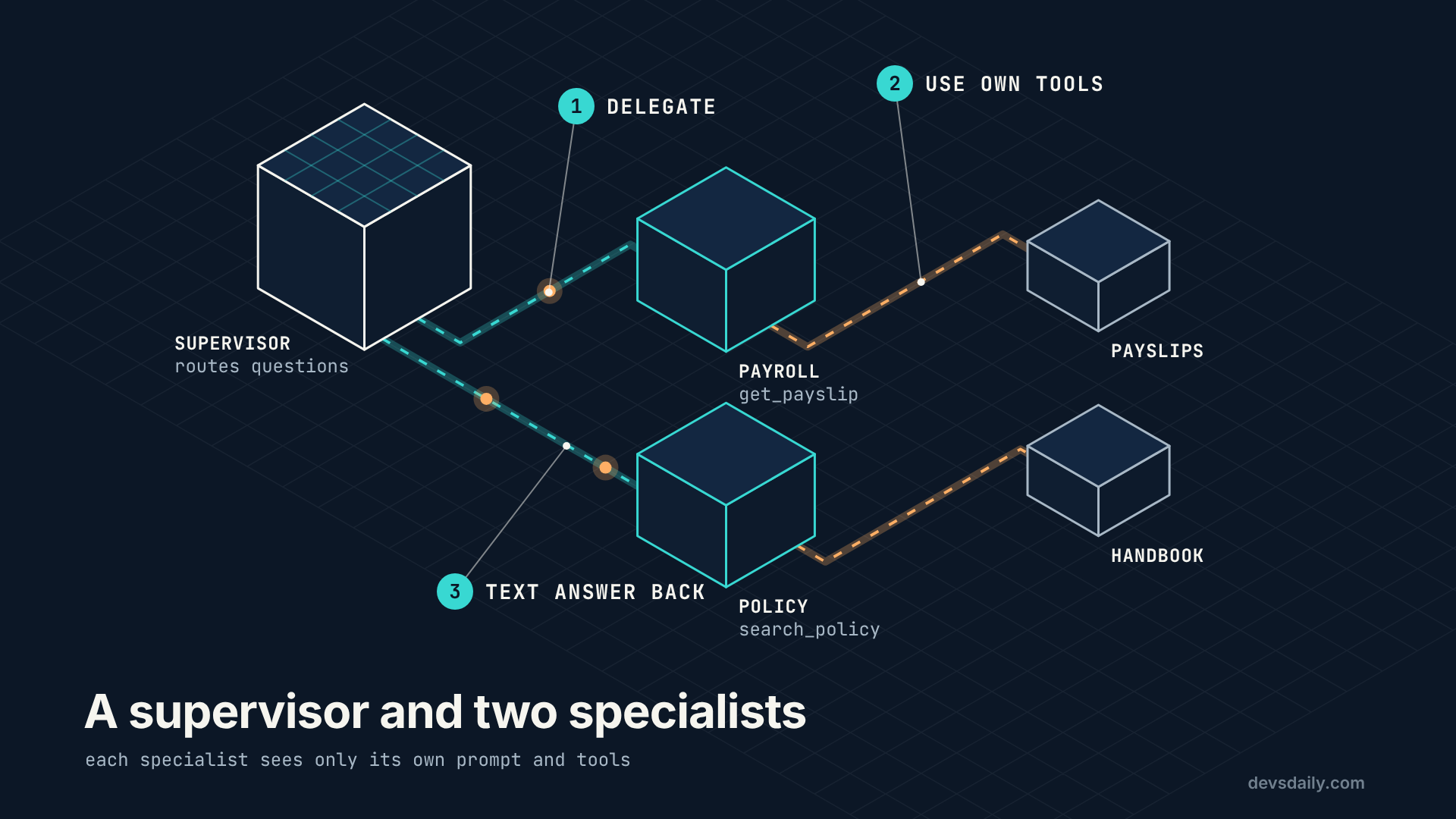
The cleanest way to build a supervisor in LangChain v1 is to make each specialist a tool. The supervisor does not need to know that a tool is "really" an agent. It just calls ask_payroll("...") and gets text back.
PAYROLL_PROMPT = (f"You are a payroll specialist. {EMPLOYEE} Answer questions about salary, "
                  "deductions, tax and payslips using get_payslip. Give exact amounts in INR.")

POLICY_PROMPT = (f"You are an HR policy specialist. {EMPLOYEE} Answer from search_policy results only, "
                 "cite sections in square brackets, and use get_leave_balance or get_holidays when the "
                 "question needs the employee's own numbers.")

SUPERVISOR_PROMPT = (f"You coordinate an HR helpdesk. {EMPLOYEE} You cannot see HR data yourself. "
                     "Send payroll questions to ask_payroll and policy, leave or holiday questions to "
                     "ask_policy. If a question needs both, ask both and combine the answers. "
                     "Use raise_ticket only when the employee wants a follow-up.")

def build_supervisor(model=None):
    model = model or get_model()
    payroll = create_agent(model, tools=[get_payslip], system_prompt=PAYROLL_PROMPT, name="payroll")
    policy = create_agent(model, tools=[search_policy, get_leave_balance, get_holidays],
                          system_prompt=POLICY_PROMPT, name="policy")

    @tool
    def ask_payroll(question: str) -> str:
        """Hand a payroll question (salary, deductions, tax, payslips) to the payroll specialist.
        Write the question so it makes sense on its own."""
        return payroll.invoke({"messages": [{"role": "user", "content": question}]})["messages"][-1].content

    @tool
    def ask_policy(question: str) -> str:
        """Hand a policy, leave or holiday question to the policy specialist.
        Write the question so it makes sense on its own."""
        return policy.invoke({"messages": [{"role": "user", "content": question}]})["messages"][-1].content

    return create_agent(model, tools=[ask_payroll, ask_policy, raise_ticket],
                        system_prompt=SUPERVISOR_PROMPT, name="supervisor")
Notice the line "Write the question so it makes sense on its own". Each specialist starts with an empty conversation: it sees only the question the supervisor writes, not the chat history. That is called context isolation, and it is both the main benefit and the main risk of this pattern. The benefit: each specialist gets a short, focused prompt and only the tools it needs. The risk: if the supervisor writes a poor question ("what about last month?"), the specialist has no way to know what "last month" refers to.
Step 3: Count the cost before you run anything
You can predict part of the result just by counting model calls. For "What was my net pay in October 2026?":
| Setup | Model calls |
|---|---|
| Single agent | 2: decide to call get_payslip, then answer |
| Supervisor | 4: supervisor delegates, payroll calls get_payslip, payroll answers, supervisor answers |
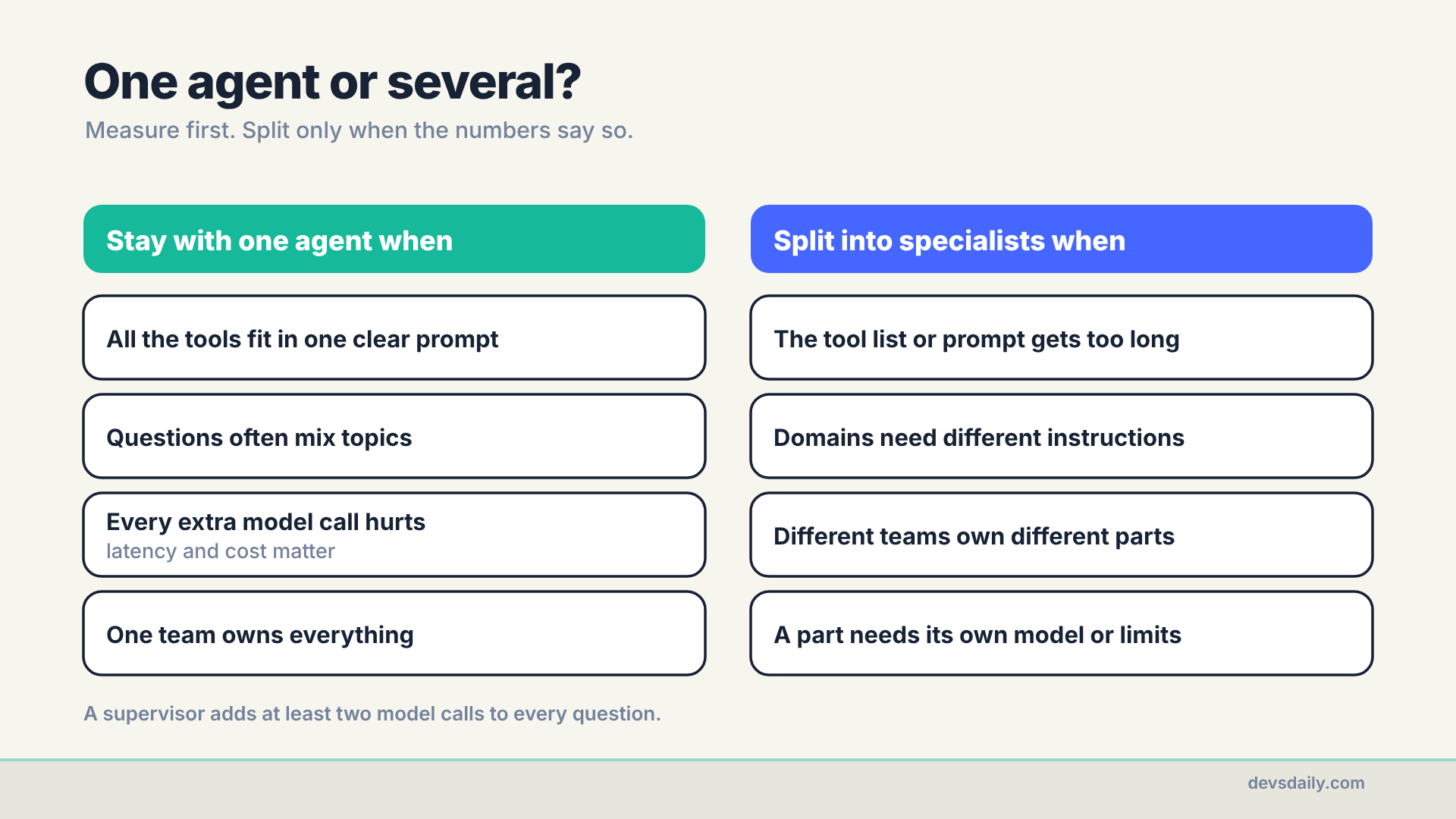
That is twice the calls, and each one adds delay and tokens. The supervisor also re-reads the specialist’s answer and rewrites it. So for the supervisor to be worth it, it has to be noticeably more accurate. That is what the test measures.
Step 4: Build a fair test
The companion repo has part08_multi_agent/questions.jsonl with 30 questions. Each one lists the facts a correct answer must contain:
{"question": "What was my net pay in October 2026?", "expected": ["120734"]}
{"question": "How much unused earned leave can I carry over to next year?", "expected": ["30"]}
{"question": "Is alcohol reimbursed on client dinners?", "expected": ["never|not|no"]}
{"question": "What was my October 2026 income tax, and when can I change my tax regime?", "expected": ["14250", "April"]}
They cover leave balances, payslips, holidays, handbook rules, and a few that need both specialists. Those mixed questions are the real test: a supervisor has to split them, ask two specialists and stitch the answers back together, while a single agent simply calls two tools. "never|not|no" means any of those words counts.
The runner sends each question to an agent and records three things:
# part08_multi_agent/compare.py
from langchain_core.callbacks import get_usage_metadata_callback

def run(agent, questions):
    rows = []
    for q in questions:
        hrms.reset()
        start = time.perf_counter()
        with get_usage_metadata_callback() as usage:   # counts tokens in nested agents too
            out = agent.invoke({"messages": [{"role": "user", "content": q["question"]}]})
        tokens = sum(v.get("total_tokens", 0) for v in usage.usage_metadata.values())
        rows.append({"question": q["question"],
                     "correct": is_correct(out["messages"][-1].content, q["expected"]),
                     "seconds": time.perf_counter() - start, "tokens": tokens})
    return rows
get_usage_metadata_callback matters here. A specialist runs inside a tool call, so its tokens would be invisible if you only looked at the supervisor’s messages. The callback counts every model call, nested ones included.
Note the hrms.reset() at the top of the loop, too. Both setups get the same questions, the same model and the same starting data, or the comparison means nothing.
Step 5: Run it and read the numbers
python -m part08_multi_agent.compareIt prints one line per setup, followed by any questions that setup got wrong. This is my run with gpt-5.4-mini:
single       accuracy 100.0%   median latency   2.9s   avg tokens     1460
supervisor   accuracy  93.3%   median latency   5.1s   avg tokens     2058
    missed: By when are payslips published?
    missed: How long do I have to raise a payslip mismatch?
So on our helpdesk, the supervisor was less accurate, 76% slower and about 40% more expensive per question. Look at the two misses. Both are about payslips, so the supervisor sent them to the payroll specialist. But the answers are in the handbook (section 4.3), and only the policy specialist can search it. The payroll specialist only has get_payslip, so it could not find the answer. The single agent never had to make that routing decision: it saw all five tools and picked search_policy.
Treat these numbers as directional, not proof. This is one run of one supervisor design on 30 questions, scored by simple word checks. Two misses out of 30 can move with a rerun, and other multi-agent patterns (routers, handoffs) would behave differently. What the run does show clearly is the mechanism: a routing decision that a single agent never has to make.
That is the hidden cost of splitting by domain. Real questions do not respect your domain boundaries, and every routing decision is one more place to be wrong.
My first run of this comparison also had a bug in the measurement itself. The model wrote "manager’s manager" with a curly apostrophe, and is_correct was looking for a straight one, so a correct answer was marked wrong. If a result surprises you, read the answers before you trust the percentage.
Your numbers will depend on your model, so run it yourself rather than trusting my table. Here is how to read them:
- If accuracy is about the same, the single agent wins, because it is faster and cheaper. With five tools and short prompts, this is the likely outcome: nothing in our helpdesk is too big for one agent to handle.
- If the supervisor is clearly more accurate, look at which questions it gets right that the single agent misses. If they are the mixed questions, the specialists’ focused prompts are helping, and the extra cost may be worth it.
- If the supervisor is less accurate, look at the questions it writes for the specialists. Lost context is the usual cause.
Whatever you find, write it down. Mine is one line: "single agent: 30/30, 2.9 s, 1,460 tokens; supervisor: 28/30, 5.1 s, 2,058 tokens; routing sent policy questions to the wrong specialist." That is a better design document than any architecture diagram.
Step 6: Where a Deep Agent fits
Supervisors split work by domain. Some jobs need something else: they are long, with many steps, and the agent needs to plan, keep notes and come back to them. For those, the deepagents package gives you a ready-made "harness" around create_agent with:
- a planning tool (
write_todos) the agent can use to break the job into steps and track progress - a virtual file system (
write_file,read_file,edit_fileand friends) for drafts and notes, so long work does not have to live in the chat history - the option to spawn subagents for focused subtasks
Here is a small job from our helpdesk to try it on: "Prepare a one-page policy summary for new joiners."
# part08_multi_agent/deep_agent.py
from deepagents import create_deep_agent

from helpdesk.llm import get_model
from part03_tools.tools import get_holidays
from part05_rag.agent import search_policy

TASK = ("Prepare a one-page policy summary for new joiners. Cover leave, work from home, "
        "holidays, payroll dates and expenses. Cite handbook sections in square brackets. "
        "Save it as /new_joiner_summary.md.")

def build_agent(model=None):
    return create_deep_agent(
        model=model or get_model(),
        tools=[search_policy, get_holidays],
        system_prompt=("You write clear HR documents for employees. Plan the document with "
                       "write_todos, research each topic with search_policy, then write the file."),
    )

if __name__ == "__main__":
    result = build_agent().invoke({"messages": [{"role": "user", "content": TASK}]})
    summary = result["files"]["/new_joiner_summary.md"]["content"]
    print(summary)
python -m part08_multi_agent.deep_agentI expected a todo list, a search per topic and items ticked off one by one. Streaming the run (Part 2’s trick) showed something simpler:
search_policy  {'query': 'leave policy summary new joiners handbook sections'}
search_policy  {'query': 'work from home policy summary new joiners handbook sections'}
search_policy  {'query': 'holidays policy summary payroll dates expenses handbook sections'}
search_policy  {'query': 'payroll dates expenses policy summary handbook sections'}
write_file     {'file_path': '/new_joiner_summary.md', 'content': '# New Joiner Policy Summary ...'}
No write_todos at all, even though the system prompt told it to plan with it. Four searches, one file of 262 words with six section citations, done. A five-topic page is not long enough to need a plan, and gpt-5.4-mini skipped one. That is the honest boundary for this tool: the harness only earns its keep on jobs that are genuinely long, such as reviewing every policy against a new law or drafting a full onboarding pack, where the agent would otherwise lose track halfway through.
By default the files live in the agent’s state (result["files"]), not on your disk, which keeps experiments safe. Deep Agents can also be configured to use real storage when you need it.
Use a Deep Agent when a task takes many steps and produces a document or artifact. Do not use it for "how many leave days do I have?": the extra machinery is pure cost there.
Get the code
This part is in part08_multi_agent/ of the companion repo. The offline test checks that the supervisor delegates correctly and that nested tokens are counted (four model calls, all included).
The series
This article is part of Building AI Agents, an 11-part series that builds one HR helpdesk agent from a plain loop to a production service.
- An agent is just a loop
- Your first LangChain agent
- Tools that don’t break your agent
- Give your agent a memory
- RAG as a tool, not a pipeline
- When the loop isn’t enough: graphs
- Human in the loop
- Many agents, or one good one? (you are here)
- Testing an agent you can’t predict
- Securing an agent
- Shipping your agent
Previous: Part 7: Human in the loop
Next: Part 9: Testing an agent you can’t predict. We turn questions like these into a proper evaluation suite that checks answers, tool calls and reasoning, and runs in CI on every change.
