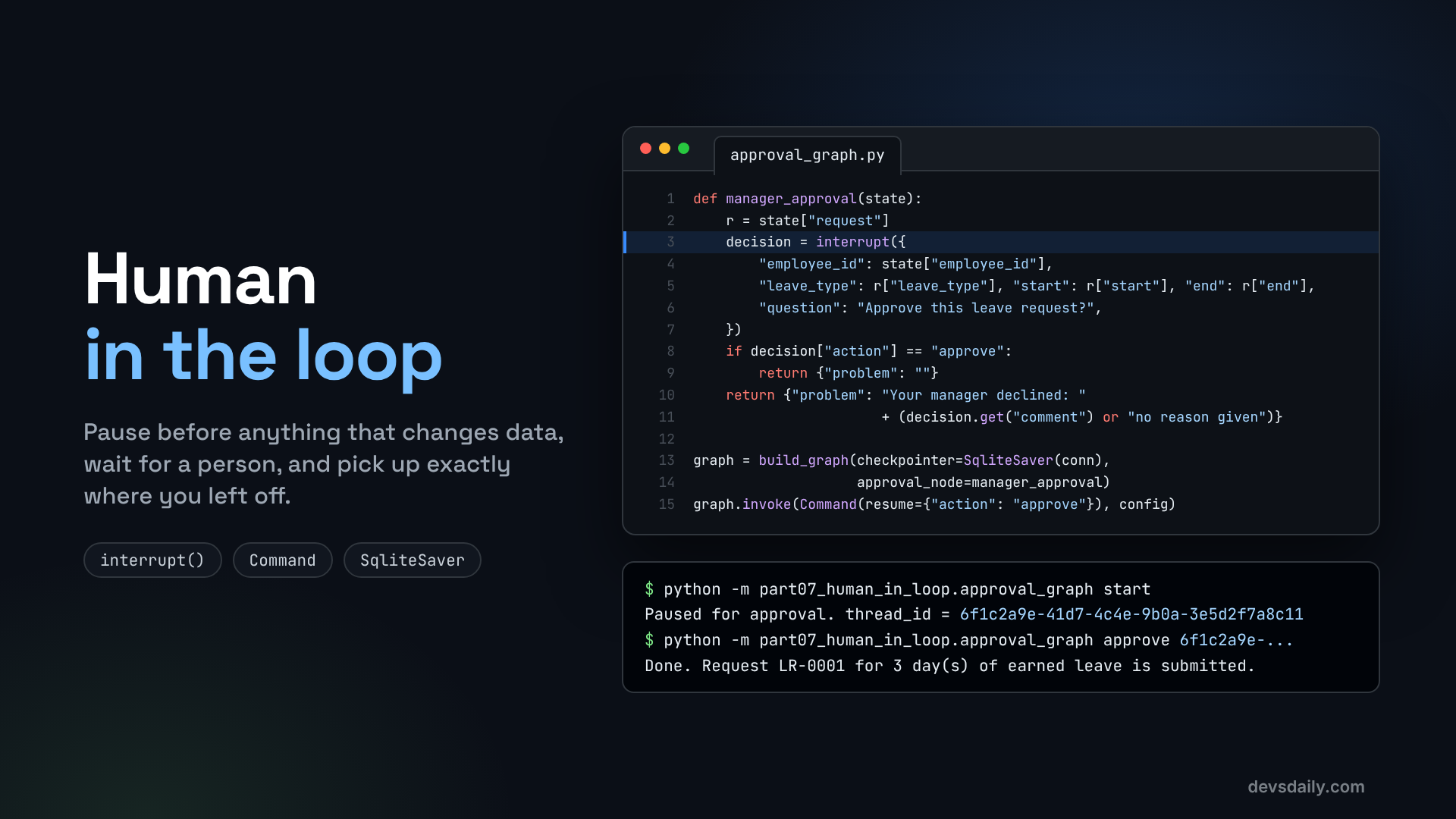

Pause the agent before anything that changes data, wait for a person, and resume exactly where you left off, even after a restart.
Building AI Agents · Part 7 of 11 · Start from Part 1 · All parts ↓
In short:
interrupt()pauses a graph and saves its state, andCommand(resume=...)continues it later, even from a new process after a restart. For free-form agents,HumanInTheLoopMiddlewaremakes chosen tools wait for approve, edit or reject. Writes wait; reads flow.Where this fits: Part 6 gave us a leave workflow that checks its rules in code. Here a person approves before anything is submitted. Part 8 asks whether splitting the agent into several specialists would make it better.
Our leave workflow from Part 6 checks the dates and the balance in code, then submits. In a real company, one more thing happens before leave is booked: a manager approves it. And that manager might answer in five minutes or on Monday morning.
This is the most important safety pattern in agent design. Let the agent read, think and prepare freely, but before it changes anything (books leave, opens a ticket, sends an email, moves money), stop and ask a person.
In this article you will build that pause two ways:
- Inside a graph, with LangGraph’s
interrupt(), so the leave workflow waits for the manager. - Inside an agent, with LangChain’s
HumanInTheLoopMiddleware, so any write tool waits for approval.
Both rely on the checkpointer you met in Part 4. The graph version uses SQLite, so its pause survives a restart; the agent version keeps it in memory to stay short, and I will show where to swap in SQLite. Start from your Part 6 project or the companion repo, and install the SQLite checkpointer:
pip install langgraph-checkpoint-sqliteHow a pause works
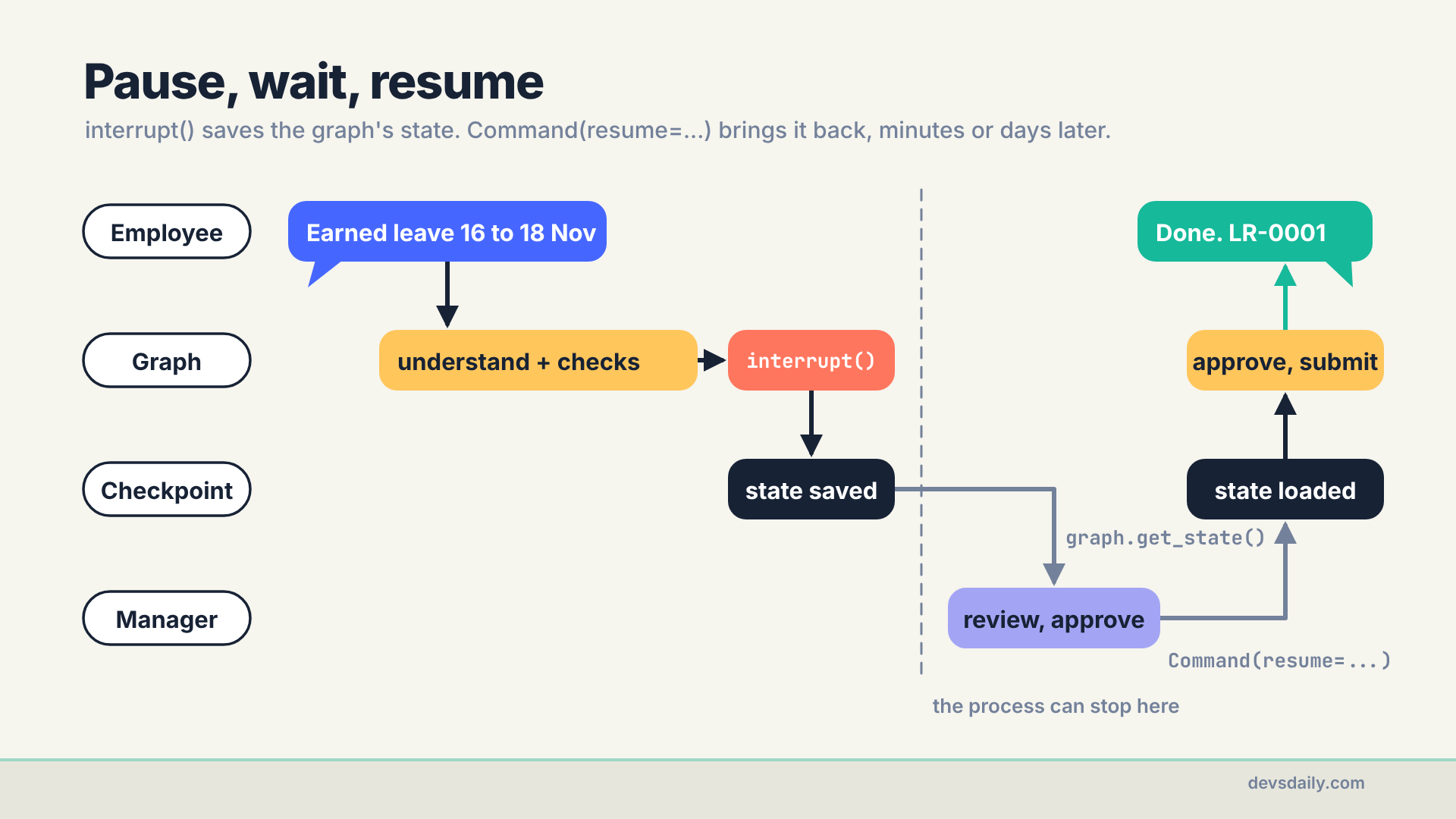
When a node calls interrupt(payload), LangGraph does three things:
- It saves the graph’s state through the checkpointer.
- It stops and hands
payloadback to your code, so you can show it to a person. - Later, when you call the graph with
Command(resume=answer)on the samethread_id, it loads the state andinterrupt()returnsanswer.
Between steps 2 and 3, nothing is running. The Python process can exit, the server can be redeployed, the manager can go to lunch. The state is in the database.
Part A: an approval step in the graph
Step 1: Write the approval node
# part07_human_in_loop/approval_graph.py
from langgraph.types import Command, interrupt

def manager_approval(state):
    r = state["request"]
    decision = interrupt({                       # the graph stops here and saves its state
        "employee_id": state["employee_id"],
        "leave_type": r["leave_type"], "start": r["start"], "end": r["end"], "reason": r["reason"],
        "question": "Approve this leave request?",
    })
    request = {**r, "decided_by": decision["approver_id"]}   # who decided is saved with the request
    if decision["action"] == "approve":         # runs again, from the top, after resume
        return {"problem": "", "request": request}
    return {"problem": "Your manager declined: " + (decision.get("comment") or "no reason given"),
            "request": request}
The payload is what the manager will see, so include everything they need to decide: who, what type, which dates, and why. "Approve?" with no context leads to rubber-stamping.
The return value follows the same convention as the Part 6 nodes: an empty problem means carry on, anything else goes to explain_problem. It also copies the approver’s ID into the request, so the saved state records who decided. Where that ID comes from is Step 4’s job.
Step 2: Plug it into the graph
The Part 6 build_graph has a hook for exactly this. When an approval_node is given, it is placed between check_balance and submit:
# part06_graphs/leave_workflow.py (excerpt)
    if approval_node:  # Part 7 plugs a human approval step in here
        g.add_node("approve", approval_node)
        g.add_conditional_edges("check_balance", ok_or_problem("approve"), ["approve", "explain_problem"])
        g.add_conditional_edges("approve", ok_or_problem("submit"), ["submit", "explain_problem"])
    else:
        g.add_conditional_edges("check_balance", ok_or_problem("submit"), ["submit", "explain_problem"])
So the full path is now: understand, validate, check balance, approve, submit. A manager only ever sees requests that already passed the rules, which saves them from approving leave the employee does not have.
Step 3: Save state to SQLite
Without a checkpointer, interrupt() has nowhere to save state and there is nothing to resume. And InMemorySaver is not enough here either: a pause that disappears when the process restarts is not a pause. Build the graph with a SqliteSaver:
import sqlite3

from langgraph.checkpoint.sqlite import SqliteSaver

from part06_graphs.leave_workflow import build_graph

def get_graph(conn, model=None):
    return build_graph(model=model, checkpointer=SqliteSaver(conn), approval_node=manager_approval)
The checkpoints go into a file called checkpoints.sqlite. In production you would use the Postgres checkpointer, so every server instance sees the same pauses.
Step 4: Start, review, approve
The companion repo turns this into a small command-line tool with four commands. Start a request:
python -m part07_human_in_loop.approval_graph start "Earned leave 2026-11-16 to 2026-11-18, family trip"Paused for approval. thread_id = 6f1c2a9e-41d7-4c4e-9b0a-3e5d2f7a8c11(Yours will be a different ID: the script makes a new one for every request.) The process has exited. Nothing is running. That thread_id is now the only way back to this request, so a real app stores it next to the approval request it shows the manager. Now, as the manager, look at what is waiting:
python -m part07_human_in_loop.approval_graph review 6f1c2a9e-41d7-4c4e-9b0a-3e5d2f7a8c11{'employee_id': 'E1042', 'leave_type': 'earned', 'start': '2026-11-16', 'end': '2026-11-18', 'reason': 'family trip', 'question': 'Approve this leave request?'}That reads the saved state without running anything:
for task in graph.get_state(config).tasks:
    for pending in task.interrupts:
        print(pending.value)
Then approve it as Neha Kapoor (E2001), Asha’s manager, or reject it with a reason:
python -m part07_human_in_loop.approval_graph approve 6f1c2a9e-41d7-4c4e-9b0a-3e5d2f7a8c11 --as E2001
python -m part07_human_in_loop.approval_graph reject  6f1c2a9e-41d7-4c4e-9b0a-3e5d2f7a8c11 "Team offsite that week" --as E2001
--as stands in for the manager’s verified login. In a real app the approver’s ID comes from the session, never from the request body or the agent. Both commands go through decide, which checks the HR data before it resumes anything:
def decide(graph, thread_id, approver_id, action, comment=""):
    config = {"configurable": {"thread_id": thread_id}}
    state = graph.get_state(config)
    if not state.next:                          # unknown thread, or already decided
        raise ApprovalError("No decision is waiting on this request.")
    employee = hrms.get_employee(state.values["employee_id"])
    if approver_id != employee["manager_id"]:
        raise ApprovalError(f"{approver_id} cannot decide on {employee['name']}'s leave.")
    resume = {"action": action, "comment": comment, "approver_id": approver_id}
    return graph.invoke(Command(resume=resume), config)["reply"]
For Neha, the approval goes through:
Done. Request LR-0001 for 3 day(s) of earned leave is submitted.A brand-new Python process picked up a graph that a different process paused. That is durable execution, and it is what makes human approval practical in real systems.
Rejecting goes through the same interrupt(), comes back with action set to reject, and ends at explain_problem:
Your manager declined: Team offsite that weekIn my run I checked the leave balance after each path: 9 earned days after the approval, still 12 after the rejection. Nothing was booked until a person said yes.
Now the cases that must fail. Rohan (E1043) might get hold of the same thread_id, from a forwarded link for example, but he is not Asha’s manager. And once Neha has decided, there is nothing left to approve:
Not allowed: E1043 cannot decide on Asha Verma's leave.
Not allowed: No decision is waiting on this request.
The thread_id finds the request; the HR system decides who may answer it. The companion repo tests the right approver, the wrong one, and a second approval of the same request.
Because decide reads the HR data when the decision is made, not when the request paused, a change of manager in between is picked up. What the checkpoint cannot do is retire old requests. Give pending approvals an expiry, and cancel them when the employee withdraws the request.
One rule about resuming
When a graph resumes, the interrupted node runs again from its first line, and this time interrupt() returns the answer instead of pausing. So any code above interrupt() runs twice. Keep that part free of side effects (reading state is fine; sending an email is not), or make it idempotent. Our node only reads state before the interrupt, so it is safe.
What can change while you wait
A pause that lasts until Monday means the world can change underneath it. If the employee books other leave in the meantime, the balance that check_balance saw is out of date by the time the manager clicks approve. The HR system checks again at submit, and the Part 6 submit node turns its refusal into a reply such as "Could not submit: Not enough casual leave: asked for 3, have 2." The companion repo has a test for exactly that. Never assume a check made before a pause still holds after it.
Part B: approval for agent tools
The graph version is ideal for a fixed process. For a free-form agent, where the model decides which tools to call, LangChain has middleware that pauses before chosen tools.
Step 5: Choose which tools need approval
# part07_human_in_loop/approval_agent.py
from langchain.agents import create_agent
from langchain.agents.middleware import HumanInTheLoopMiddleware
from langgraph.checkpoint.memory import InMemorySaver

def build_agent(model=None, checkpointer=None):
    return create_agent(
        model or get_model(),
        tools=[get_leave_balance, get_holidays, apply_leave, raise_ticket],
        system_prompt="You are an HR helpdesk assistant for employee E1042. Today is 2026-11-07.",
        checkpointer=checkpointer or InMemorySaver(),   # pausing needs a checkpointer
        middleware=[HumanInTheLoopMiddleware(interrupt_on={
            "apply_leave": True,                                          # approve, edit, reject or respond
            "raise_ticket": {"allowed_decisions": ["approve", "reject"]}, # no editing tickets
            "get_leave_balance": False,                                   # reads never pause
            "get_holidays": False,
        })],
    )
InMemorySaver keeps this example short, so these pauses are lost on restart. To make them durable, pass checkpointer=SqliteSaver(conn) exactly as in Step 3; nothing else changes.
interrupt_on maps tool names to a policy:
Trueallows every decision: approve it as it is, edit the arguments first, reject it, or respond, which skips the tool and hands the model your answer instead (useful for "ask the user" style tools).- A dict with
allowed_decisionslimits the choices. Falsemeans never pause. Reads should not wait for anyone.
Step 6: Handle the pause
When the model calls apply_leave, the agent stops before the tool runs and returns the pending request under __interrupt__:
from langgraph.types import Command

config = {"configurable": {"thread_id": "demo-1"}}
result = agent.invoke({"messages": [{"role": "user", "content":
                       "Book earned leave from 2026-11-16 to 2026-11-18 for a family trip."}]}, config)

while "__interrupt__" in result:
    request = result["__interrupt__"][0].value
    decisions = []
    for action in request["action_requests"]:
        print(f"\nThe agent wants to run {action['name']} with {action['args']}")
        answer = input("approve / reject? ").strip().lower()
        if answer.startswith("a"):
            decisions.append({"type": "approve"})
        else:
            decisions.append({"type": "reject", "message": input("Why? ")})
    result = agent.invoke(Command(resume={"decisions": decisions}), config)

print(result["messages"][-1].content)
One decision is needed for each action in action_requests (the model can request several tools at once). To change the arguments instead, send an edit:
{"type": "edit", "edited_action": {"name": "apply_leave",
                                   "args": {"employee_id": "E1042", "leave_type": "earned",
                                            "start": "2026-11-17", "end": "2026-11-18"}}}
A rejection reaches the model as the tool’s result, in this exact form: "User rejected the tool call for apply_leave with reason: Please wait until the team plan is out." The model can then explain what happened to the employee instead of trying the same call again. This is what gpt-5.4-mini told the employee in my run:
I couldn't submit that leave request right now: the system says, **"Please wait until the team plan is out."**Notice two things. The balance stayed at 12, so the tool never ran. And the reviewer’s reason went to the employee word for word, credited to "the system". Write rejection reasons as if the employee will read them, because they will.
One more thing this demo leaves out. Here the person typing at input() is the approver, and the middleware never asks who they are: it handles the pause, not the permission. In a real app, the endpoint that receives the decisions must authenticate the approver and check that they may approve, just as decide does in Step 4, before it resumes the agent.
What should wait for a human?
A practical rule: writes wait, reads flow. Anything that changes data, spends money, contacts someone or cannot be undone waits for a yes. Looking things up never does, otherwise people stop reading the approval requests and just click "approve".
Two more habits pay off. Keep a record of every decision (who approved what, when), which Part 10 builds as an audit log. And do not put an approval in front of something a rule can decide: the balance check stays in code, so the manager only judges what needs judgement.
Get the code
This part is in part07_human_in_loop/ of the companion repo. One test pauses a graph, "restarts" by opening a fresh connection to the same SQLite file, and resumes it. Another checks that a rejected apply_leave never touches the leave balance.
The series
This article is part of Building AI Agents, an 11-part series that builds one HR helpdesk agent from a plain loop to a production service.
- An agent is just a loop
- Your first LangChain agent
- Tools that don’t break your agent
- Give your agent a memory
- RAG as a tool, not a pipeline
- When the loop isn’t enough: graphs
- Human in the loop (you are here)
- Many agents, or one good one?
- Testing an agent you can’t predict
- Securing an agent
- Shipping your agent
Previous: Part 6: When the loop isn’t enough: graphs
Next: Part 8: Many agents, or one good one? We split the helpdesk into a supervisor and two specialists, measure it against a single agent on the same 30 questions, and try a Deep Agent on a longer task.
