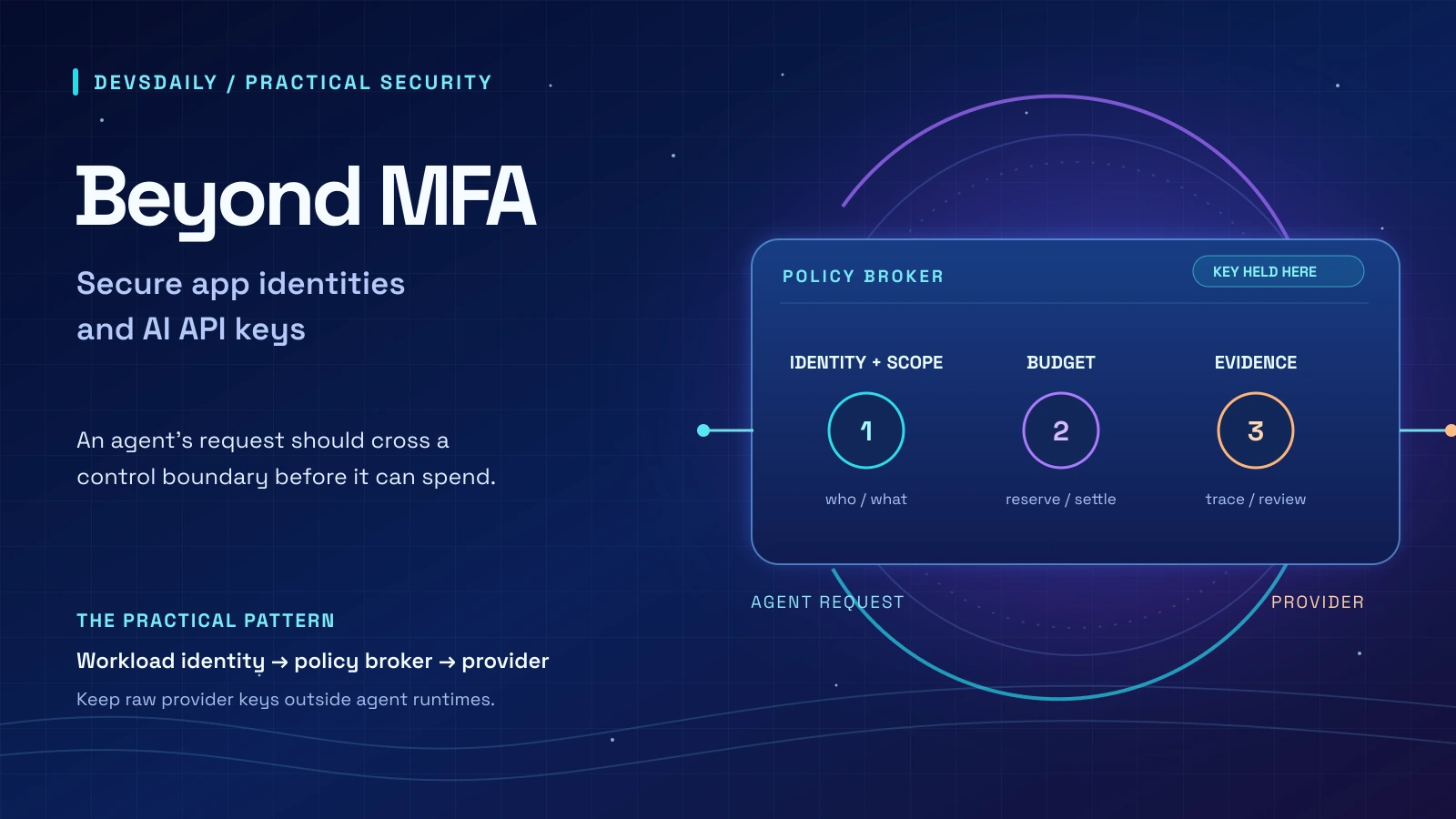

Your employees can have MFA. Your tenant can still be compromised.
Disclosure: This article was prepared with AI assistance and reviewed against the linked documentation. The companion Python lab passed eight local tests; no live Microsoft 365 tenant, Kubernetes cluster or AI provider was tested.
Cover: A scoped agent request passes identity, budget and evidence checks before reaching an AI provider. Illustration by DevsDaily with AI assistance | AI-Generated
Your LLM API key is also permission to spend money.
These two statements belong in the same architecture review. An integration credential can authorize access to business data. An AI provider key can authorize model usage and charges. Once accepted, either credential lets software act with the permissions behind it.
The work starts with five concrete checks: inventory application credentials, put provider access behind a broker, reserve budget before dispatch, restrict agent egress, and investigate what happens after authentication. Recovery belongs in the same review, because a missed credential can reopen the door.
The examples are defensive and intended for environments you administer. The companion lab uses Python’s standard library and makes no paid API calls. Kubernetes, Graph PowerShell and KQL examples require adaptation to your environment.
What the incidents actually show
In October 2026, Huntress documented abuse of ConnectWise application credentials to obtain access to customer Microsoft 365 tenants. In one investigated tenant, a second ConnectWise application assigned itself Global Administrator and added credentials to other trusted applications. Disabling the original application does not remove credentials planted on those other identities.
Separately, OpenCode’s public statement and incident reporting describe affected hosted Console users being told that saved third-party provider keys may have been exposed. The reported scope distinguishes the hosted Console from the local OpenCode application. The public record does not justify inventing an exploit chain or treating every installation as affected.
CERT-In’s 15 October advisory, CIAD-2026-0049 adds a related lesson: agents can find exposed credentials and permissive APIs faster, while affected organisations may fail to detect the resulting access.
The question for your next design review is: what can this identity do, where can it act, and what evidence will its actions leave?
First, separate the identities
An employee session, an application identity and a provider key have different security properties.
| Identity | What it represents | What to review |
|---|---|---|
| Employee session | A signed-in person | MFA, session controls, user privileges |
| Application identity | Software acting under its own identity | Granted roles, credentials, ownership, workload controls |
| AI provider key | Access to a provider project or account | Key permissions, model access, usage, billing limits |
| Agent task identity | A particular automated workload | Tenant scope, allowed tools, lifetime, network destinations |
Microsoft Entra also distinguishes an application object from its service principal, the application’s local representation in a tenant. For a multi-tenant vendor application, the home application and its credentials may reside in the vendor’s tenant. Your local review cannot inspect everything the vendor controls. Microsoft’s identity model explains that distinction.
MFA remains essential for people. Application-only authentication follows a separate path, so a user MFA policy cannot be assumed to govern that path.
Download the companion examples (ZIP). Start with examples/README.md: the archive contains a local Python budget-ledger lab and starter files for Microsoft Graph inventory, Entra detection queries and Kubernetes egress policy. The exercises below explain what each file demonstrates and where it needs adaptation.
To try the self-contained lab, unzip the archive and run python3 -m unittest discover -s examples -v with Python 3.9 or newer. Its eight tests use integer demo units and make no paid API calls. The Graph, KQL and Kubernetes files are starting points, not ready-to-deploy controls: review permissions, fields, selectors and enforcement in your own environment before using them.
Exercise 1: Make an inventory you can investigate
Start with one critical integration. Record its application ID, local object ID, owner, business purpose, granted application permissions, directory roles, credential metadata, and last observed use. Add a revocation owner and a tested recovery procedure.
The companion examples/inventory.ps1 exports credential metadata from application objects and service principals using Microsoft Graph PowerShell. It requires an installed Graph module and an authorised account with Application.Read.All; tenant consent may be required. It does not grant consent or change credentials.
Run it in a controlled working directory:
./examples/inventory.ps1The CSV contains IDs and validity dates, not plaintext secrets. Treat it as sensitive operational inventory. It is one input to the review, not a complete permission audit: inspect owners, consent, app-role assignments and directory-role assignments separately. Federated identity credentials also need their own review.
An unfamiliar credential is an investigation lead. Compare it with change records, deployment configuration and the owner before deciding it is malicious. For a vendor-owned home application, request evidence from the vendor as well as reviewing local service-principal activity.
Takeaway: an application name is insufficient. You need object IDs, permission scope, ownership and credential history. The Graph PowerShell reference documents the read operation used by the script.
Exercise 2: Put a broker between the agent and the provider
Giving an agent a raw provider key makes every environment that can read that key part of your billing security boundary.
Keep the provider credential in a small broker service. The agent authenticates to that broker using a scoped workload identity. The broker determines the tenant, permitted operation, model and maximum output, then calls a fixed provider endpoint.
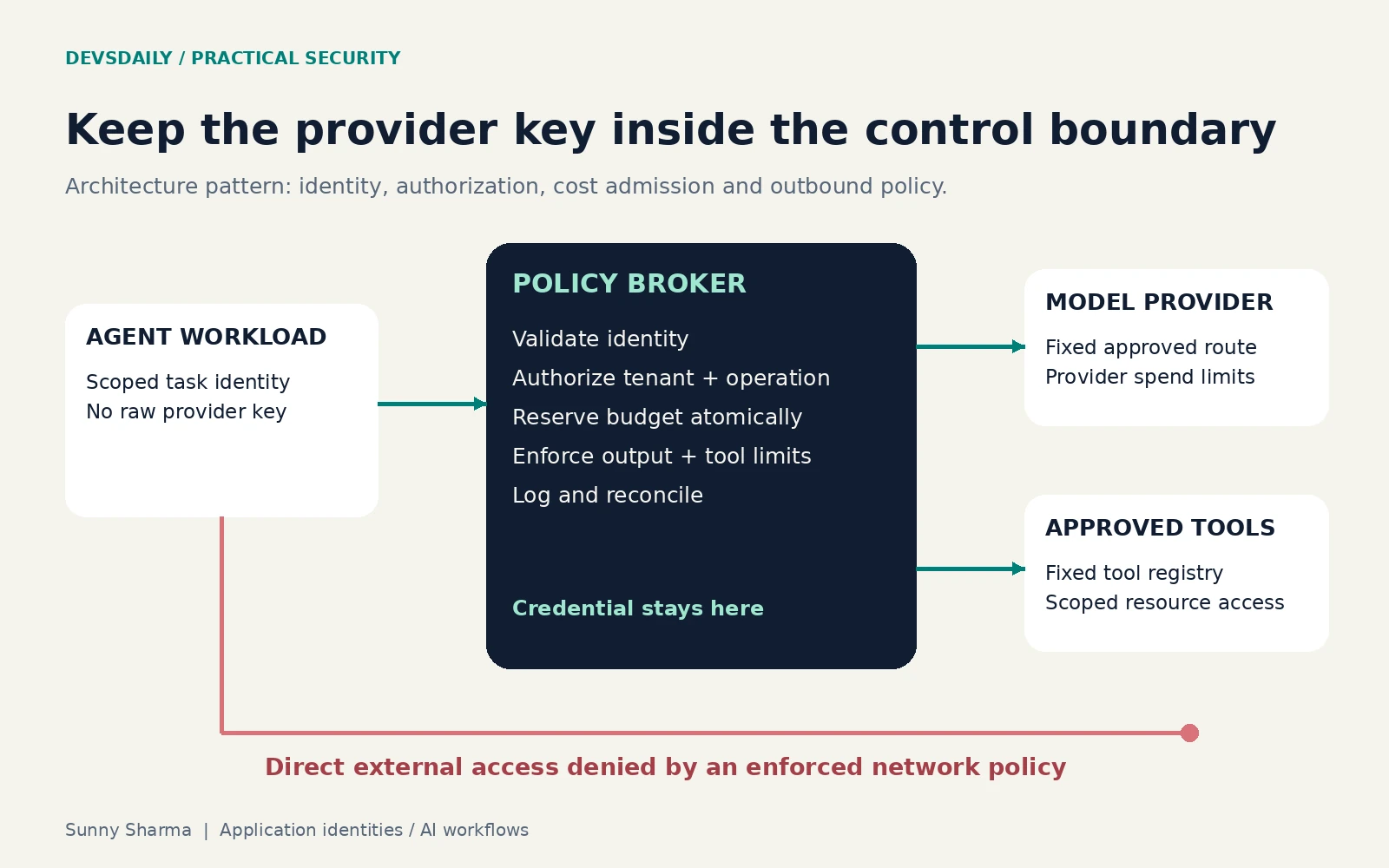
The broker should perform these decisions in application code:
- Validate the workload identity and derive tenant scope from trusted authentication state.
- Authorize the operation for that tenant and workload.
- Map a permitted operation to a fixed tool or provider route.
- Validate arguments and set server-side output, time and concurrency limits.
- Reserve budget, dispatch the request and record its outcome.
Do not accept a caller-supplied tenant_id, provider URL or unrestricted tool name as authority. A model proposing a tool call is providing input to your policy layer.
For example, this is implementation pseudocode, not a runnable authentication service:
principal = validate_workload_identity(request.authorization)
policy = load_policy(principal.tenant, principal.workload)
operation = validate_operation(request.body, policy.allowed_operations)
route = server_owned_registry[operation.name]
authorize(principal, route, operation.arguments)
reservation = reserve_budget_atomically(principal.tenant, cost_upper_bound)
dispatch(route, bounded_arguments, reservation.id)
Keep the key out of prompts, traces and client bundles. Where supported, add provider-side project isolation, identity federation, key restrictions and enforced spend limits.
The broker becomes a privileged component. Restrict its outbound routes, validate redirects and destinations, protect its credential store, and prevent agents from changing its policy. Otherwise, a generic forwarding endpoint merely relocates the original risk.
Takeaway: a gateway controls only traffic that passes through it. If a stolen provider key can be used directly, the gateway’s quota can be bypassed. Provider-side restrictions and key custody still matter.
Exercise 3: Reserve budget before concurrent work starts
A post-request cost check is too late for admission control. Multiple workers can all observe the same available balance and dispatch expensive work before any of them records a charge.
Use a reservation ledger. Before dispatch, atomically reserve a conservative upper bound. When authoritative usage becomes available, settle the actual cost and release the unused portion.
admit only if:
    spent + reserved + next_reservation <= budget
For a text-only operation, an estimate can include input tokens, the enforced output ceiling and current model prices. Tool fees, reasoning tokens, images, audio and retries may require additional allowances. A provider price change or incomplete cost model can invalidate your estimate.
The companion budget_ledger.py demonstrates the accounting pattern with SQLite transactions and integer demo units. These units are deliberately not dollars or provider prices. Its admission update is conditional and executes inside BEGIN IMMEDIATE:
UPDATE budgets
SET reserved = reserved + :upper_bound
WHERE tenant = :tenant
  AND spent + reserved + :upper_bound <= ceiling;
If the update affects zero rows, reject admission. The full example also records the request ID in the same transaction and refuses duplicate reservation attempts.
Run the local tests:
cd examples
python3 -m unittest -v
The suite checks that 20 concurrent attempts to reserve 100 units against a 500-unit budget admit exactly five. It also checks tenant isolation, repeated settlement, duplicate requests, invalid costs and pending reservations after a restart.
Two cases are easy to get wrong:
- Unknown outcome: a provider timeout does not prove the request was unbilled. Keep the reservation pending until usage is reconciled.
- Retries: reusing a ledger ID does not make an external provider call idempotent. Persist dispatch state and verify the provider’s idempotency semantics before retrying.
For production, add authenticated request handling, a suitable shared transactional store, billing periods, durable job state, reconciliation, alerting and operational recovery. Never return an overspent reservation to the pool merely because the estimate was wrong.
Alerts and hard limits are different controls
As of 20 October 2026, OpenAI’s spend-limit documentation distinguishes notification alerts from enforced organisation or project hard limits. Alerts allow traffic to continue. Enforced limits reject affected requests after tracked spend reaches the configured amount, but propagation delay can allow some overrun.
Verify the behaviour for each provider and account. Also distinguish spend limits from request-rate limits. On a spend-related rejection, avoid retry loops that continually resubmit work or silently move it to another paid project.
Takeaway: combine provider controls, atomic admission and reconciliation. None of these makes an inaccurate cost estimate exact.
Exercise 4: Restrict agent egress outside the model
CERT-In explicitly recommends network-layer restrictions for agent workloads. A system prompt cannot enforce packet routing.
The companion examples/agent-egress.yaml selects app: agent-worker pods in ai-lab. It permits TCP access to app: ai-broker pods in ai-control on port 8443, plus DNS to a specifically selected resolver. The namespace and pod selectors are in the same peer entry, so both must match.
kubectl apply --dry-run=server -f examples/agent-egress.yaml
# After reviewing the selectors and cluster networking:
kubectl apply -f examples/agent-egress.yaml
Use an enforcing CNI. NetworkPolicies combine additively, so another allow policy can widen access. Adapt DNS rules for NodeLocal DNS or other resolver layouts. DNS access itself needs monitoring; it can carry unintended data. The broker needs its own restrictive policy.
From a disposable, equivalently configured pod, test that the broker works and direct provider or unrelated HTTPS access fails. A successful dry run validates the resource, not packet enforcement. Standard NetworkPolicy is not an HTTP-host allowlist. Kubernetes documents these policy semantics and prerequisites.
Takeaway: test the denied path, and prevent agent workloads from changing the policies or labels that define their boundary.
Exercise 5: Investigate successful authentication
Successful authentication should begin another set of questions: what changed, what was read and what was spent?
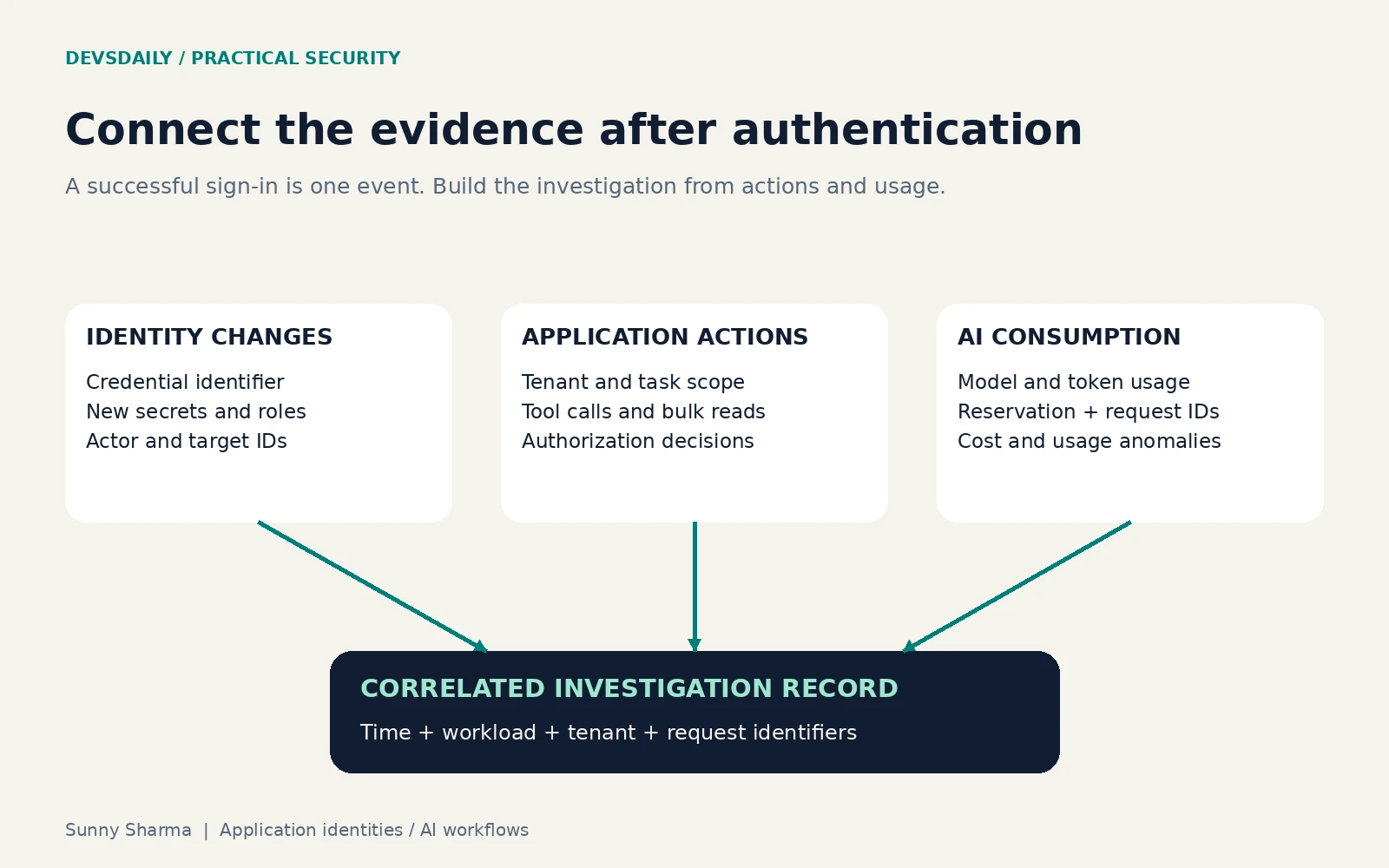
For Entra, export the required diagnostic categories to your authorised Log Analytics or Sentinel workspace. Availability, licensing, retention and routing determine what you can query. A missing table means the query cannot work; it does not mean there was no activity.
Start by examining the actual result encoding:
AADServicePrincipalSignInLogs
| where TimeGenerated > ago(1d)
| summarize Events=count() by ResultType, ResultSignature
The companion detection.kql then builds a review queue of successful application sign-ins grouped by application, service principal and hour. It includes credential IDs, resource names and source IPs. Confirm your status encoding before adopting its success filter. The fields come from Microsoft’s service-principal sign-in schema.
The audit query looks for credential-related operations, application updates and privilege changes. It retains the actor, target, modified properties, result and correlation ID. It includes attempted changes, so distinguish success from failure during investigation. Use Microsoft’s audit schema and application security operations guidance to tune it.
Treat these as starting queries, not production detections. They have not been executed against your tenant. Test them with known benign changes, confirm field population and tune against approved automation. High sign-in volume, Python user agents or unfamiliar IPs alone do not establish maliciousness.
At the broker and application layers, record:
| Field | Investigation purpose |
|---|---|
| Tenant and workload identity | Establish which scope acted |
| Task and request IDs | Connect tool calls and model requests |
| Tool, operation and authorization result | Explain why an action was allowed |
| Model, token usage and cost estimate | Detect unexpected consumption |
| Reservation and provider request IDs | Reconcile billing and ambiguous failures |
| Credential identifier | Locate the affected credential without logging its value |
Keep raw prompts, authorization headers, secret values and personal records out of routine logs. Use controlled evidence capture when investigation requires sensitive content. Send security telemetry outside the workload’s administrative boundary and alert on logging gaps.
Takeaway: sign-in, application action and provider usage describe different parts of the event. Correlate them without assuming every system records every read.
Recovery has two meanings
Incident recovery means removing the attacker’s ability to return. Preserve evidence, contain affected identities or runtimes, review related applications and role changes, then establish clean credential custody. If the runtime remains compromised, it may capture replacement secrets. Disable affected access promptly, then coordinate replacement and validation from a trusted environment. Existing token behaviour depends on the resource and revocation mechanism; do not assume instant universal invalidation.
Account recovery is another trust boundary. Microsoft’s ASP.NET Core Identity advisory, CVE-2026-70175, describes reset and confirmation flows that can deliver mail to an unvalidated request address instead of the user’s stored canonical address. Apply the vendor fix and test custom handlers. A valid token is insufficient if delivery is unsafe.
For your own recovery workflows, test four cases:
- A request-supplied destination cannot override the stored, verified destination.
- A new application credential raises a review event with actor and target details.
- Revoking the original credential is followed by a review of other credentials and grants created during exposure.
- An agent task that fails during provider dispatch keeps its budget reservation until the outcome is known.
What to take into the next architecture review
| Audience | Concrete next step | Evidence to bring |
|---|---|---|
| AI developers | Keep provider credentials behind controlled custody | A denied direct-call test and bounded task policy |
| Backend and platform engineers | Add atomic admission and enforce egress | Concurrency results and network enforcement tests |
| Cybersecurity teams | Investigate credential and privilege changes | Known-good audit events and a documented response path |
| Engineering leaders | Assign owners and expiry reviews | An integration register with permission and revocation owners |
Pick one high-impact integration and one AI workflow. Document their permissions, prove that a denied action actually fails, and rehearse revocation. Use what breaks in that rehearsal to decide what to fix next.
The useful question is not only whether a credential is valid. Ask what it authorizes, what limits its use, and whether you would notice it being abused.
Sources and example scope
Incident scope reflects information available on 20 October 2026. The OpenCode section is explicitly attributed to disclosure reporting; its low-level breach mechanism is not assumed. Implementation examples are original teaching material. The Python ledger was tested locally; infrastructure and detection examples require environment validation.
- Huntress: ConnectWise vendor-credential investigation
- OpenCode Console disclosure reporting and original-source links
- CERT-In: CIAD-2026-0049
- Microsoft: application objects and service principals
- Microsoft: Get-MgServicePrincipal
- Microsoft: service-principal sign-in log schema
- Microsoft: audit log schema
- Microsoft: security operations for applications
- Kubernetes: Network Policies
- OpenAI: spend limits
- Microsoft advisory: CVE-2026-70175
The Python accounting lab was executed locally; tenant queries, cluster policies and provider integrations were not tested in a live environment.
