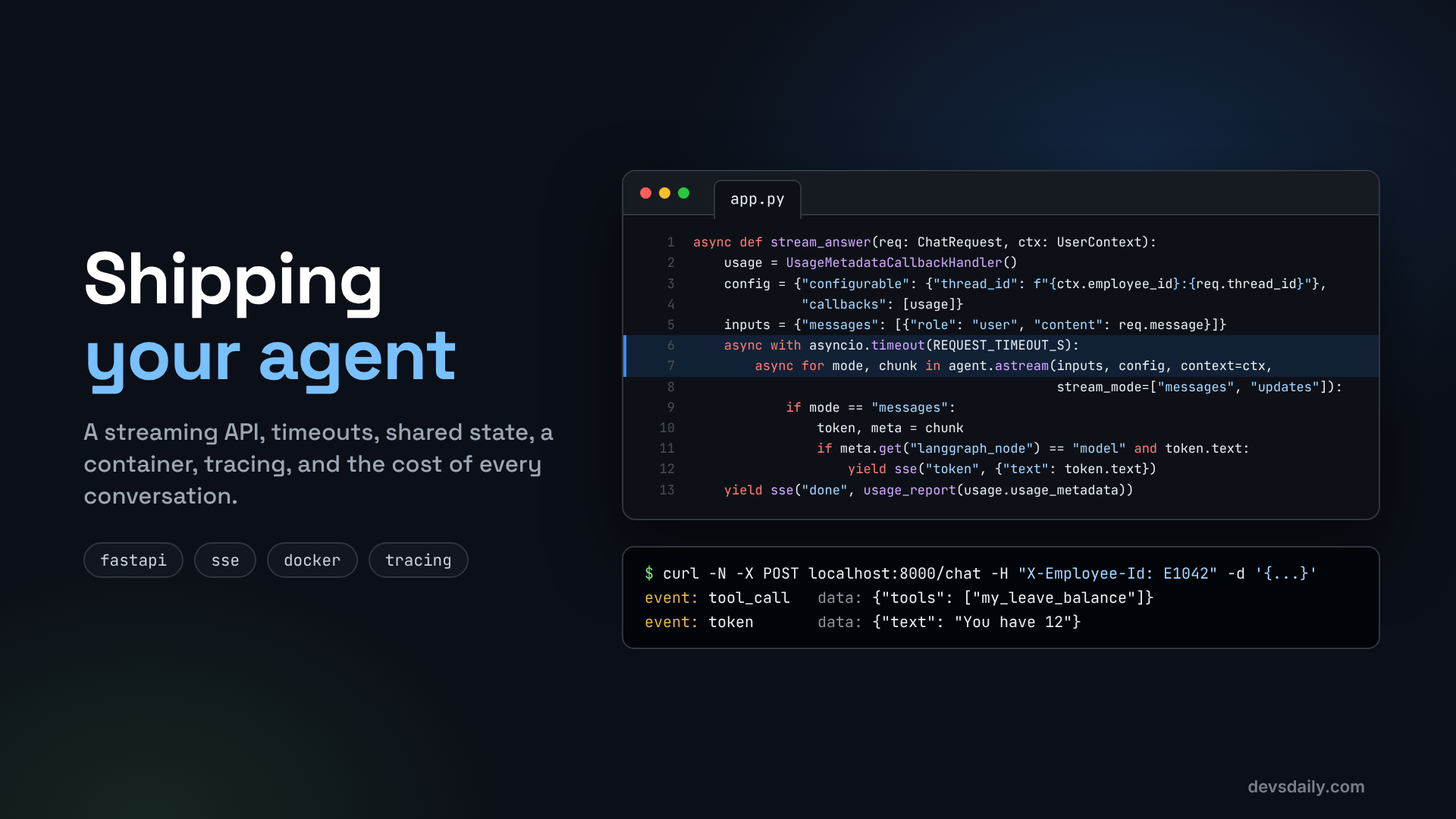

Deploy an AI agent as a real service: a streaming HTTP API, timeouts and limits, shared state, a container, tracing, and a clear number for what each conversation costs.
Building AI Agents · Part 11 of 11 · Start from Part 1 · All parts ↓
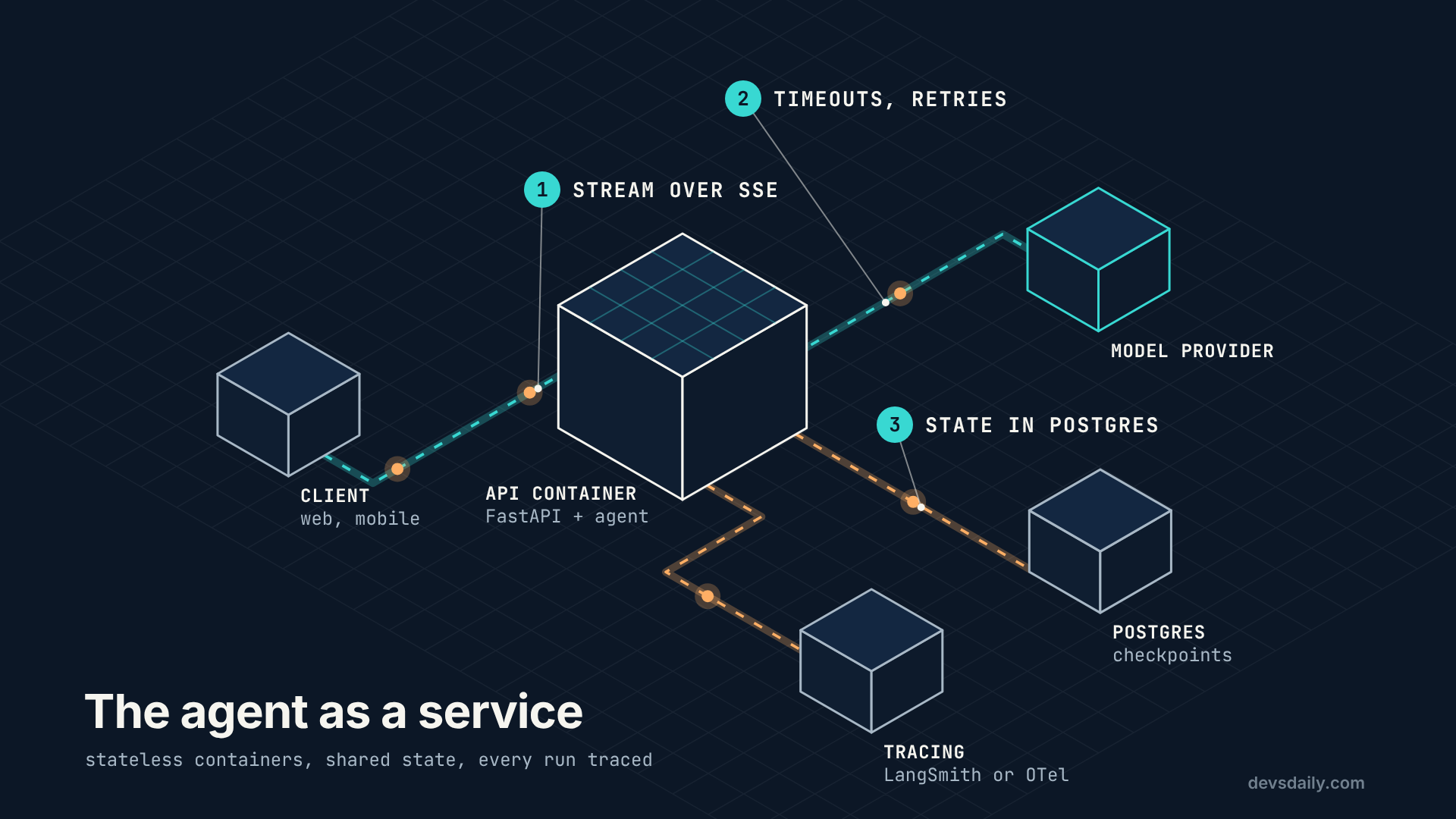
In short: Wrap the agent in a FastAPI endpoint that streams tokens and tool events over SSE, add two levels of timeout, keep state in a shared database, package it in a container, turn on tracing, and report what every conversation costs.
Where this fits: This is the last part. Everything from Parts 1 to 10 comes together as a service an app can call, and its cost-per-conversation number is where the Model Router series picks up.
Over ten articles our HR helpdesk agent has learned to use tools, remember, search the handbook, follow a process, wait for approval, pass its evals and resist the usual attacks. It still only runs from a terminal.
This last part shows how to deploy an AI agent as something an app can call, starting from the secure agent in Part 10. You need your Part 10 project or the companion repo, with the handbook index built, plus FastAPI and a server to run it:
pip install fastapi "uvicorn[standard]"Step 1: One endpoint, one request shape
The API is small: POST /chat with a thread ID and a message.
# part11_service/app.py
from pydantic import BaseModel, Field

class ChatRequest(BaseModel):
    thread_id: str = Field(min_length=1, max_length=100)
    message: str = Field(min_length=1, max_length=4000)
Limits on the request are your first line of defence. A 4,000-character cap on the message stops someone pasting a novel into your token bill.
The agent is built once, when the app starts, not on every request:
from contextlib import asynccontextmanager

from fastapi import FastAPI
from langgraph.checkpoint.memory import InMemorySaver

from helpdesk.llm import get_model
from part10_security.secure_agent import UserContext, build_agent

state = {}

@asynccontextmanager
async def lifespan(app: FastAPI):
    model = get_model(timeout=30, max_retries=2)   # per-call timeout and retries
    state["agent"] = build_agent(model, checkpointer=InMemorySaver())  # Postgres saver in production
    yield

app = FastAPI(title="HR helpdesk agent", lifespan=lifespan)
timeout=30, max_retries=2 are passed straight to the provider’s client: each model call gives up after 30 seconds and is retried twice on transient errors. That is the first of two timeouts.
Step 2: Stream the answer
Nobody wants to stare at a spinner for eight seconds. Streaming shows the answer as it is written, and also lets the UI say "Checking your leave balance…" while a tool runs.
LangGraph agents can stream several kinds of data at once. We use two:
messagesyields tokens as the model produces them.updatesyields each step’s result, which is where tool calls and tool results show up.
import asyncio
import json
import logging
import time

from langchain_core.callbacks import UsageMetadataCallbackHandler

REQUEST_TIMEOUT_S = 90

def sse(event: str, data: dict) -> str:
    return f"event: {event}\ndata: {json.dumps(data)}\n\n"

async def stream_answer(req: ChatRequest, ctx: UserContext):
    usage = UsageMetadataCallbackHandler()
    config = {"configurable": {"thread_id": f"{ctx.employee_id}:{req.thread_id}"}, "callbacks": [usage]}
    inputs = {"messages": [{"role": "user", "content": req.message}]}
    started = time.perf_counter()
    try:
        async with asyncio.timeout(REQUEST_TIMEOUT_S):
            async for mode, chunk in state["agent"].astream(inputs, config, context=ctx,
                                                            stream_mode=["messages", "updates"]):
                if mode == "messages":
                    token, meta = chunk
                    if meta.get("langgraph_node") == "model" and token.text and not getattr(token, "tool_call_chunks", None):
                        yield sse("token", {"text": token.text})
                elif mode == "updates":
                    for node, update in chunk.items():
                        for msg in (update or {}).get("messages", []):
                            if msg.type == "ai" and msg.tool_calls:
                                yield sse("tool_call", {"tools": [c["name"] for c in msg.tool_calls]})
                            elif msg.type == "tool":
                                yield sse("tool_result", {"tool": msg.name, "status": msg.status})
    except TimeoutError:
        yield sse("error", {"message": "The assistant took too long. Please try again."})
        return
    except Exception:  # model, tool or middleware failure: log the details, show the user a safe message
        logging.getLogger(__name__).exception("chat request failed")
        yield sse("error", {"message": "Something went wrong. Please try again."})
        return
    report = usage_report(usage.usage_metadata)
    report["seconds"] = round(time.perf_counter() - started, 2)
    yield sse("done", report)
A few things worth noticing:
- The thread ID is scoped to the employee (
E1042:t1). Even if two users send the samethread_id, they never share a conversation. - Only tokens from the
modelnode are sent, and never tool-call fragments, so the user sees the answer and not JSON. asyncio.timeout(90)is the second timeout, for the whole request. Together with Part 10’s call limits, no request can run forever. Those limits bound one request, though, not the bill: nothing here stops a user sending a thousand of them. Per-user rate limits and a budget check belong in front of this endpoint, in your API gateway or the app.- Errors are events too. The client always gets a clear ending:
doneorerror. A timeout gets its own message; any other failure is logged in full on the server, while the user only sees a safe, generic message. The companion repo tests that path with a model that throws. - A dropped connection is the case events cannot cover. If the network fails before
donearrives, the client cannot tell how far the request got, and its natural move is to send the message again. In this sample that is harmless, because the Part 10 agent’s tools only read. Add a write tool, such as Part 3’sraise_ticket, and a resent message can create a second ticket: the retry Part 3 warned about. The fix is a request ID the app creates once per user action and sends again on every retry. The service stores the result under that ID and returns it on a repeat, and passes the ID to write tools as their idempotency key. This sample does not implement it, because it has nothing to protect yet.
The route
The route returns a StreamingResponse:
from fastapi import Header, HTTPException
from fastapi.responses import StreamingResponse

@app.post("/chat")
async def chat(req: ChatRequest, x_employee_id: str = Header(...), x_role: str = Header("employee")):
    if x_role not in ("employee", "manager"):
        raise HTTPException(400, "Unknown role")
    ctx = UserContext(employee_id=x_employee_id, role=x_role)
    return StreamingResponse(stream_answer(req, ctx), media_type="text/event-stream",
                             headers={"Cache-Control": "no-cache", "X-Accel-Buffering": "no"})
A warning about those headers. Reading the employee ID from a header the client sets is fine for a demo and never fine in production, because anyone can send any header. In a real app, take the identity from a verified session or token (for example, the ID token from your single sign-on) inside this function. Everything Part 10 built depends on that identity being true.
X-Accel-Buffering: no tells nginx-style proxies not to buffer the stream. Without it, some proxies hold the whole response and your "streaming" arrives all at once.
Step 3: Try it
uvicorn part11_service.app:app --port 8000In another terminal:
curl -N -X POST localhost:8000/chat -H "Content-Type: application/json" \
     -H "X-Employee-Id: E1042" -H "X-Role: employee" \
     -d '{"thread_id": "t1", "message": "How many earned leave days do I have?"}'
You will see events arrive one by one:
event: tool_call
data: {"tools": ["my_leave_balance"]}

event: tool_result
data: {"tool": "my_leave_balance", "status": "success"}

event: token
data: {"text": "You"}

event: token
data: {"text": " have"}
...
event: done
data: {"input_tokens": 677, "output_tokens": 27, "cost_usd": 0.000629, "seconds": 2.86}
Those are the real numbers from my run with gpt-5.4-mini. The tokens arrive as Markdown (the model wraps "12 earned leave days" in **), so render them as Markdown in your UI.
A browser can read this with fetch and a stream reader, since this endpoint uses POST (the browser’s built-in EventSource only supports GET). Behind a load balancer or proxy, a long silence during a slow tool call can trip an idle timeout. Sending an SSE comment line (: ping) every 15 seconds or so keeps the connection open, and stopping the agent when the client disconnects saves tokens nobody will read. Starlette, which FastAPI builds on, already does that part: when the client goes away it cancels the stream, and the agent run inside it stops. I checked that with the versions in the repo’s constraints.txt.
Step 4: Share state between servers
In Part 4 we used InMemorySaver. In a service it has two problems: it is lost on every restart, and with more than one worker process, each worker has its own memory. A follow-up message that lands on a different worker finds no conversation.
So the companion repo’s Dockerfile runs one worker while state is in memory. For production, switch to the Postgres checkpointer (package langgraph-checkpoint-postgres). Then every worker and every container reads the same conversation state, and you can scale out freely. The agent code does not change; only the checkpointer you pass to build_agent does.
The same goes for Part 7’s paused approvals: they must live in the shared database, or a manager’s "approve" may reach a server that has never heard of the request.
Step 5: Package it
# Dockerfile
FROM python:3.12-slim

ENV PYTHONDONTWRITEBYTECODE=1 PYTHONUNBUFFERED=1
WORKDIR /app

COPY requirements.txt .
RUN pip install --no-cache-dir -r requirements.txt

COPY . .
# Build the handbook index before building the image (python -m part05_rag.ingest),
# so data/handbook_index.json is copied in and the container needs no embedding call at start.

RUN useradd --create-home appuser
USER appuser

EXPOSE 8000
# One worker while the checkpointer is in memory. With a Postgres checkpointer you can run more
# workers or replicas, because every one of them reads the same conversation state.
CMD ["uvicorn", "part11_service.app:app", "--host", "0.0.0.0", "--port", "8000", "--workers", "1"]
python -m part05_rag.ingest
docker build -t hr-helpdesk-agent .
docker run --env-file .env -p 8000:8000 hr-helpdesk-agentThree habits are baked in: the container runs as a non-root user, secrets come from the environment (--env-file, or your platform’s secret store) and never from the image, and .dockerignore keeps .env, local databases and the audit log out of the build.
There is also a /healthz endpoint for your load balancer or orchestrator.
Step 6: Turn on tracing
When an employee says "the bot gave me a weird answer yesterday", you need to see exactly what happened: every model call, every tool call, every input and output. That is tracing.
With LangSmith, it is three environment variables and no code changes:
LANGSMITH_TRACING=true
LANGSMITH_API_KEY=lsv2_...
LANGSMITH_PROJECT=hr-helpdesk-agent
If your organisation standardises on OpenTelemetry instead, LangChain can export traces through OTel to your existing observability stack. Either way, two cautions:
- Traces contain conversation content, unmasked. Part 10’s
PIIMiddlewarecleans what goes to the model, but the tracer records the request before that middleware runs, so an email address the employee typed lands in the trace as typed. Treat your tracing tool like any system that stores personal data: access control and retention limits, plus masking of its own. In LangSmith,LANGSMITH_HIDE_INPUTS=trueandLANGSMITH_HIDE_OUTPUTS=truedrop inputs and outputs entirely, or you can give the LangSmith client a masking function that redacts just the sensitive parts. - Link traces to your audit log with the thread ID, so an investigation can move from "who did what" to "why did the model decide that".
Step 7: Know what each conversation costs
Every model call is billed by tokens in and tokens out. What surprises most teams is how much goes in. Each call resends the system prompt, every tool definition, the conversation so far and every tool result, not just the new question:
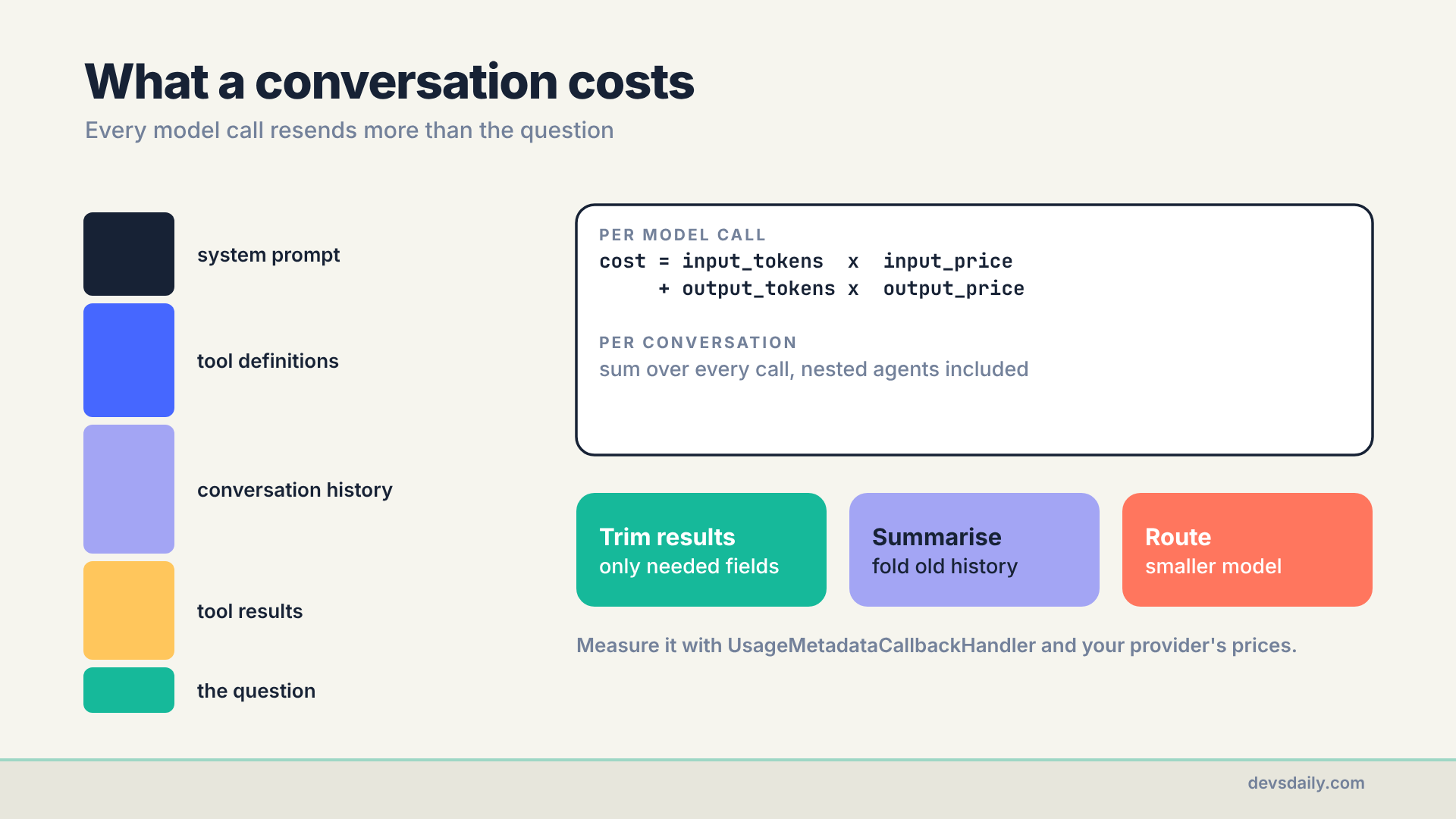
The UsageMetadataCallbackHandler in Step 2 collects token counts from every model call in the request, including nested agents. Turning that into money needs your provider’s prices, which change, so they live in .env rather than in code:
PRICE_IN = float(os.getenv("PRICE_INPUT_PER_1M", "0"))    # your provider's price per 1M input tokens
PRICE_OUT = float(os.getenv("PRICE_OUTPUT_PER_1M", "0"))  # and per 1M output tokens
PRICE_CACHED = float(os.getenv("PRICE_CACHED_INPUT_PER_1M") or PRICE_IN)  # cached input; unset means full price

def usage_report(usage: dict) -> dict:
    tokens_in = sum(u.get("input_tokens", 0) for u in usage.values())       # includes cached tokens
    cached = sum(u.get("input_token_details", {}).get("cache_read", 0) for u in usage.values())
    tokens_out = sum(u.get("output_tokens", 0) for u in usage.values())
    cost = ((tokens_in - cached) * PRICE_IN + cached * PRICE_CACHED + tokens_out * PRICE_OUT) / 1e6
    return {"input_tokens": tokens_in, "output_tokens": tokens_out, "cost_usd": round(cost, 6)}
For gpt-5.4-mini, OpenAI’s list price when I wrote this was $0.75 per million input tokens and $4.50 per million output tokens, so .env gets PRICE_INPUT_PER_1M=0.75 and PRICE_OUTPUT_PER_1M=4.50. Cached input was $0.075 per million, a tenth of the full rate. Check the current prices for your model before you trust the totals.
One refinement. Providers cache repeated prompt prefixes, such as the system prompt and tool definitions, and bill cached input at a much lower rate. LangChain reports those tokens as cache_read, so the report prices them separately once you set PRICE_CACHED_INPUT_PER_1M to your model’s cached-input price. Leave it unset and every input token is priced at the full rate, which is how the figures below were calculated, so treat them as an upper bound.
What three questions cost
Every done event now carries the cost of that request. These are three questions from my run:
| Question | Input tokens | Output tokens | Cost |
|---|---|---|---|
| "How many earned leave days do I have?" | 677 | 27 | $0.000629 |
| "What is Rohan Mehta’s salary? His ID is E1043." (refused, no tool) | 315 | 69 | $0.000547 |
| "Can I work from home on Fridays?" | 897 | 126 | $0.001240 |
Notice the split. Almost all of it is input, which is exactly what the diagram above predicts. The refusal needed one model call, so it paid for the system prompt and tool definitions once. The leave question needed two calls, so it paid for them twice. The handbook question cost the most, because the search results went back into the second call as input. Log it, add it up per thread, and you have cost per conversation, the number your finance team will eventually ask for.
Then pull the levers you already have: return fewer fields from tools (Part 3), summarise long threads (Part 4), and cap calls (Part 10). The biggest lever is one we have not touched yet: not every question needs the same model. "Thanks!" and "What is the WFH policy?" do not need the model you use for "Why did my tax go up and what should I declare?". That idea is the whole of our next series.
Eleven parts later
Eleven parts ago, this agent was a for loop and two functions. Now it streams its answers, remembers the conversation, searches a handbook and cites it, waits for a manager before booking leave, passes a test suite on every change, and will not hand over a colleague’s salary however the question is phrased. No single piece of that is clever. What made it shippable was putting each rule somewhere the model cannot argue with it: in a tool, in the shape of a graph, in a test, in the session.
If you take one habit from this series, take the first one. Write the loop by hand once, the way Part 1 did, so you always know what is being sent to the model and what it is allowed to call. Every decision after that got easier for me because of it. Thanks for reading along. The cost table above is where the Model Router series picks up.
Get the code
The service is in part11_service/ of the companion repo, with the Dockerfile at the root. The offline test starts the app with a scripted model, calls /chat, and checks the stream: a tool call, a tool result, tokens, and a done event with token counts.
The series
This article is part of Building AI Agents, an 11-part series that builds one HR helpdesk agent from a plain loop to a production service.
- An agent is just a loop
- Your first LangChain agent
- Tools that don’t break your agent
- Give your agent a memory
- RAG as a tool, not a pipeline
- When the loop isn’t enough: graphs
- Human in the loop
- Many agents, or one good one?
- Testing an agent you can’t predict
- Securing an agent
- Shipping your agent (you are here)
Previous: Part 10: Securing an agent
Next: the Model Router series, starting with Not every prompt needs your biggest model. We take this agent’s cost-per-conversation number and cut it by sending each request to the right model.
