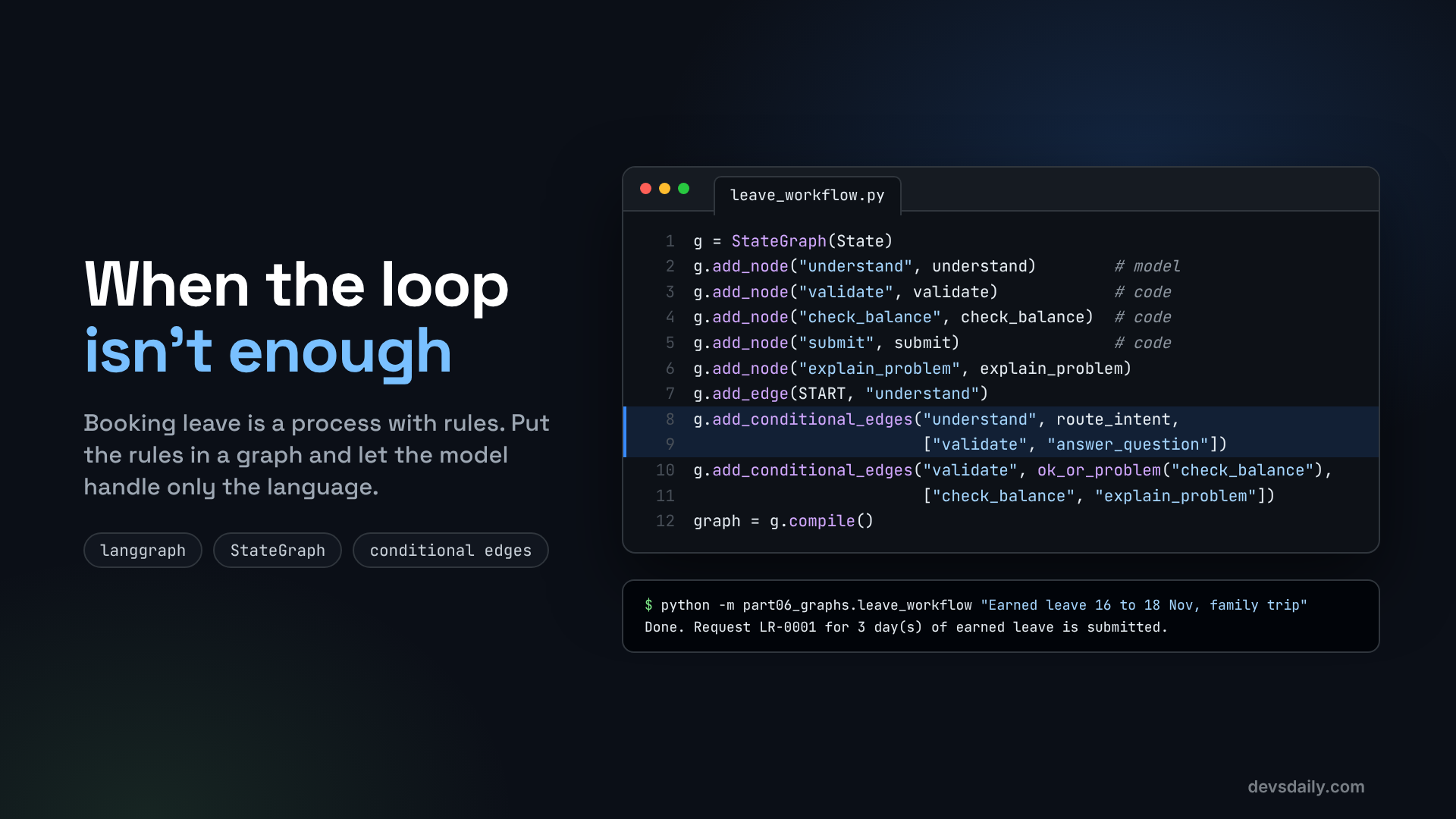

Some jobs are processes with rules, not conversations. Build a leave-booking workflow in LangGraph where code owns the steps and the model only handles language.
Building AI Agents · Part 6 of 11 · Start from Part 1 · All parts ↓
In short: Booking leave is a process, not a chat. In a LangGraph graph, code owns the order of steps and the rules (valid dates, enough balance, submit once), the model only turns a sentence into fields, and an agent can still be one node in the graph.
Where this fits: Parts 1 to 5 built a free-form agent. This part shows when to stop letting the model decide the steps. Part 7 adds the step every real leave process has: a manager’s approval.
So far our helpdesk agent has been a loop: the model looks at the conversation and decides what to do next. That is perfect for open questions like "why is my take-home lower this month?", where nobody can predict the steps in advance.
Booking leave is different. It is a process with rules that must always hold:
- Understand what the employee is asking for.
- Check that the dates make sense.
- Check that they have enough leave.
- Only then submit, exactly once.
You could write those rules into a system prompt and hope the model follows them every time. Most of the time it will. "Most of the time" is not good enough when the step it skips is the balance check. In this article we move the process into a LangGraph graph, where the order of steps is fixed in code, and the model is only used for the part it is good at: reading a messy human sentence.
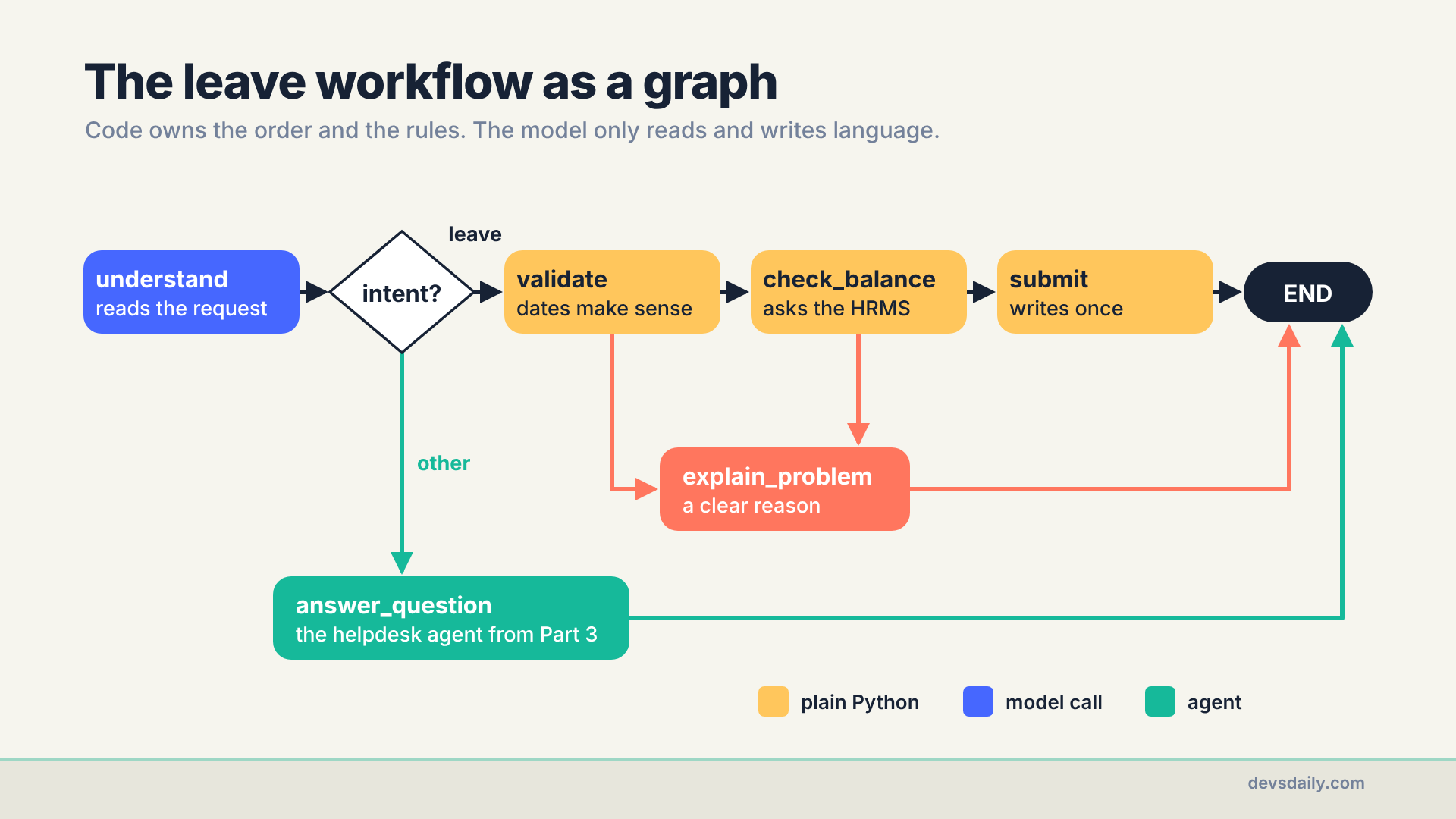
The workflow we build has six steps. One calls the model, one hands off to the Part 3 helpdesk agent, and the other four are plain Python. To follow along you need your Part 5 project or the companion repo. LangGraph came with LangChain, so there is nothing new to install.
Three ideas: state, nodes, edges
LangGraph models a workflow as a graph.
- State is a dictionary that every step can read. You define its keys up front.
- Nodes are plain Python functions. Each one receives the state and returns only the keys it wants to change.
- Edges connect nodes. A normal edge always goes to the same next node. A conditional edge calls a small function that looks at the state and returns the name of the next node.
create_agent from Part 2 is itself a LangGraph graph with two nodes, "model" and "tools", and a conditional edge between them. Today we draw our own.
Step 1: Describe what the model should extract
The only language task is turning a sentence into fields. Define those fields with Pydantic. The model will fill them in using structured output, like HelpdeskAnswer in Part 2:
# part06_graphs/leave_workflow.py
from typing import Literal, Optional

from pydantic import BaseModel, Field

class LeaveRequest(BaseModel):
    """What the employee is asking for, read from their message."""
    intent: Literal["apply_leave", "other"] = Field(description="apply_leave only if they want to book leave")
    leave_type: Optional[Literal["earned", "sick", "casual"]] = None
    start: Optional[str] = Field(default=None, description="YYYY-MM-DD")
    end: Optional[str] = Field(default=None, description="YYYY-MM-DD")
    reason: str = ""
The intent field lets one graph handle both "book my leave" and "what is the WFH policy?" without guessing in code.
Step 2: Define the state
from typing_extensions import TypedDict

class State(TypedDict, total=False):
    employee_id: str
    message: str
    request: dict          # LeaveRequest as a plain dict, so checkpoints stay simple JSON
    problem: str
    result: dict
    reply: str
total=False means a node can return just one or two keys. We store the request as a plain dict rather than the Pydantic object. That will matter in Part 7, when state gets saved to a database between steps.
Step 3: Write the nodes
The understand node is the only one that calls the model. with_structured_output makes the model return a LeaveRequest directly:
def build_graph(model=None, helpdesk_agent=None, checkpointer=None, approval_node=None):
    model = model or get_model()
    reader = model.with_structured_output(LeaveRequest)

    def understand(state: State) -> State:
        prompt = ("Read this HR helpdesk message. Today is 2026-11-07. "
                  f"Extract a leave request if there is one.\n\nMessage: {state['message']}")
        return {"request": reader.invoke(prompt).model_dump()}
Telling the model today’s date matters, because "next Monday" is meaningless without it. We fix it to 2026-11-07 so examples are repeatable. In a real app, use today’s date in the company’s business timezone (for example datetime.now(ZoneInfo("Asia/Kolkata")).date()), not the server’s local date, which may sit in another timezone.
The rule nodes are ordinary Python. No prompt, no model, no surprises:
    def validate(state: State) -> State:
        r = state["request"]
        if not (r["leave_type"] and r["start"] and r["end"]):
            return {"problem": "I need the leave type and both dates (YYYY-MM-DD) to book this."}
        try:
            d1, d2 = date.fromisoformat(r["start"]), date.fromisoformat(r["end"])
        except ValueError:
            return {"problem": "Those dates don't look right. Please use YYYY-MM-DD."}
        if d2 < d1:
            return {"problem": "The end date is before the start date."}
        if d1 < date(2026, 11, 7) and r["leave_type"] != "sick":
            return {"problem": "Only sick leave can be applied for past dates."}
        return {"problem": ""}

    def check_balance(state: State) -> State:
        r = state["request"]
        have = hrms.get_leave_balance(state["employee_id"])[r["leave_type"]]
        days = (date.fromisoformat(r["end"]) - date.fromisoformat(r["start"])).days + 1
        if days > have:
            return {"problem": f"You asked for {days} days of {r['leave_type']} leave but have {have} left."}
        return {"problem": ""}

    def submit(state: State) -> State:
        r = state["request"]
        try:  # the HR system re-checks the balance; it may have changed since check_balance ran
            result = hrms.apply_leave(state["employee_id"], r["leave_type"], r["start"], r["end"], r["reason"],
                                      request_id=f"{state['employee_id']}:{r['leave_type']}:{r['start']}:{r['end']}")
        except hrms.HRMSError as exc:
            return {"reply": f"Could not submit: {exc}"}
        return {"result": result,
                "reply": f"Done. Request {result['request_id']} for {result['days']} day(s) of "
                         f"{r['leave_type']} leave is submitted."}

    def explain_problem(state: State) -> State:
        return {"reply": state["problem"]}
Each node does one job. A single node that validates, checks and submits would be the old problem hidden inside a function: you could not test the rules on their own, and the graph would no longer show the process.
One simplification to be aware of: check_balance counts calendar days, weekends included. Our handbook says only working days count, so a real version would skip weekends and holidays (the is_working_day check from Part 3 is exactly that). Leaving it out keeps the focus on the graph, and because the rule lives in one plain function, adding it later changes nothing else.
Notice the request_id in submit. It is the idempotency rule from Part 3 again: if this node ever runs twice for the same request, the HR system returns the first result instead of booking the leave twice. And notice the try. check_balance ran a moment earlier, but the HR system is the source of truth and checks again. If it refuses, the employee gets a clear reply instead of a stack trace. That gap matters more in Part 7, when a manager’s approval can sit between the two checks for days.
Building the key from the employee, leave type and dates has one cost. If Asha cancels this leave and later books the same dates again on purpose, an HR system that remembers old keys would treat the new request as a retry of the old one. It is the trade-off from Part 3, with the same fix: in a real app, use an ID your app creates once for each request.
The last node reuses work we already did. Anything that is not a leave request goes to the helpdesk agent from Part 3, so a graph and an agent work together:
    def answer_question(state: State) -> State:
        if helpdesk_agent is None:
            return {"reply": "I can only book leave here. Try the helpdesk chat for other questions."}
        out = helpdesk_agent.invoke({"messages": [{"role": "user", "content": state["message"]}]})
        return {"reply": out["messages"][-1].content}
Step 4: Decide where to go next
Conditional edges need small routing functions. Each returns the name of the next node:
    def route_intent(state: State) -> str:
        return "validate" if state["request"]["intent"] == "apply_leave" else "answer_question"

    def ok_or_problem(next_step: str):
        return lambda state: "explain_problem" if state.get("problem") else next_step
ok_or_problem builds one router per step: go on to next_step if there is no problem, otherwise go and explain it.
These routers are code on purpose. Whether the balance is too low or the dates are wrong is not a language question, so the model has no say in it. Use the model to route only when the decision depends on reading what someone meant, as route_intent does with the intent field.
Step 5: Wire the graph
    g = StateGraph(State)
    g.add_node("understand", understand)
    g.add_node("validate", validate)
    g.add_node("check_balance", check_balance)
    g.add_node("submit", submit)
    g.add_node("explain_problem", explain_problem)
    g.add_node("answer_question", answer_question)

    g.add_edge(START, "understand")
    g.add_conditional_edges("understand", route_intent, ["validate", "answer_question"])
    g.add_conditional_edges("validate", ok_or_problem("check_balance"), ["check_balance", "explain_problem"])
    g.add_conditional_edges("check_balance", ok_or_problem("submit"), ["submit", "explain_problem"])
    g.add_edge("submit", END)
    g.add_edge("explain_problem", END)
    g.add_edge("answer_question", END)
    return g.compile(checkpointer=checkpointer)
The list at the end of each add_conditional_edges call names every place the router may send you. LangGraph uses it to check the graph and to draw it. The real file also has a small approval_node hook that we use in Part 7.
Now the important part: there is no path to submit that skips validate and check_balance. That is not a request in a prompt. It is the shape of the graph.
Step 6: Run it
python -m part06_graphs.leave_workflow "I want earned leave from 2026-11-16 to 2026-11-18 for a family trip"The script first prints the graph as a Mermaid diagram (more on that in Step 7), then the reply:
Done. Request LR-0001 for 3 day(s) of earned leave is submitted.The model’s whole job was this one line of state: {'intent': 'apply_leave', 'leave_type': 'earned', 'start': '2026-11-16', 'end': '2026-11-18', 'reason': 'family trip'}. It produced exactly the same fields from the lazier "Earned leave 16 to 18 Nov, family trip", working out the year from the date in the prompt.
Now try to break it. These are the replies from my run with gpt-5.4-mini:
| Message | Stopped by | Reply |
|---|---|---|
| "Casual leave from 2026-11-16 to 2026-11-20" | check_balance | "You asked for 5 days of casual leave but have 3 left." |
| "Earned leave from 2026-11-20 to 2026-11-18" | validate | "The end date is before the start date." |
| "Earned leave last Monday" | validate | "Only sick leave can be applied for past dates." |
For "last Monday", the model turned the phrase into 2026-11-02 using the date in the prompt, and code refused it. The model never gets the chance to "helpfully" submit anyway, because there is no edge for it to take.
Questions that are not leave requests go to the helpdesk agent, and that is where my run surprised me:
| Message | Reply |
|---|---|
| "What was my net pay in October?" | "Your net pay for October 2026 was INR 120,734." |
| "What’s the work from home policy?" | "I’ve raised a ticket for HR to follow up on the work-from-home policy. Ticket ID: HR-0001" |
The Part 3 agent has payslip tools, so the first answer is right. It has no handbook search, though, so for the second it did what its prompt says when it cannot answer: it opened a ticket. That is a real write in a real system, triggered by a harmless question. An agent inside a graph brings its whole toolset and its prompt with it. For handbook questions, pass the Part 5 agent as helpdesk_agent instead. Nothing else in the graph changes.
Step 7: Draw the graph
Every compiled graph can describe itself as a Mermaid diagram, which renders in GitHub, many Markdown tools and most documentation sites:
print(graph.get_graph().draw_mermaid())---
config:
flowchart:
curve: linear
---
graph TD;
__start__([<p>__start__</p>]):::first
understand(understand)
validate(validate)
...
__start__ --> understand;
check_balance -.-> explain_problem;
check_balance -.-> submit;
understand -.-> answer_question;
understand -.-> validate;
...
submit --> __end__;Dotted arrows are conditional edges, solid ones are fixed. Paste it into your design docs: the diagram is generated from the code, so it is never out of date.
Step 8: Test the rules without a model
Because the rule nodes are plain Python, you can test them without calling a model. The companion repo swaps the model for a tiny fake that always returns a fixed LeaveRequest, then checks the outcome:
def test_part06_graph_stops_on_low_balance():
    req = LeaveRequest(intent="apply_leave", leave_type="casual", start="2026-11-16", end="2026-11-20")
    out = build_graph(FakeReaderModel(req)).invoke({"employee_id": "E1042", "message": "..."})
    assert "have 3 left" in out["reply"] and "result" not in out
That test runs in milliseconds, costs nothing, and proves the rule holds. Try writing that test for a rule that lives only in a prompt.
Graph or agent?
| Use an agent loop when… | Use a graph when… |
|---|---|
| The steps depend on the question | The steps are known in advance |
| Exploring, answering, explaining | Booking, approving, paying, deleting |
| A wrong step is cheap to undo | A wrong step costs money or trust |
| You want flexibility | You need guarantees and tests |
And you rarely have to choose: as answer_question shows, an agent can be one node inside a graph.
Get the code
This part is in part06_graphs/ of the companion repo. The tests book leave, refuse a low balance and never call a model.
The series
This article is part of Building AI Agents, an 11-part series that builds one HR helpdesk agent from a plain loop to a production service.
- An agent is just a loop
- Your first LangChain agent
- Tools that don’t break your agent
- Give your agent a memory
- RAG as a tool, not a pipeline
- When the loop isn’t enough: graphs (you are here)
- Human in the loop
- Many agents, or one good one?
- Testing an agent you can’t predict
- Securing an agent
- Shipping your agent
Previous: Part 5: RAG as a tool, not a pipeline
Next: Part 7: Human in the loop. Before leave is submitted, a manager should approve it. We pause the graph, wait for a person, and resume, even after the server restarts.
