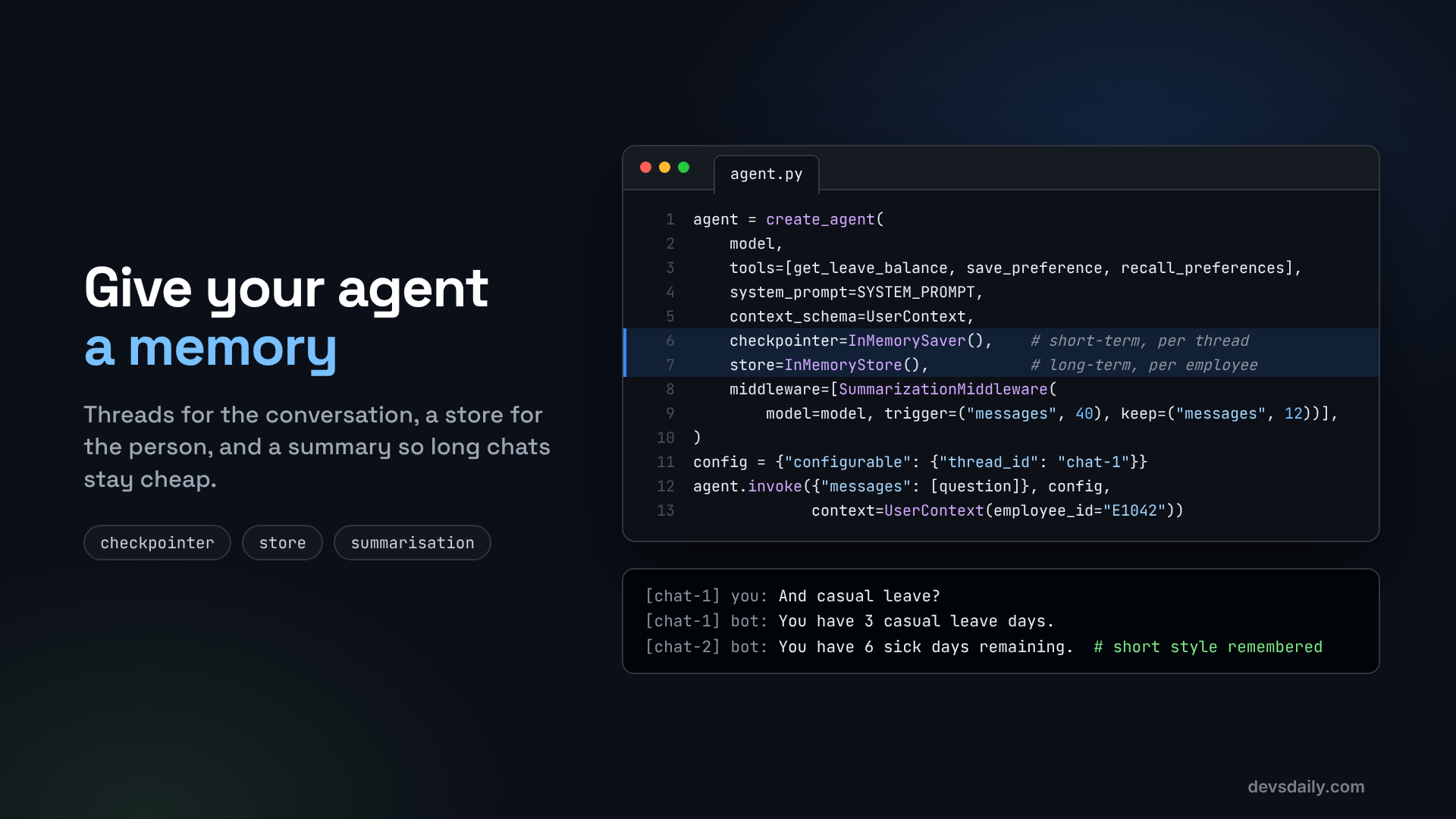

Short-term memory for a conversation, long-term memory for the person, and summaries so long chats stay affordable. All with LangChain v1 and LangGraph.
Building AI Agents · Part 4 of 11 · Start from Part 1 · All parts ↓
In short: A checkpointer keeps each conversation thread, a store keeps lasting facts about the person, runtime context tells tools who is asking, and
SummarizationMiddlewarekeeps long threads affordable. You also decide in code what must never be remembered.Where this fits: Part 3 made the tools reliable, but the agent still forgets everything between messages. Here it learns to remember, safely. Part 5 lets it answer from documents, not just from the HR system.
Ask our helpdesk agent "How many earned leave days do I have?" and it answers. Then ask "And casual leave?" and it has no idea what you are talking about. Every call starts from zero.
That is because a model has no memory of its own. Each call only knows what you send in that call. "Memory" in an agent means your code decides what to send back in, and where to keep it in between.
Everything in this part ships with langchain and langgraph, which you already installed, so there is nothing new to set up. Start from your Part 3 project or the companion repo.
Threads and the store
Before the code, the mental model. A thread is one conversation. A checkpointer saves every step of a thread, keyed by a thread_id. A store holds facts that outlive any one thread, organised by namespace, for example ("preferences", "E1042").
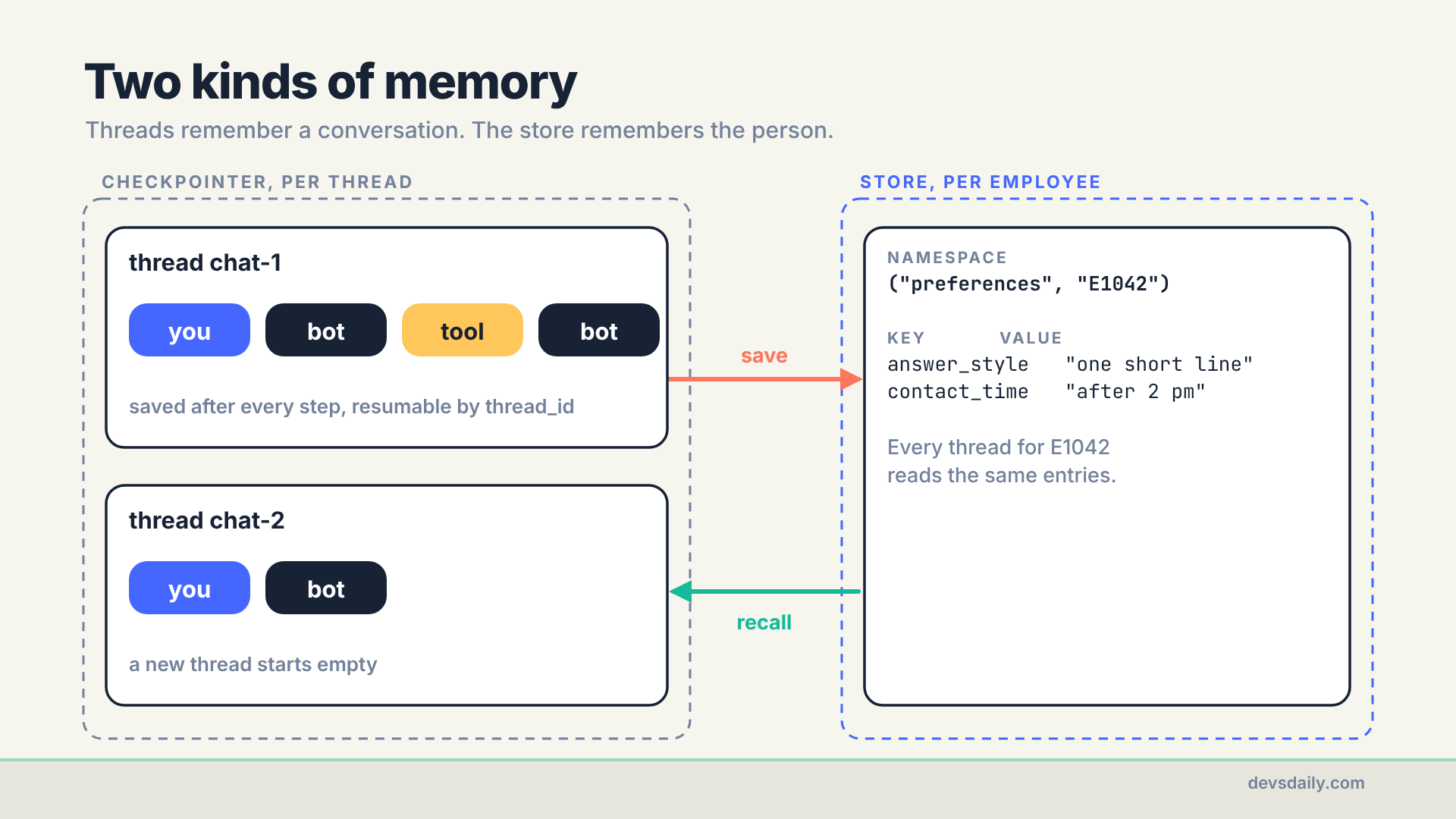
A new thread starts empty, but it can still read the store. That is exactly how a person works: you do not remember every word of last week’s chat with HR, but they remember you prefer email.
Step 1: Tell the agent who is asking
Memory belongs to a person, so the agent needs to know who it is talking to. Until now we wrote "employee E1042" into the system prompt. That does not scale, and it lets the model choose the ID. Instead, pass the user as runtime context: data your app provides on every call, which tools can read but the model cannot change.
# part04_memory/agent.py
from dataclasses import dataclass

from langchain.tools import ToolRuntime, tool

from helpdesk import hrms

@dataclass
class UserContext:
    employee_id: str  # set by your app after login, never by the model

@tool
def get_leave_balance(runtime: ToolRuntime[UserContext]) -> dict:
    """Get the current employee's remaining leave days by type."""
    return hrms.get_leave_balance(runtime.context.employee_id)
Look at the signature: get_leave_balance no longer takes an employee_id argument. The runtime parameter is filled in by LangChain and is hidden from the model, so the model just calls get_leave_balance() and the tool reads the ID from the context. We will lean on this a lot in Part 10, because it closes a whole class of security problems.
Step 2: Add short-term memory with a checkpointer
Give create_agent a checkpointer, and pass a thread_id when you call it:
from langchain.agents import create_agent
from langgraph.checkpoint.memory import InMemorySaver

agent = create_agent(
    get_model(),
    tools=[get_leave_balance],
    system_prompt="You are an HR helpdesk assistant. Use tools for facts.",
    context_schema=UserContext,
    checkpointer=InMemorySaver(),
)

me = UserContext(employee_id="E1042")
config = {"configurable": {"thread_id": "chat-1"}}

agent.invoke({"messages": [{"role": "user", "content": "How many earned leave days do I have?"}]},
             config, context=me)
agent.invoke({"messages": [{"role": "user", "content": "And casual leave?"}]},
             config, context=me)
The second call only sends the new question, but the checkpointer loads everything already saved under chat-1, so the model sees the whole conversation and "And casual leave?" makes sense.
Two things to know:
- Same
thread_id, same conversation. A newthread_idstarts a fresh, empty conversation. In a real app, create a new ID when the user clicks "New chat", and build it from something user-specific, such asf"{employee_id}:{chat_id}". One shared ID would put every user in the same conversation. InMemorySaverforgets on restart. It keeps checkpoints in the Python process, which is perfect for learning and tests. For anything real, use a database-backed checkpointer such asSqliteSaver(packagelanggraph-checkpoint-sqlite) orPostgresSaver(packagelanggraph-checkpoint-postgres). The agent code does not change, only the object you pass in. We use SQLite in Part 7.
You can look at what a thread contains at any time:
for message in agent.get_state(config).values["messages"]:
    message.pretty_print()
Step 3: Add long-term memory with a store
A checkpointer remembers conversations. For facts about the person, use a store. Give the agent a few small tools that read and write it through runtime.store:
BLOCKED_WORDS = ("salary", "medical", "illness", "diagnosis", "pregnan")
ALLOWED_KEYS = ("answer_style", "language", "preferred_name", "contact_time")
MAX_VALUE_LENGTH = 60   # a preference is a few words, never a story

@tool
def save_preference(key: str, value: str, runtime: ToolRuntime[UserContext]) -> str:
    """Save one lasting preference for this employee. key is one of answer_style, language,
    preferred_name or contact_time, e.g. key='answer_style', value='one short line'."""
    if any(w in f"{key} {value}".lower() for w in BLOCKED_WORDS):
        return "Not saved: this looks like sensitive information."
    if key not in ALLOWED_KEYS:
        return f"Not saved: {key!r} is not a preference I can keep. Allowed: {', '.join(ALLOWED_KEYS)}."
    if len(value) > MAX_VALUE_LENGTH:
        return f"Not saved: keep it under {MAX_VALUE_LENGTH} characters."
    runtime.store.put(("preferences", runtime.context.employee_id), key, {"value": value})
    return f"Saved {key}."

@tool
def recall_preferences(runtime: ToolRuntime[UserContext]) -> dict:
    """Return every saved preference for this employee."""
    items = runtime.store.search(("preferences", runtime.context.employee_id))
    return {item.key: item.value["value"] for item in items}

@tool
def forget_preference(key: str, runtime: ToolRuntime[UserContext]) -> str:
    """Delete one saved preference when the employee asks you to forget it."""
    if key not in ALLOWED_KEYS:
        return f"Nothing to forget: {key!r} is not a preference I keep."
    runtime.store.delete(("preferences", runtime.context.employee_id), key)
    return f"Forgot {key}."
The namespace ("preferences", employee_id) is what keeps one employee’s preferences away from another’s. It comes from the context, not from the model, so the model cannot read or write someone else’s entries. The companion repo tests this: with Rohan signed in, recall_preferences returns nothing that Asha saved.
Tell the model when to use these tools in the system prompt:
SYSTEM_PROMPT = ("You are an HR helpdesk assistant. Use tools for facts. "
                 "At the start of a conversation call recall_preferences. "
                 "When the employee states a lasting preference (answer style, language, how to address "
                 "them, preferred contact time), save it with save_preference. Never save health details, "
                 "salary figures, or anything the employee asks you to forget.")
Then pass a store to create_agent:
from langgraph.store.memory import InMemoryStore

agent = create_agent(
    get_model(),
    tools=[get_leave_balance, save_preference, recall_preferences, forget_preference],
    system_prompt=SYSTEM_PROMPT,
    context_schema=UserContext,
    checkpointer=InMemorySaver(),
    store=InMemoryStore(),
)
Like InMemorySaver, InMemoryStore lives in memory and is lost on restart. For production, the langgraph-checkpoint-postgres package also provides a Postgres-backed store with the same interface.
Step 4: Decide what must never be remembered
Long-term memory is where an agent can quietly become a privacy problem. If the model "helpfully" saves "has a medical appointment every Tuesday", you are now storing health data you never meant to collect.
Do not rely only on the prompt for this. I tested exactly that sentence on gpt-5.4-mini, with the system prompt above telling it never to save health details:
[chat-2] you: I have a medical appointment every Tuesday, please remember that.
[chat-2]   call: save_preference({'key': 'medical_appointment_schedule', 'value': 'Every Tuesday'})
[chat-2] bot: I can't save medical information like that. If you want, I can help with a non-medical preference instead.
The model tried to save it anyway. The BLOCKED_WORDS check in save_preference refused, and the model passed the refusal on politely. That is the job of a code-level guard: the save fails no matter what the model decides. A word list is a starting point, not a complete filter, though. With the word list alone, a key like tuesday_plans would have gone through. That is why save_preference also checks ALLOWED_KEYS and refuses anything else; the companion repo tests exactly that key. So:
- Keep the store narrow. A small set of known keys (
answer_style,language,contact_time) is easier to control than free-form notes. An allowlist of keys is stronger than a blocklist of words, which is why the code checks both. Values get a length limit too: a preference is a few words, and a 500-character "preference" is a note in disguise. - Make forgetting easy.
forget_preferenceexists so "please forget that" actually works. Privacy laws such as India’s DPDPA give people a right to have their personal data erased, subject to exceptions such as data you must keep by law, and your memory store is personal data too. Decide with your privacy team what can be deleted on request and how long the rest is kept. - Never store what you can look up. Leave balances change. Store the preference, fetch the number fresh.
Step 5: Keep long threads affordable with summarisation
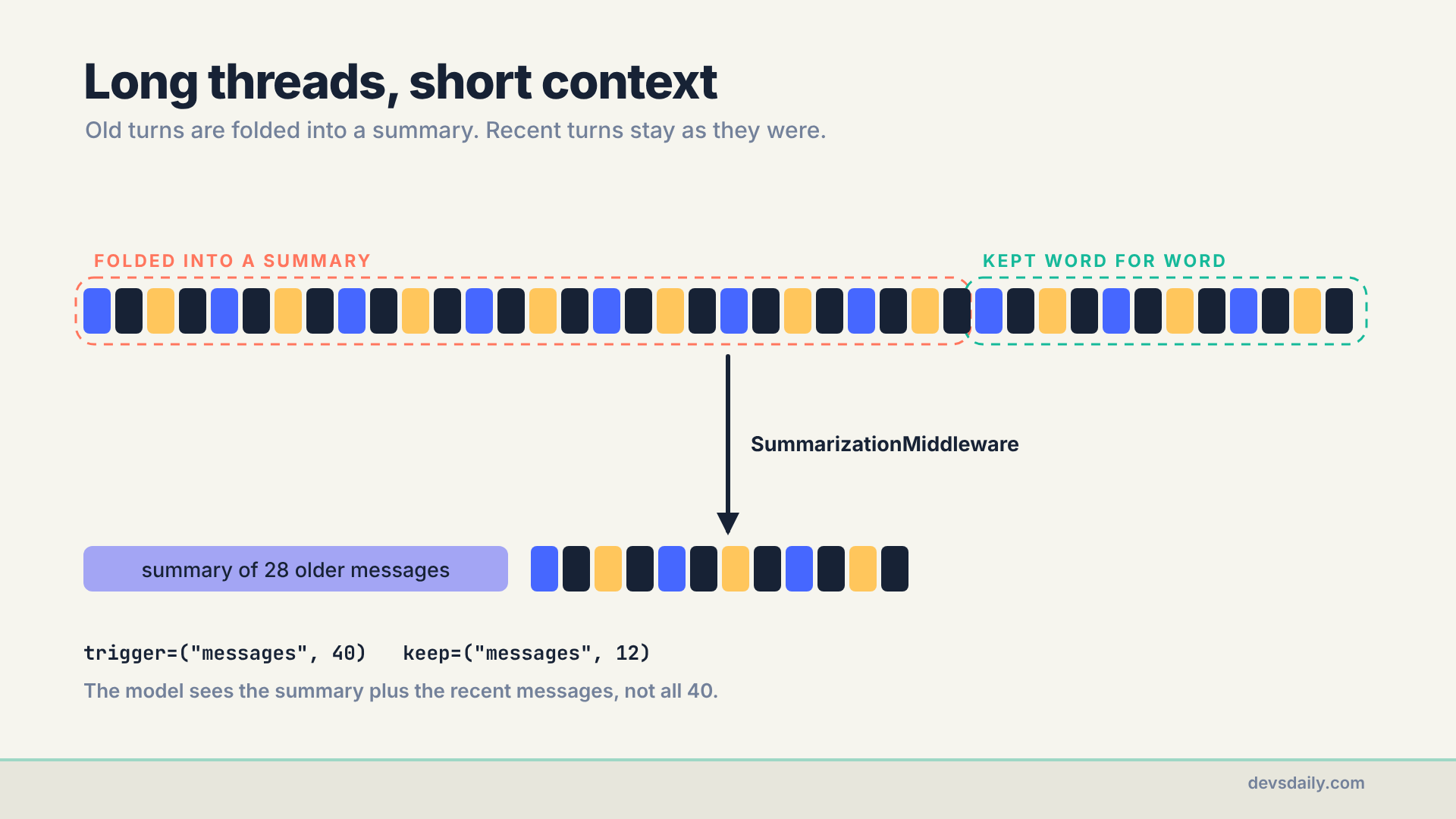
Every turn sends the whole thread to the model. A 200-message conversation means paying for 200 messages on every reply, and eventually hitting the model’s context limit. SummarizationMiddleware handles this: once a thread passes a threshold, it asks a model to summarise the older messages and replaces them with that summary.
from langchain.agents.middleware import SummarizationMiddleware

def build_agent(model=None, summary_model=None, checkpointer=None, store=None):
    model = model or get_model()
    return create_agent(
        model,
        tools=[get_leave_balance, save_preference, recall_preferences, forget_preference],
        system_prompt=SYSTEM_PROMPT,
        context_schema=UserContext,
        checkpointer=checkpointer or InMemorySaver(),
        store=store or InMemoryStore(),
        middleware=[SummarizationMiddleware(
            model=summary_model or model,
            trigger=("messages", 40),   # summarise once a thread passes 40 messages
            keep=("messages", 12),      # keep the latest 12 messages word for word
        )],
    )
trigger decides when to summarise; keep decides how much recent history stays exactly as it was. Both also accept token counts, such as ("tokens", 4000), which track cost more closely than message counts. You can pass a smaller, cheaper model as summary_model, since summarising is an easy job.
One honest trade-off: a summary loses detail. If an employee mentioned a ticket number 50 messages ago, it may not survive. That is another reason to put important facts in the store or the HR system, not just in the chat.
Step 6: Run it
The demo in the companion repo has four exchanges across two threads:
python -m part04_memory.agentask("Hi! Please keep your answers to one short line from now on.", "chat-1")
ask("How many earned leave days do I have?", "chat-1")
ask("And casual leave?", "chat-1") # follow-up works because of the checkpointer
ask("How many sick days do I have?", "chat-2")Here is my run with gpt-5.4-mini, with the tool calls printed under each question:
[chat-1] you: Hi! Please keep your answers to one short line from now on.
[chat-1]   call: recall_preferences({})
[chat-1]   call: save_preference({'key': 'answer_style', 'value': 'one short line'})
[chat-1] bot: Got it — I'll keep replies to one short line.

[chat-1] you: How many earned leave days do I have?
[chat-1]   call: get_leave_balance({})
[chat-1] bot: You have 12 earned leave days.

[chat-1] you: And casual leave?
[chat-1] bot: You have 3 casual leave days.

[chat-2] you: How many sick days do I have?
[chat-2]   call: recall_preferences({})
[chat-2]   call: get_leave_balance({})
[chat-2] bot: You have 6 sick days remaining.
Three things worth noticing:
get_leave_balance({})has no arguments. The employee ID came from the runtime context, exactly as Step 1 promised.- "And casual leave?" made no tool call at all. The earlier balance in the thread already included casual leave, so the model answered from memory. That is the checkpointer at work. Within one conversation it is fine. Across days it is the reason not to keep balances in the store.
chat-2started empty but still answered in one short line, because the model recalled the savedanswer_stylefirst.
Get the code
Everything here is in part04_memory/ of the companion repo. The tests check that a new thread starts empty, that preferences carry across threads, and that sensitive values are refused.
The series
This article is part of Building AI Agents, an 11-part series that builds one HR helpdesk agent from a plain loop to a production service.
- An agent is just a loop
- Your first LangChain agent
- Tools that don’t break your agent
- Give your agent a memory (you are here)
- RAG as a tool, not a pipeline
- When the loop isn’t enough: graphs
- Human in the loop
- Many agents, or one good one?
- Testing an agent you can’t predict
- Securing an agent
- Shipping your agent
Previous: Part 3: Tools that don’t break your agent
Next: Part 5: RAG as a tool, not a pipeline. The agent can look up numbers, but it cannot answer "can I carry leave into next year?". We teach it to search the HR handbook and cite what it finds.
