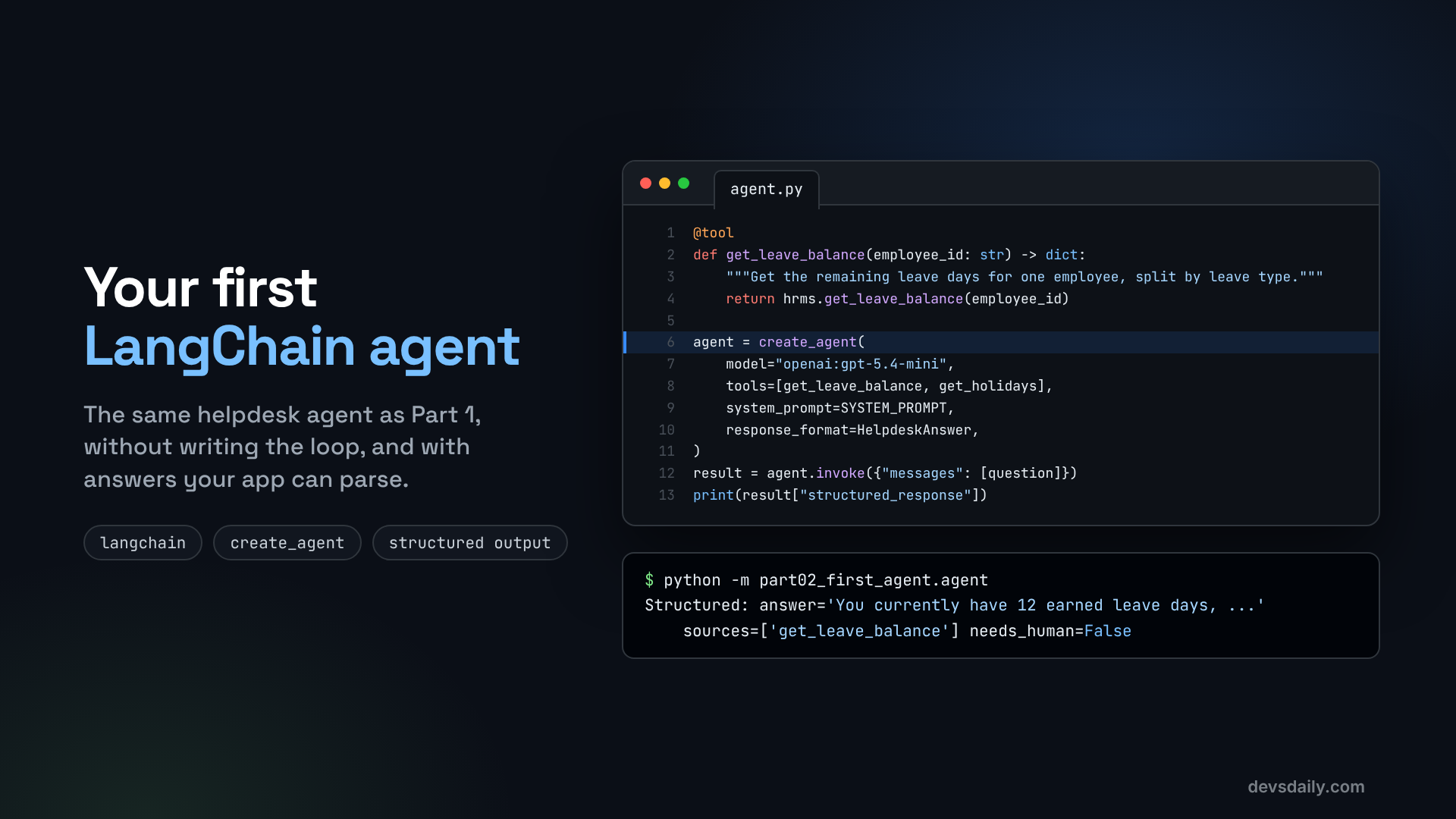

Rebuild the Part 1 helpdesk agent with LangChain’s create_agent, without writing the loop yourself, and get structured answers your app can rely on.
Building AI Agents · Part 2 of 11 · Start from Part 1 · All parts ↓
In short: LangChain’s
create_agentruns the Part 1 loop for you.@toolturns typed, documented functions into tools, andresponse_formatreturns a validated Pydantic object instead of free text, so your app gets fields it can trust.Where this fits: Part 1 built the loop by hand. Here we hand that loop to LangChain and keep the same agent, so you can see exactly what the framework replaces. Part 3 then hardens the tools it calls.
In Part 1 we wrote an agent by hand: tool schemas in JSON, a dictionary to find functions, a list of messages, and a loop that calls the model until it stops asking for tools.
Writing that loop by hand for every project gets old quickly, though. Today we hand it to LangChain. You will rebuild the same HR helpdesk agent with create_agent, see exactly which parts of your Part 1 code it replaces, and add one thing that is fiddly to do by hand: structured output, so your app gets a validated object instead of a paragraph of text.
You need the project from Part 1 (or the companion repo), Python 3.12 or newer and an OpenAI API key. Install LangChain and its OpenAI integration:
pip install langchain langchain-openai python-dotenvWhat create_agent replaces
Before writing code, here is the mapping. Everything on the left you wrote yourself in Part 1. Everything on the right, create_agent now does for you, and it is still the same loop underneath.
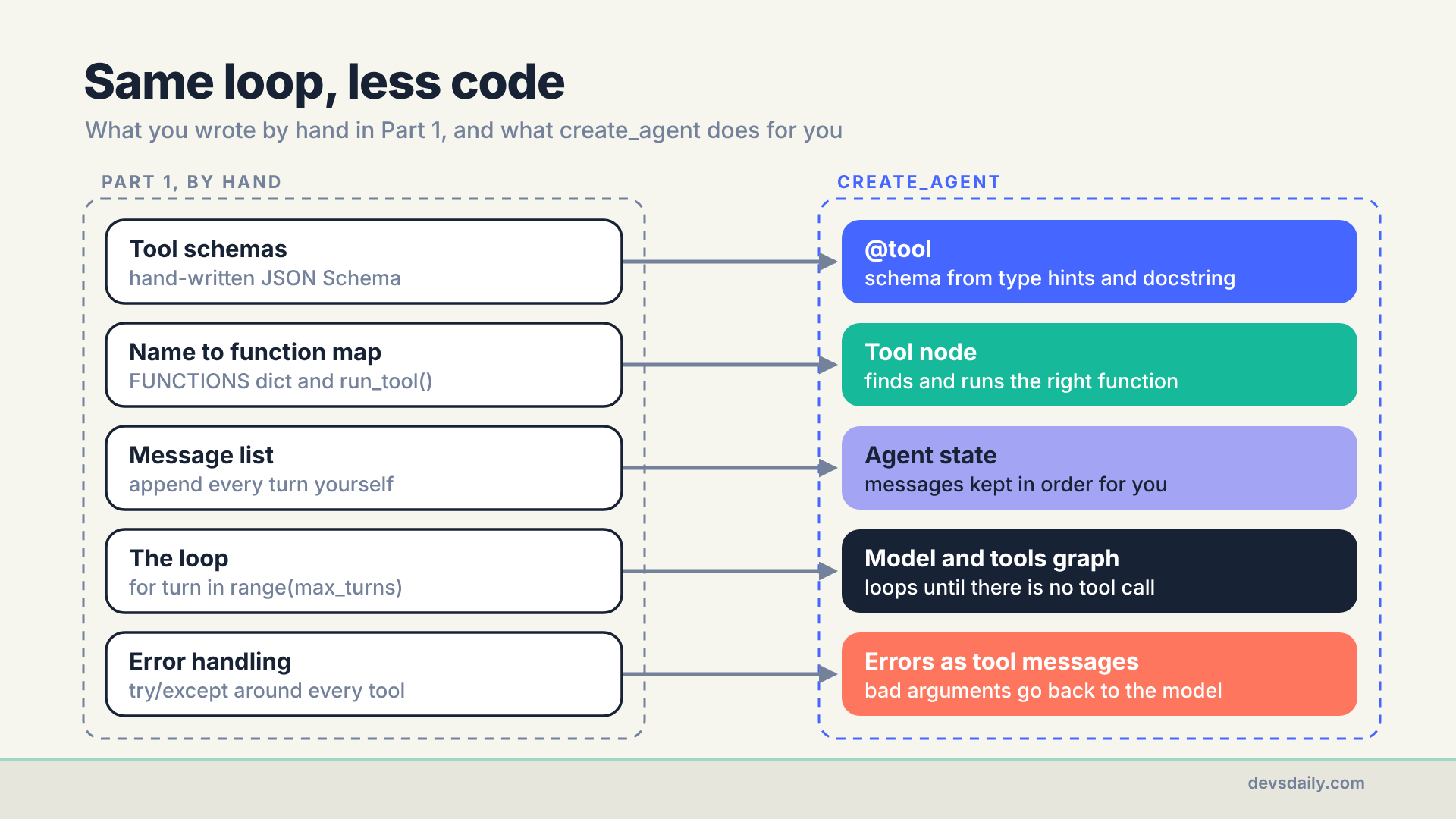
The last row needs a footnote. Part 1’s try/except sent every error back to the model. create_agent only does that for bad arguments, such as month="October" instead of a number. An error raised inside your own function, like the HR system rejecting month 13, now stops the run. I checked: Part 1 recovers from month 13, this version does not. Part 3 fixes that properly.
Step 1: Choose the model in one place
LangChain can talk to many providers through one function, init_chat_model. It takes a string in the form provider:model-name. Put that choice in one small file so every part of the series reads it from .env:
# helpdesk/llm.py
import os

from dotenv import load_dotenv
from langchain.chat_models import init_chat_model

load_dotenv()

def get_model(**kwargs):
    return init_chat_model(os.getenv("MODEL", "openai:gpt-5.4-mini"), **kwargs)
Add the model to .env:
MODEL=openai:gpt-5.4-miniTo switch providers later, change that one line (for example to an Anthropic or Azure OpenAI model) and install the matching package, such as langchain-anthropic. Nothing else in the series changes.
Step 2: Turn functions into tools with @tool
In Part 1 you wrote a JSON Schema for each tool. With LangChain, you write a normal function with type hints and a docstring, and add @tool:
# part02_first_agent/agent.py
from langchain.tools import tool

from helpdesk import hrms

@tool
def get_leave_balance(employee_id: str) -> dict:
    """Get the remaining leave days for one employee, split by leave type."""
    return hrms.get_leave_balance(employee_id)

@tool
def get_holidays(month: int) -> list[dict]:
    """List company holidays in a month of 2026. month is 1 to 12."""
    return hrms.get_holidays(month)
The decorator builds the schema for you:
- the function name becomes the tool name
- the docstring becomes the description the model reads
- the type hints become the argument schema
You can check what the model will see:
print(get_leave_balance.name)         # get_leave_balance
print(get_leave_balance.description)  # Get the remaining leave days for one employee, split by leave type.
print(get_leave_balance.args)         # {'employee_id': {'title': 'Employee Id', 'type': 'string'}}
Two rules follow from this. Always write a docstring: without one, @tool raises an error, because the model would have no idea what the tool is for. And always add type hints, so the model knows to send a string here and an integer there.
Step 3: Create the agent
Now the part that replaces the whole loop:
from langchain.agents import create_agent

from helpdesk.llm import get_model

SYSTEM_PROMPT = ("You are an HR helpdesk assistant. The person chatting with you is employee E1042. "
                 "Use the tools for any fact about leave or holidays. Never guess numbers. "
                 "If the question needs a human in HR, say so.")

agent = create_agent(
    model=get_model(),
    tools=[get_leave_balance, get_holidays],
    system_prompt=SYSTEM_PROMPT,
)
create_agent returns a ready-to-run agent. Call it with a list of messages:
result = agent.invoke({"messages": [{"role": "user", "content": "How many leave days do I have?"}]})

for message in result["messages"]:
    message.pretty_print()
result["messages"] is the same conversation you built by hand in Part 1: the question, the model’s tool call, the tool result, and the final answer. pretty_print shows it clearly. This is my run with gpt-5.4-mini:
================================ Human Message =================================

How many leave days do I have?
================================== Ai Message ==================================
Tool Calls:
  get_leave_balance (call_X21VS4mHoZo09igq5r8XJoxl)
 Call ID: call_X21VS4mHoZo09igq5r8XJoxl
  Args:
    employee_id: E1042
================================= Tool Message =================================
Name: get_leave_balance

{"employee_id": "E1042", "unit": "days", "earned": 12, "sick": 6, "casual": 3}
================================== Ai Message ==================================

Your current leave balance for E1042 is:

- Earned leave: 12 days
- Sick leave: 6 days
- Casual leave: 3 days

Total: 21 days
The call ID is the same tool_call_id you copied by hand in Part 1; LangChain now does that for you. Notice the "Total: 21 days" too. Nobody asked for it, and adding earned, sick and casual leave together means little to HR. The model decides what the answer looks like, which is exactly the problem the next step solves.
Step 4: Ask for structured output
A paragraph is nice for a person but awkward for an app. Your helpdesk UI wants fields it can act on, not prose it has to pick apart.
Describe the shape you want with Pydantic, and pass it as response_format:
from pydantic import BaseModel, Field

class HelpdeskAnswer(BaseModel):
    """The reply the helpdesk app shows to the employee."""
    answer: str = Field(description="A short, friendly reply for the employee")
    sources: list[str] = Field(description="Names of the tools whose data the answer uses")
    needs_human: bool = Field(description="True if someone in HR should follow up")

def build_agent(model=None):
    return create_agent(
        model=model or get_model(),
        tools=[get_leave_balance, get_holidays],
        system_prompt=SYSTEM_PROMPT,
        response_format=HelpdeskAnswer,
    )
After the run, the validated object is waiting in result["structured_response"]:
agent = build_agent()
result = agent.invoke({"messages": [{"role": "user", "content": "How many leave days do I have?"}]})
print(result["structured_response"])
answer='You currently have 12 earned leave days, 6 sick leave days, and 3 casual leave days.' sources=['functions.get_leave_balance'] needs_human=False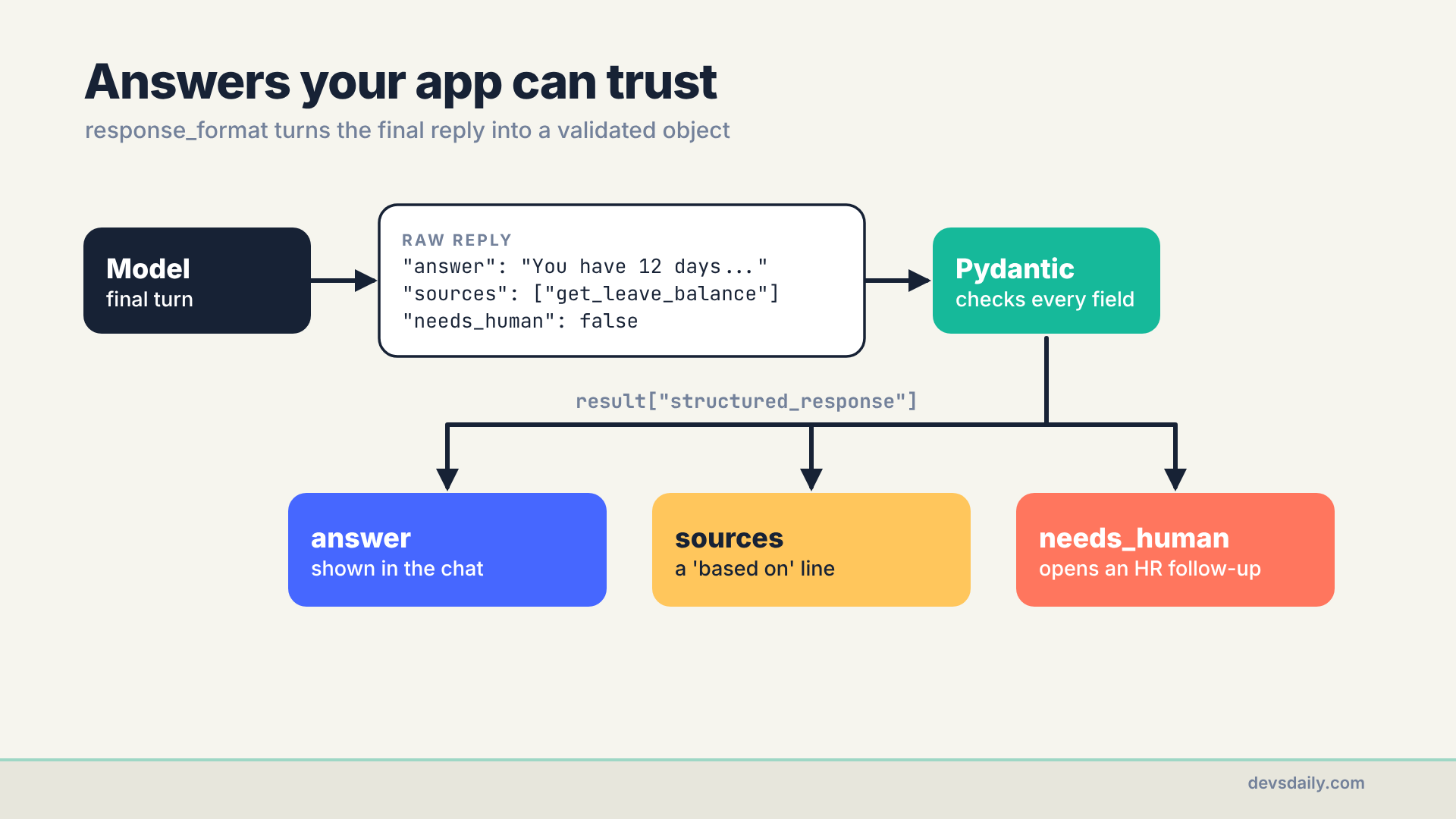
How does this work? If the model supports structured output natively, LangChain uses that. If not, it gives the model one extra "tool" shaped like HelpdeskAnswer, and the model "calls" it to deliver its final answer. Either way, Pydantic validates the result, so needs_human really is a boolean and sources really is a list. The field descriptions matter, because the model reads them just like tool docstrings.
Now look closely at sources in my run: functions.get_leave_balance, not get_leave_balance. In the same session, the holidays question came back with a plain get_holidays. Pydantic was happy both times, because both are strings. Validation checks the shape of the data, not whether it makes sense. If your app matches on those names, say exactly which values are allowed:
from typing import Literal

ToolName = Literal["get_leave_balance", "get_holidays"]

class HelpdeskAnswer(BaseModel):
    """The reply the helpdesk app shows to the employee."""
    answer: str = Field(description="A short, friendly reply for the employee")
    sources: list[ToolName] = Field(description="Names of the tools whose data the answer uses")
    needs_human: bool = Field(description="True if someone in HR should follow up")
The allowed names now go to the model as part of the schema, and if it still sends anything else, validation fails loudly instead of a wrong name slipping into your app. With that one change, my next run came back with plain get_leave_balance and get_holidays. Keep the model small for the same reason: every extra field is one more thing the model can get wrong, so add fields only when the app needs them.
One more limit to know. Literal stops made-up names, but sources is still something the model writes, so it cannot prove a tool actually ran. If your app shows sources as evidence, build them from what really happened instead:
sources = [m.name for m in result["messages"] if m.type == "tool" and m.status != "error"]That proves a tool ran and succeeded, not that the answer actually used its result. For citations you can check, keep the IDs of what the tool returned and compare them with what the answer cites, as Part 5 does with handbook sections. My payslip run shows why this matters. No tool was called, and sources came back empty. That is honest here, but nothing in the schema forces the model to be.
Step 5: Run it
python -m part02_first_agent.agent "How many leave days do I have?"Then try two questions that test the other fields. Here is what came back in my run:
Which holidays are in October?
answer='In October 2026, the company holidays are:\n- 2026-10-02: Gandhi Jayanti\n- 2026-10-20: Dussehra' sources=['get_holidays'] needs_human=False

My payslip looks wrong, who do I talk to?
answer='For a payslip issue, please contact Payroll or HR Shared Services. If you want, I can also help you check leave or holiday details that may affect your payslip.' sources=[] needs_human=True
The payslip question is the interesting one. No tool can answer it, so the model called none, left sources empty and set needs_human=True. Your app can open an HR ticket from that one field, with no text parsing.
Step 6: Watch the loop as it runs
The loop is hidden now, but you can still watch it. Use stream instead of invoke, and you get one update per step:
for update in agent.stream({"messages": [{"role": "user", "content": "How many leave days do I have?"}]},
                           stream_mode="updates"):
    print(list(update))
['model']
['tools']
['model']Model, tools, model: the same turn 1 and turn 2 your Part 1 loop printed. Keep this trick in mind. When an agent misbehaves, streaming its steps is the fastest way to see where.
Get the code
This part lives in part02_first_agent/ in the companion repo. The offline tests in tests/ run it against a scripted fake model, so you can see the tool call and the structured answer without an API key.
The series
This article is part of Building AI Agents, an 11-part series that builds one HR helpdesk agent from a plain loop to a production service.
- An agent is just a loop
- Your first LangChain agent (you are here)
- Tools that don’t break your agent
- Give your agent a memory
- RAG as a tool, not a pipeline
- When the loop isn’t enough: graphs
- Human in the loop
- Many agents, or one good one?
- Testing an agent you can’t predict
- Securing an agent
- Shipping your agent
Previous: Part 1: An agent is just a loop
Next: Part 3: Tools that don’t break your agent. Real tools fail, get bad arguments and get called twice. We make them robust, and plug in a tool from an MCP server.
