
In short: TLS does three jobs. It encrypts your traffic, proves you reached the real server, and spots tampering. The certificate only proves identity. The keys that encrypt your data are new for every connection. Certificate rules are tightening fast: the maximum lifetime is 200 days today, 100 days from March 2027 and 47 days from March 2029. Manual renewal will not keep up. Post-quantum key exchange is already on in your browser, but post-quantum certificates are still experimental.
Type a web address and press Enter. In a fraction of a second, something remarkable happens. Your browser and a server that have never met agree on a secret key, even though anyone on the network can watch. The server proves who it is with a document that your device already trusts. Then everything you send is sealed, so even a one-bit change gets caught.
That routine took thirty years to build. It came out of break-ins, broken protocols, a certificate authority that went bankrupt, and a nonprofit that made the padlock free. And it is changing again right now. Certificates are heading for 47-day lifetimes, and the encryption is being rebuilt for computers that do not exist yet.
Most of us only think about TLS when something breaks. A certificate expires over a long weekend. A Java client rejects a chain that Chrome accepts. A security questionnaire asks which TLS versions you allow, and nobody is sure.
This article tells the whole story. It is written for engineers who know HTTP and networking but have never needed cryptography. It started as an internal session I put together for developers, DevOps engineers and IT administrators. I checked every date against its primary source in November 2026: IETF RFCs, CA/Browser Forum ballots, browser root programs, Let’s Encrypt and NIST.
Watch one page load, slowed down
Before we take it apart, watch it whole. The video follows one visit to google.com. You will see the browser switch to HTTPS, the DNS lookup, the TCP handshake and every TLS message. Then come the browser’s certificate checks, the first encrypted request, and what an observer on the network can still see.
The certificates in the video are examples. The certificate authority names are made up, so you will not find them in your trust store. The structure, the message order and the checks are all real.
The next few sections zoom into parts of the video. After that, we cover what happens around it: history, certificate types, lifetimes, automation and post-quantum.
1994: the web had no lock
In 1994, HTTP travelled as plain text. Anyone on the path could read it: a shared office network, a router, an ISP. That included passwords and card numbers. Worse, nothing proved that the server answering you was the real one. A poisoned DNS reply could send you to an impostor, and you would never know.
Netscape wanted people to shop online. That needed two things: a sealed envelope and an ID check. Its answer was the Secure Sockets Layer, or SSL. SSL 1.0 never shipped. SSL 2.0 came out with Netscape Navigator in 1995, but its design had serious flaws. So SSL 3.0 followed in 1996 as a redesign. Its ideas still run inside every HTTPS connection today, just under a different name.
SSL vs TLS, and why we still say “SSL certificate”
In January 1999, the IETF, the group that writes internet standards, published TLS 1.0 (RFC 2246). It was really SSL 3.1 with a vendor-neutral name. On the wire, it even calls itself version 3.1. Every version since then has been TLS.
| Version | Year | Status today |
|---|---|---|
| SSL 2.0 | 1995 | Prohibited (RFC 6176, 2011) |
| SSL 3.0 | 1996 | Deprecated (RFC 7568, 2015) |
| TLS 1.0 | 1999 | Deprecated (RFC 8996, 2021) |
| TLS 1.1 | 2006 | Deprecated (RFC 8996, 2021) |
| TLS 1.2 | 2008 | Fine with modern settings (RFC 5246) |
| TLS 1.3 | 2018 | Preferred (RFC 8446) |
“SSL certificate” lives on as a marketing name. The real thing is an X.509 certificate, the standard certificate format, and it does not care about protocol versions. The same certificate works with TLS 1.2 and TLS 1.3. So if someone asks you to “upgrade the SSL certificate to TLS 1.3”, the fix is in your server or load balancer settings, not the certificate.
What TLS guarantees, and where it stops
TLS gives you three things:
- Encryption. Only the two ends can read the data. In TLS 1.3, that in practice means one of two well-tested ciphers: AES-GCM or ChaCha20-Poly1305.
- Authentication. You are talking to whoever holds the private key for the site’s certificate, and a trusted authority issued that certificate for this hostname.
- Integrity. TLS sends data in chunks called records, and each one carries a tamper-check tag. If someone flips one bit on the way, the connection closes instead of passing on bad data.
You need all three. Encryption without authentication is a private chat with someone who might be an impostor. An attacker in the middle could end your connection and open a second one to the real server.
TLS protects everything inside the HTTP message: the path, the query string, headers, cookies, tokens and the body. Some metadata stays visible, though. An observer can still see the server’s IP address and port. They can see the hostname in your DNS lookup, unless you use DNS over HTTPS or TLS. They can also see it in the first TLS message, in a field called Server Name Indication (SNI) that tells the server which site you want. Encrypted Client Hello (ECH) hides that name when both the browser and the server support it. It became RFC 9849 in March 2026. The size and timing of your traffic still leak.
Some things TLS never promised to cover. Phishing sites get valid certificates every day. TLS cannot help with a hacked server, SQL injection or stored data. It also cannot protect the hop behind a load balancer that ends TLS. That last one is worth asking in every architecture review: is the traffic between your load balancer and your app servers or pods encrypted too?
The padlock means “a private connection to this name”. It does not mean “this site is safe”.
Four tools behind the padlock
TLS combines four ideas. You do not need the maths, only what each one does.
Symmetric encryption uses one shared key to lock and unlock. It is fast enough for gigabytes, so it carries all your data. The hard part is getting the same key to both ends without anyone else learning it.
Asymmetric (public-key) cryptography uses a pair of keys. What one key does, only the other can undo or check. Think of handing out open padlocks that only you can unlock. It is much slower, so TLS uses it briefly for two jobs: agreeing on keys and proving identity.
Hashing turns any data into a short, fixed-size fingerprint. Change one bit and the fingerprint changes completely. Attackers later learned to make two different inputs with the same fingerprint for two older hash functions, MD5 and then SHA-1. Certificates signed with those hashes had to go.
A digital signature is a hash locked with a private key. Anyone with the matching public key can check two things: who signed it, and that the data has not changed since.
Agreeing on a secret while everyone listens
Every connection starts with a puzzle. Two strangers need a shared secret key. But every message they send to agree on it can be read by anyone on the network.
The classic way to picture the answer, called Diffie-Hellman key exchange, is mixing paint. Mixing is easy. Un-mixing is practically impossible. An eavesdropper sees the public colour and both mixtures, but still cannot work out either secret.
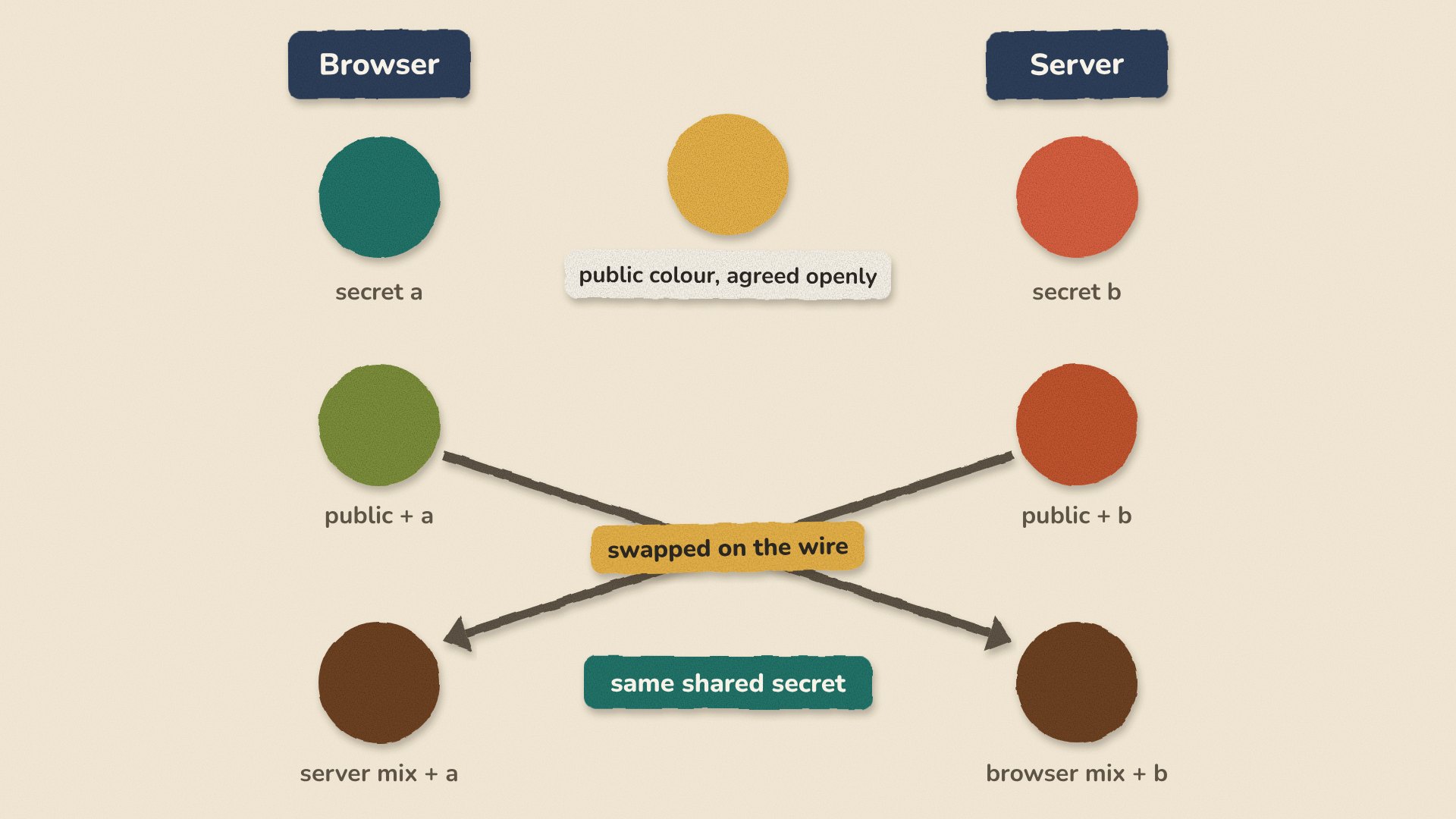
TLS 1.3 uses a faster version built on elliptic curves, called ECDHE. The most common choice is a curve named X25519. The “E” at the end stands for ephemeral. Both sides make fresh key pairs for every connection and throw them away afterwards. That gives you forward secrecy. If someone steals the server’s private key next year, they still cannot decrypt traffic they recorded today.
TLS 1.2 also allowed an older method called RSA key transport. There, the browser locked the secret with the server’s certificate key. Steal that key later, and every recorded session opens up. TLS 1.3 removed that option completely.
Notice what key exchange does not do. It does not tell you who is on the other end. That is the certificate’s job.
The TLS 1.3 handshake, message by message
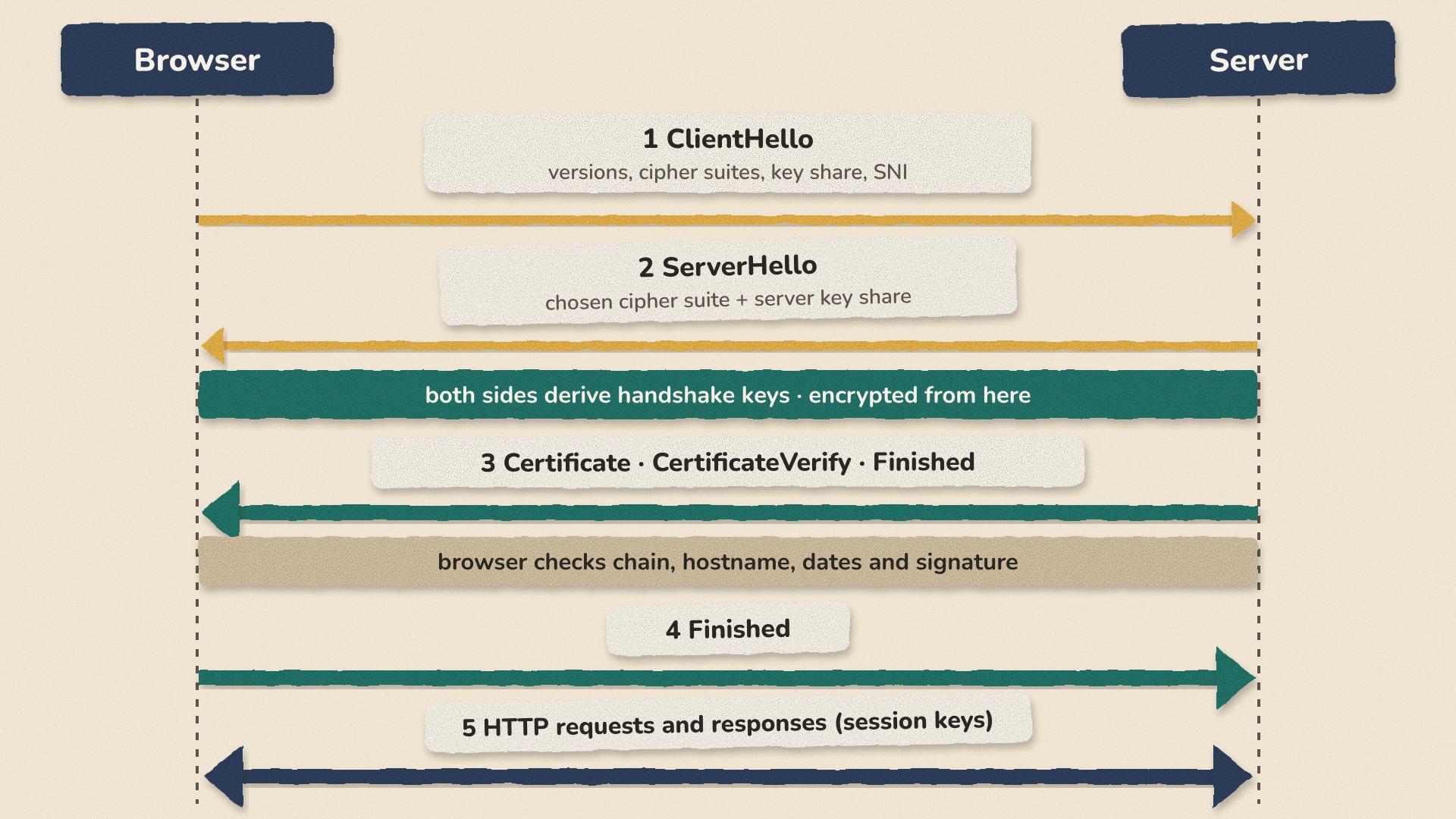
First come the DNS lookup and a TCP connection. HTTP/3 uses QUIC instead of TCP, but it carries the same handshake. Then the browser and the server exchange these messages:
- ClientHello. The browser lists the TLS versions it supports and its cipher suites, which are the sets of algorithms it can use. It sends its half of the key exchange, called a key share, right away. It also names the site it wants in the SNI field, so a server that hosts many sites can pick the right certificate.
- ServerHello. The server picks a cipher suite and sends back its own key share. Both sides now finish the key exchange and create temporary keys for the rest of the handshake. From here on, everything is encrypted.
- Certificate, CertificateVerify, Finished. The server sends its certificate, plus the certificate that vouches for it. We look at this chain in the next section. Then it signs the whole handshake so far with its private key. That signature is the proof. Anyone can copy a certificate, but only the key holder can sign this exact handshake. Finished then seals the conversation with a keyed checksum, called a MAC.
- The browser checks the chain, the hostname, the dates and the signature. Then it sends its own Finished.
- Application data starts to flow, protected by session keys made from the shared secret.
Compared with TLS 1.2, this takes one round trip instead of two. The certificate now travels encrypted. Older features that led to attacks are gone, including RSA key transport, CBC-mode ciphers, compression and renegotiation. TLS 1.3 also lets a returning client send data in its very first message. This is called 0-RTT, short for zero round trips. But an attacker can capture that early data and send it again, so only accept it for requests that are safe to repeat, like GET.
Who vouches for the server: the chain of trust
A certificate is a signed ID card for a public key. These are the fields worth knowing:
- Subject Alternative Names (SAN): the hostnames the certificate covers. Browsers match the site name against this list. Chrome stopped using the old Common Name field in version 58 (2017), and other major browsers did the same.
- Validity: the start and end dates.
- Public key: usually one of two common key types, RSA with 2048 bits or more, or ECDSA with the P-256 or P-384 curve. The private key is never in the certificate, and it should never leave your server or key store.
- Extended Key Usage: what the key may be used for, such as server authentication.
- Signed Certificate Timestamps: proof that the certificate was published in Certificate Transparency logs, the public record of every certificate. More on these below.
- The issuer’s signature over all of the above.
Your server’s certificate is signed by an intermediate certificate authority (CA). The intermediate is signed by a root CA.
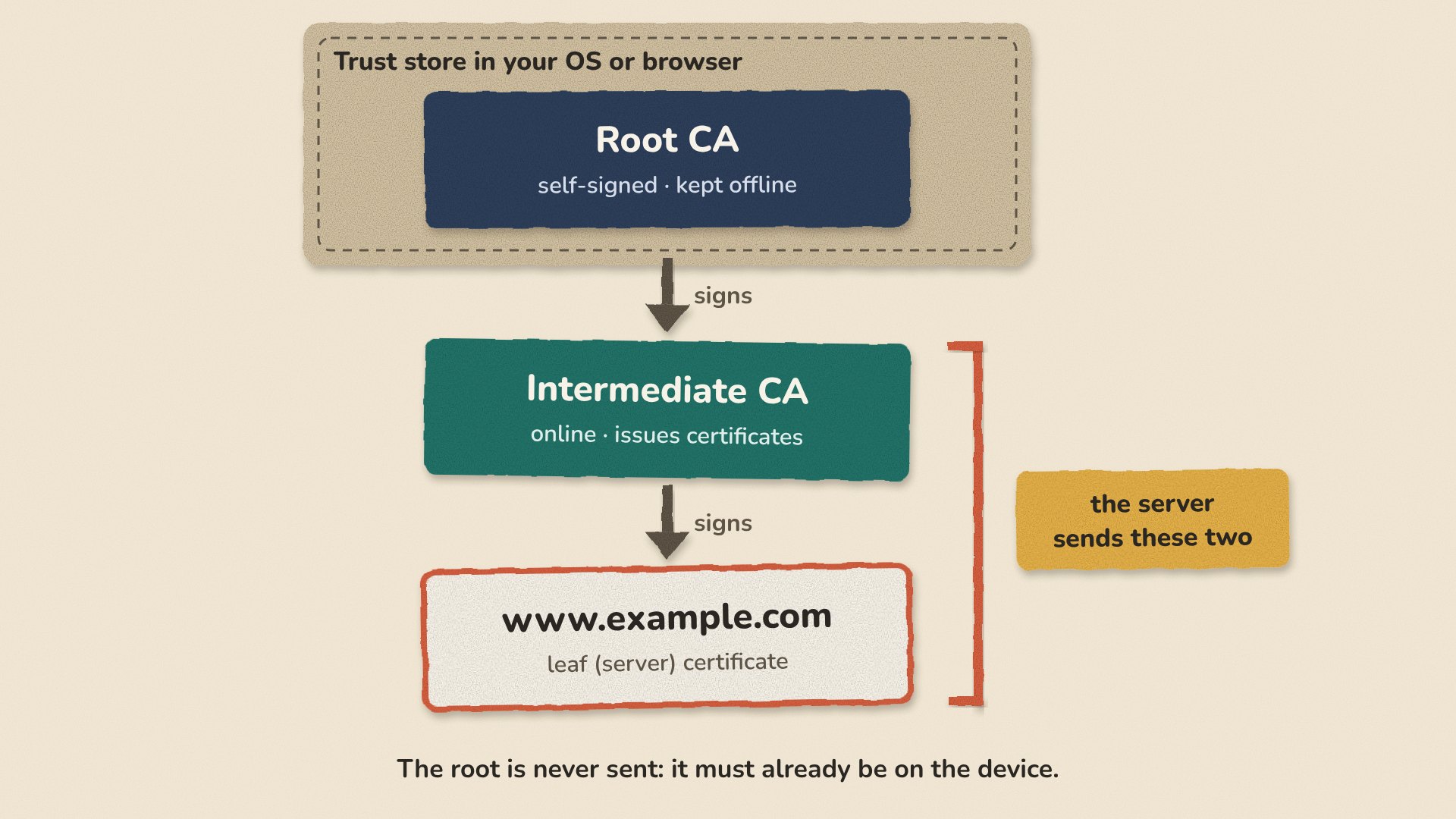
Root certificates live in trust stores. Browsers and operating systems maintain them: Mozilla, the Chrome Root Store, Apple and Microsoft. Runtimes such as Java keep their own. Root keys stay offline. Intermediates do the daily signing. That way, a hacked intermediate can be revoked, meaning cancelled, without touching billions of devices.
Before the browser trusts the connection, it runs a series of checks. It builds a path from your certificate to a root it already has, and checks every signature on the way. It confirms the hostname is in the SAN list and today’s date is inside the validity period. It checks that the certificate is not revoked and is allowed for server authentication. Chrome and Safari also want Certificate Transparency proofs. The “Browser checks” scene in the video walks through ten of these, one at a time.
The most common real-world failure here is a missing intermediate. Your server must send its own certificate, called the leaf, and the intermediate, but never the root. If you forget the intermediate, Chrome may still connect, because it can fetch or cache intermediates. But curl, Java services and mobile apps will fail. Always deploy the full chain. With certbot, that means fullchain.pem, not cert.pem.
The certificate does not encrypt your traffic
This may be the most common misunderstanding about TLS, so it gets its own section. In TLS 1.3, the certificate’s key does exactly one thing. It signs the handshake, so the client knows who it is talking to. Your data is encrypted with session keys from the key exchange.
| Certificate key pair | Session keys | |
|---|---|---|
| Job | Proves identity by signing the handshake | Encrypts and protects the data |
| Created | Once, before the certificate is issued | Fresh in every handshake |
| Lifetime | Weeks to months | One connection |
| If stolen | Attacker can pose as you until it is revoked or expires | Only that one session is exposed |
Three practical points follow. A 4096-bit RSA key slows your handshakes but does not make your data any safer. A free certificate and an expensive one give you the same encryption. And because identity and encryption are separate, the industry could move key exchange to post-quantum algorithms without replacing a single certificate. More on that later.
Try it yourself
You can see all of this with tools you already have. In Chrome, click the site information icon to the left of the address bar. Open Connection is secure, then the certificate viewer. You will find the SAN list, the issuer, the validity dates and the chain.
Next, open DevTools and the Security panel. Recent Chrome versions call it Privacy and security. On many large sites, it shows TLS 1.3, an AES-GCM cipher and X25519MLKEM768 as the key exchange. That name means X25519 combined with ML-KEM, a new post-quantum algorithm. We will get to it near the end.
On the command line, OpenSSL shows the same details:
# Protocol, cipher, key exchange and verification result, in brief
openssl s_client -connect example.com:443 -servername example.com -brief </dev/null

# The full chain the server sends
openssl s_client -connect example.com:443 -servername example.com -showcerts </dev/null

# The fields that matter on the leaf certificate
openssl s_client -connect example.com:443 -servername example.com </dev/null 2>/dev/null \
  | openssl x509 -noout -subject -issuer -dates -ext subjectAltName

# Exit code 1 if the certificate expires within 30 days
openssl s_client -connect example.com:443 -servername example.com </dev/null 2>/dev/null \
  | openssl x509 -noout -checkend 2592000

# Old protocol versions should be refused
openssl s_client -connect example.com:443 -servername example.com -tls1_1 </dev/null
Here is the -brief output from a run I did against a small local test server with its own CA, using OpenSSL 3.0 with -CAfile pointing at that CA. A public site shows the same fields:
CONNECTION ESTABLISHED
Protocol version: TLSv1.3
Ciphersuite: TLS_AES_256_GCM_SHA384
Peer certificate: CN = localhost
Hash used: SHA256
Signature type: ECDSA
Verification: OK
Server Temp Key: X25519, 253 bits
DONE
Server Temp Key is the key exchange from earlier: a fresh X25519 key made for this one connection.
The last command may fail before it even leaves your machine. In my run, OpenSSL 3 stopped with “no protocols available”, because it refuses TLS 1.1 by default. Either way, no connection happens.
With OpenSSL 3.5 or newer, you can ask for the post-quantum hybrid directly with -groups X25519MLKEM768. To see every certificate ever logged for a domain, search for it on crt.sh. Put %. in front of the domain to include subdomains. It is a quick way to find forgotten services. It is also a reminder that every name on a public certificate is public.
Thirty years of break-ins, bugs and fixes
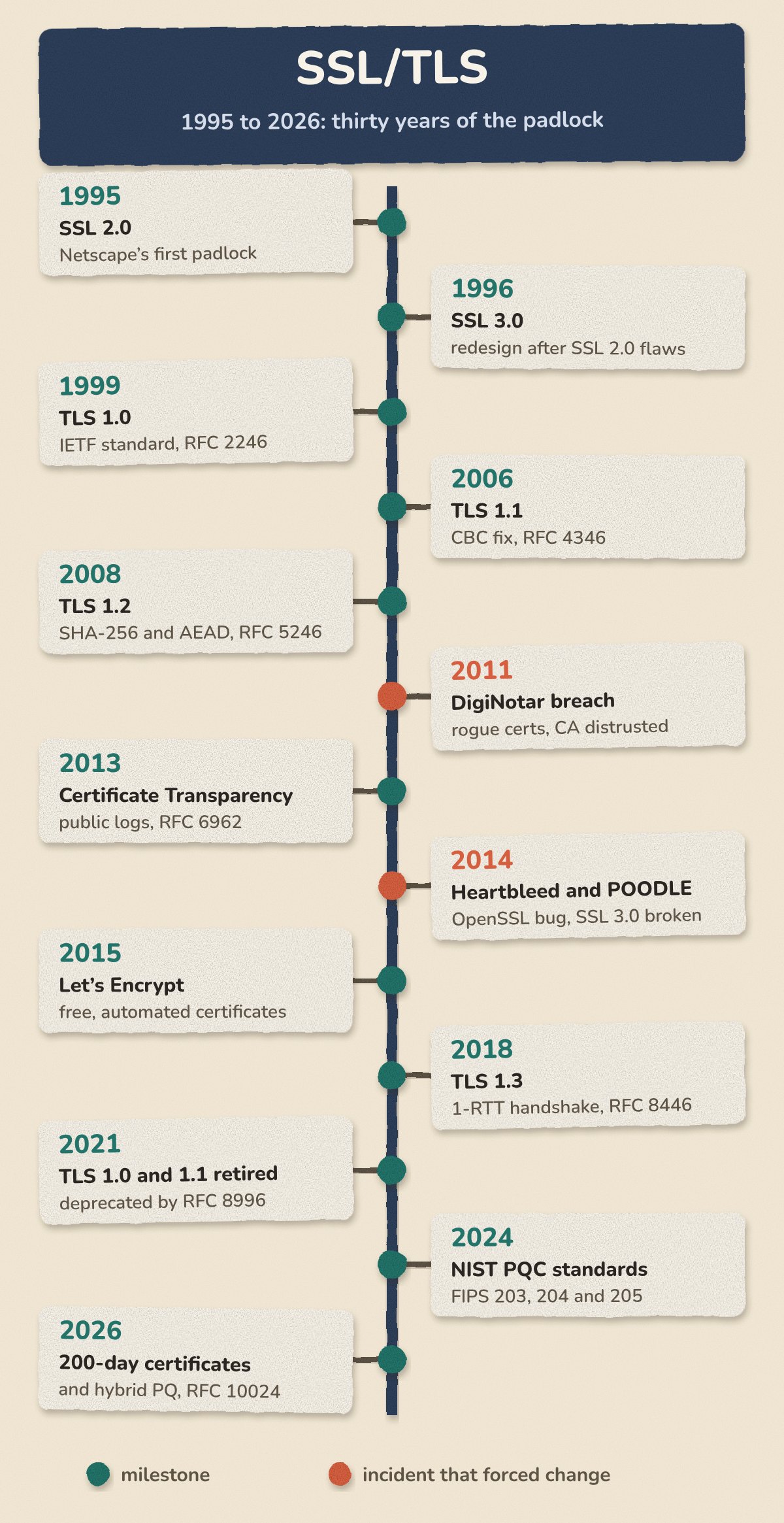
Almost every rule you live with today exists because something went wrong. Those failures come in four kinds, and each kind needs a different fix:
- Implementation bug: the design is fine, but one library’s code is wrong. Fix: patch and upgrade.
- Protocol flaw: the design itself is wrong, so every correct implementation is open to attack. Fix: change the protocol.
- Misissuance: a CA gives a certificate to someone who does not control the name. That can happen through a break-in, a mistake or bad practice. Fix: detection, audits and distrust.
- Private-key compromise: a real key is stolen or exposed. Fix: revoke it, replace it, and keep lifetimes short.
| Year | Incident | Kind | What changed |
|---|---|---|---|
| 2008 | Debian OpenSSL weak keys | Implementation bug | Keys regenerated everywhere; weak keys blocked |
| 2008 | Rogue CA via an MD5 collision | Weak algorithm | MD5 retired for signatures; SHA-1 followed in 2017 |
| 2011 | Comodo partner and DigiNotar breaches | CA break-in leading to misissuance | DigiNotar distrusted and bankrupt; push for Certificate Transparency |
| 2011 to 2016 | BEAST, CRIME, POODLE, FREAK, Logjam, DROWN | Protocol flaws and old crypto | SSL and deliberately weak 1990s “export” ciphers removed; TLS 1.3 drops CBC and compression |
| 2014 | Heartbleed | Implementation bug that leaked private keys | Patch, then revoke and reissue at internet scale |
| 2017 to 2018 | Symantec distrust | Repeated CA rule failures and misissuance | Browsers stopped trusting one of the largest CAs |
| 2024 | Entrust distrust | Repeated CA rule failures | Chrome 131 distrusts Entrust certificates logged after 11 November 2024 |
DigiNotar is the story to remember. On 10 July 2011, an attacker broke into this Dutch certificate authority and issued a certificate for *.google.com. Nobody noticed for weeks.
Then, in late August, users in Iran started seeing certificate errors in Chrome. Chrome had a built-in list of the certificates Google expected for its own sites, a technique called pinning, and this one was not on the list. The investigation found that close to 300,000 unique IP addresses had been served the fake certificate before it was revoked on 29 August. More than 99% of them were in Iran.
Browsers removed DigiNotar within days. Investigators counted at least 531 misissued certificates. The company was declared bankrupt on 20 September 2011.
The lesson was uncomfortable. One hacked CA out of hundreds could impersonate any website, and nobody would know unless they happened to be looking. The industry’s answer was Certificate Transparency. Certificates must now appear in public logs, which can only be added to and never edited, before Chrome or Safari will trust them. Chrome has required this for new certificates since 30 April 2018. Misissuance can still happen. It just cannot happen quietly any more.
Heartbleed shows why the four kinds matter. The bug was made public on 7 April 2014, after sitting for about two years in OpenSSL’s code for heartbeat, a small keep-alive feature. It let anyone ask a server for chunks of its memory, private keys included. A patch closed the hole, but it could not un-leak a key. So every affected site also had to revoke and reissue its certificates.
Choosing the right kind of certificate
People often mix up two separate questions. How much did the CA check about who you are? And which hostnames does the certificate cover?
| Type | Proves or covers | Typical use | Common misconception |
|---|---|---|---|
| DV (domain validated) | You control the domain, checked automatically | Most websites and APIs | “Weaker encryption.” The encryption is the same. |
| OV (organisation validated) | The domain, plus a verified organisation | Corporate sites, contract requirements | “Users can tell.” Browsers show no difference. |
| EV (extended validation) | Detailed legal identity checks | Regulator or contract demands | “Green address bar.” Chrome and Firefox removed it in 2019. |
| Single-domain | One name, often plus www | One site or service | “One per server.” It is one per name, not per server. |
| Wildcard | *.example.com, exactly one level deep | Many subdomains behind one load balancer or CDN | “Covers a.b.example.com and example.com.” It covers neither. |
| Multi-domain (SAN) | A list of named hosts | Related sites on shared infrastructure | “Adding names is free.” Every name becomes public in CT logs. |
Wildcards need one extra warning. The same private key ends up on every server that uses the certificate. If one server is hacked, all of them are exposed. Once renewal is automated, separate certificates per service are often the safer choice.
The other question is who should issue the certificate.
A public CA is trusted by every browser and operating system. It must follow the rules of the CA/Browser Forum, where CAs and browser makers agree the rules, and log every certificate publicly. Use one for anything the public internet can reach.
A private CA is trusted only where you install its root. Examples include Active Directory Certificate Services, HashiCorp Vault, smallstep, cert-manager with a CA issuer, or a cloud private CA. You choose the lifetimes and names, and nothing goes into public logs. Service meshes often issue certificates that last only hours.
Client certificates and mutual TLS need a fresh look in 2026. In mutual TLS (mTLS), both sides show certificates. It is common for service-to-service APIs and B2B integrations. Under Chrome’s rules for trusted CAs, the root and intermediate certificates behind public website certificates may now be used only for server authentication. Since 15 June 2026, Chrome no longer accepts new public certificates that also allow client authentication. Let’s Encrypt dropped client authentication from its default certificates on 11 February 2026. It retired its last option for it on 8 July 2026. If anything in your setup uses public server certificates as client certificates, move it to a private CA.
Self-signed certificates vouch only for themselves. They are fine on a laptop, or between systems that are told to trust each other directly. In front of real users, they teach people to click through warnings, and that defeats the point of TLS. For local development, a small dev CA such as mkcert is a better habit.
The 47-day countdown: certificate lifetimes are shrinking
If you still renew certificates by hand, this is the chart to worry about.
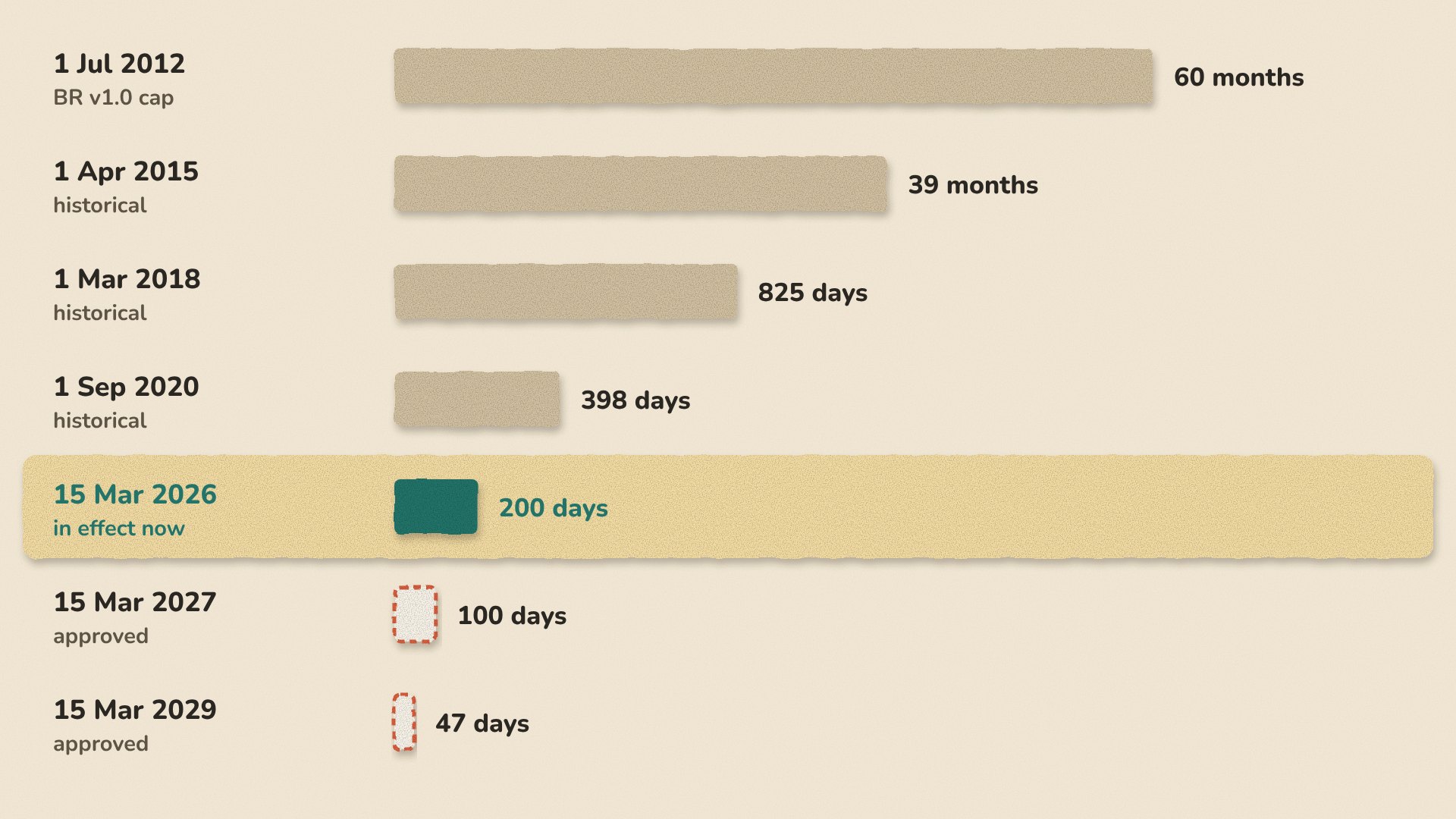
Before 2012, there was no industry-wide limit at all, and five-year certificates were normal. That year, the Forum’s rulebook, called the Baseline Requirements, set the first cap. The 2020 step to 398 days has an interesting backstory. A Forum vote to cut lifetimes to about a year failed in 2019. So in early 2020, Apple announced that Safari would reject longer certificates, and the rest of the industry followed.
The cuts from 2026 onward come from a Forum vote called Ballot SC-081v3. It passed on 11 April 2025 with no votes against, and Apple, Google, Microsoft and Mozilla all supported it.
The same ballot also shrinks something that gets far less attention: domain validation reuse. That is how long a CA may rely on an earlier proof that you control a domain. It was 398 days until March 2026 and is 200 days now. It drops to 100 days in March 2027 and to just 10 days in March 2029. At 10 days, almost every new certificate needs fresh proof. Any process where a person edits DNS by hand will not keep up.
Two points clear up a lot of confusion. First, the maximum is not what you get. Let’s Encrypt issues 90-day certificates by default today. It also offers two opt-in options, which it calls profiles: 45-day certificates since 13 May 2026, and 160-hour (about six-day) certificates. Its default drops to 64 days on 10 February 2027 and to 45 days on 16 February 2028. Second, a “multi-year” plan from a commercial CA is just a subscription. The certificate itself is still reissued within the current limit.
Why shrink lifetimes at all? The official reasons are simple. Information in a certificate goes out of date. Revocation does not work reliably at internet scale. And short lifetimes force the automation that lets everyone switch algorithms quickly. I would not link each cut to a specific breach. The pattern of incidents above made the case together.
Expiry is the outage you will actually have
Think of a certificate’s life as a loop, not a one-off event. You generate a key, prove you control the domain, and get the certificate issued and logged. You deploy the full chain everywhere it is needed. Then you monitor it and renew early. A good rule is to renew at about two-thirds of the lifetime. Even better, let the CA tell your client when to renew, using ACME Renewal Information. ACME is the automation protocol covered in the next section. It also lets a CA ask for early renewal during a mass revocation.
The loop has two exits. The first is revocation, for stolen keys and misissued certificates. It is weaker than most people think, because browsers check only some certificates and often let connections through when a check fails. Certificate revocation lists (CRLs) are now the baseline. OCSP, an online lookup that asks the CA about one certificate at a time, has become optional for CAs. Let’s Encrypt shut down its OCSP service on 6 August 2025. It cited privacy, because every OCSP query tells the CA which site you are visiting, and cost. Chrome and Firefox now push compact revocation lists to the browser instead.
The second exit is expiry, and it causes far more outages than attackers do. The usual culprit is the place nobody remembered: a Java keystore, an appliance, a second load balancer, a partner integration. Once lifetimes reach 47 days, each of those is a renewal you either automated or will miss.
How Let’s Encrypt made the padlock free
Let’s Encrypt is the reason most of the web is encrypted. The nonprofit Internet Security Research Group announced it in November 2014, together with Mozilla, EFF, Cisco, Akamai and IdenTrust. It issued its first certificate on 14 September 2015.
At launch, fewer than 30% of page loads were encrypted. About five years later, that had reached roughly 80% worldwide and about 95% in the US. Those figures come from Firefox data that Let’s Encrypt shared for its tenth anniversary. Today it issues around 10 million certificates a day.
Chrome is taking the next step. Under Google’s plan, Chrome 154 (October 2026) turns on “Always Use Secure Connections” by default for public sites. Users will see a warning before visiting a site over plain HTTP.
A free certificate gives you exactly the same encryption and browser trust as a paid DV certificate. Paid CAs add other things: identity checks for OV and EV, support, warranties, inventory and management tools, and sometimes contract terms that a buyer or regulator needs.
The automation runs on a protocol called ACME (RFC 8555, 2019). Many commercial CAs support it now too. You run an ACME client, such as certbot, acme.sh, lego, Caddy, Traefik or cert-manager. The client orders a certificate for some names. The CA sends back a random token. The client publishes proof that it controls each name. The CA checks that proof from several network locations, then issues the certificate. You will meet two challenge types most often:
| HTTP-01 | DNS-01 | |
|---|---|---|
| Proof | A file at /.well-known/acme-challenge/<token> | A TXT record at _acme-challenge.<domain> |
| Needs | Port 80 open to the internet | API access to your DNS provider |
| Wildcards | No | Yes |
| Good fit | A single public web server | Wildcards, internal hosts, load-balanced fleets |
| Watch out | Every node behind the load balancer must serve the token | The DNS API key can change any record, so limit its scope |
# HTTP-01 on a single nginx host
certbot certonly --webroot -w /var/www/html -d example.com -d www.example.com

# DNS-01 for a wildcard, using the Cloudflare DNS plugin
certbot certonly --dns-cloudflare --dns-cloudflare-credentials ~/.secrets/cloudflare.ini \
  -d '*.example.com' -d example.com
For DNS-01, use an API token that can only touch one zone. Or point _acme-challenge at a separate validation zone with a CNAME, so the key cannot touch your real records. Add CAA records too, so that only the CAs you choose can issue for your domain. A newer method, DNS-PERSIST-01, uses one DNS record that stays the same at every renewal. The CA/Browser Forum approved it in October 2025. When I checked, it was not yet live in Let’s Encrypt production.
Someone may be recording this conversation: post-quantum TLS
Encrypted traffic that is useless to an eavesdropper today may not stay that way. A large enough quantum computer, running a known method called Shor’s algorithm, would break RSA and elliptic-curve cryptography. That covers both the key exchange and the signatures in today’s TLS. Symmetric crypto is far less affected. A second method, Grover’s algorithm, only gives a limited speed-up, so AES and SHA-2 remain usable.
The two halves of TLS face very different deadlines.
Key exchange is urgent today. The threat is called “harvest now, decrypt later”. An attacker can record encrypted traffic now and decrypt it once such a machine exists. If your data must stay secret for ten years or more, a classical-only key exchange already puts it at risk.
Signatures can wait a little longer. A forged certificate or handshake signature only helps an attacker in real time. So certificates only need replacing before such a machine exists. That is still a deadline, just a later one.
Nobody knows when that will be, and I will not guess. Plan around published guidance instead. NIST’s draft IR 8547 proposes phasing out RSA-2048, and other keys of the same strength, after 2030. It would then ban quantum-vulnerable RSA and elliptic-curve methods entirely after 2035. It is still a draft.
Here is where things stand as I write:
- Standardised. NIST, the US standards body, published FIPS 203, 204 and 205 on 13 August 2024. They define ML-KEM for key exchange, and ML-DSA and SLH-DSA for signatures. In March 2025, NIST picked a backup key-exchange method called HQC. In August 2026, the IETF published hybrid ML-KEM key exchange for TLS 1.3 as RFC 10024.
- In production. Chrome switched its hybrid key exchange to ML-KEM in Chrome 131 (November 2024). Recent versions of all major browsers now use
X25519MLKEM768by default, and so do OpenSSL, Go and recent Apple platforms. By late October 2025, most human traffic to Cloudflare used it. If you opened the DevTools Security panel earlier, you already saw it. - Experimental. Post-quantum signatures are big. An ML-DSA-44 signature is about 2.4 KB, against 64 bytes for ECDSA P-256, and a handshake carries several. So instead of putting them into today’s certificate chains, Chrome is betting on Merkle Tree Certificates. In that design, a CA signs one summary covering many certificates, so each connection carries a small proof instead of several large signatures. Cloudflare ran an experiment with Chrome Beta that served them with classical signatures, and ended it in August 2026. It is now building a CA that can issue them, but that is not in production yet.
- Future. In 2027, Chrome plans a separate list of trusted roots just for quantum-resistant certificates. Publicly trusted post-quantum certificates do not exist yet.
The word “hybrid” matters here. A hybrid key exchange runs a classical algorithm and a post-quantum one together and combines the results. An attacker has to break both. That is a hedge in case a flaw turns up in the newer algorithms.
For you, this is mostly housekeeping for now. Keep your TLS libraries, proxies, CDNs, web application firewalls and appliances up to date, so the hybrid key exchange gets used. Watch for older network boxes that choke on the larger first message (the ClientHello). Being able to switch algorithms through upgrades and settings, without a redesign, is what people call crypto-agility. Short-lived, automated certificates help here too, because any algorithm change rides along with the next renewal.
Where to start
If you run services that use TLS, these three steps cover most of what this article describes.
1. Find every certificate. For each one, write down the hostname, the team that owns it, the issuer, the expiry date and every place it is deployed. Then search the CT logs for your domains to find the certificates nobody told you about. You cannot automate or migrate what you cannot see.
2. Automate renewals and tighten your settings. Move each certificate onto ACME or your cloud provider’s managed certificates, and keep expiry alerts as a safety net. Make TLS 1.2 the minimum and prefer TLS 1.3. Allow only modern cipher suites: ECDHE key exchange with AES-GCM or ChaCha20-Poly1305. Turn on HSTS for public sites. HSTS is a header that tells browsers to use only HTTPS for your domain. Then check the result with SSL Labs or testssl.sh.
3. Ask your vendors about post-quantum. Ask the companies behind your load balancers, CDN, web application firewall and appliances when they will support post-quantum key exchange. Their answer also tells you how they will handle the next change.
The padlock in your address bar looks much as it did in 1995. Almost everything behind it has been rebuilt at least once since then, and the next rebuild has already started.
References
- IETF: RFC 8446 (TLS 1.3), RFC 5246 (TLS 1.2), RFC 8996, RFC 5280 (X.509), RFC 6962 (CT), RFC 8555 (ACME), RFC 9773 (ARI), RFC 9849 (ECH), RFC 10024 (hybrid ML-KEM)
- CA/Browser Forum: Ballot SC-081v3
- Chrome: Root Program policy, Entrust distrust, ML-KEM in Chrome, HTTPS by default, quantum-safe HTTPS plan
- Let’s Encrypt and ISRG: 10 years, 90 to 45 days, ending OCSP, ending client authentication, six-day and IP certificates, DNS-PERSIST-01
- NIST: FIPS 203 to 205, PQC project, IR 8547 draft
- Measurement and reporting: Cloudflare, state of the post-quantum internet 2025, PCWorld on the DigiNotar investigation, InfoQ on Cloudflare’s Merkle Tree Certificates
